The Best Password Managers of 2026: Ultimate Guide to Digital Security
In an era where digital threats are evolving faster than ever, a password manager is no longer a luxury—it's a fundamental necessity. With data breaches reaching record highs in 2025 and the rise of sophisticated phishing attacks, relying on your memory or a sticky note is a recipe for disaster.
According to recent cybersecurity reports, over 80% of data breaches are still caused by weak, reused, or stolen passwords. In the United States alone, identity theft and account takeovers have cost consumers billions of dollars annually. This is where a dedicated password manager comes in, acting as a secure vault for your digital identity.
But with dozens of options available, which one should you trust with your most sensitive information? We spent over 200 hours testing the leading password managers on the market, evaluating them for security, ease of use, cross-platform compatibility, and value for money. Whether you're a privacy enthusiast, a budget-conscious student, or a business owner, this guide will help you find the perfect fit for your needs in 2026.
🏆 Quick Picks: Best Password Managers at a Glance
| Category | Our Top Pick | Key Strength | Starting Price |
|---|---|---|---|
| 🥇 Best Overall | 1Password | Unmatched UX & Family Features | $2.99/mo |
| 🥈 Best for Privacy | Proton Pass | Swiss Privacy & Email Aliases | $1.99/mo |
| 🥉 Best Free Option | Bitwarden | Open Source & Unlimited Devices | Free / $1.65/mo |
| 🏢 Best for Business | Dashlane | Admin Controls & Included VPN | $4.99/mo |
| 💰 Best Value | RoboForm | Superior Form Filling | $0.99/mo |
Why You Need a Password Manager in 2026
The digital landscape has shifted. In 2026, we are no longer just managing "passwords." We are managing digital identities. From social media and banking to healthcare portals and work applications, the average US consumer now manages over 150 online accounts.
The Danger of Password Reuse
The biggest mistake people make is using the same password across multiple sites. If one site is breached—even a minor one like a forum or a local shopping site—hackers will immediately try that same email and password combination on high-value targets like Gmail, PayPal, or your bank. This technique, known as credential stuffing, is responsible for millions of account takeovers every year.
The Rise of Passkeys
2026 is the year of the Passkey. Passkeys are a more secure, passwordless alternative to traditional logins. They use biometric data (like FaceID or TouchID) or a hardware security key to authenticate you. A modern password manager must not only store passwords but also manage these passkeys seamlessly across all your devices.
Beyond Just Storage: Security Audits and Dark Web Monitoring
Modern password managers do more than just store your credentials. They act as a security command center. They can:
- Identify weak or reused passwords and prompt you to change them.
- Monitor the dark web for your leaked information and alert you in real-time.
- Generate complex, unique passwords that are virtually impossible to crack.
- Store secure notes, credit card info, and IDs in an encrypted vault.
What Makes a Password Manager "The Best"? Our Methodology
To provide you with the most accurate recommendations, we evaluated each password manager based on five critical pillars:
- Security & Encryption: We look for zero-knowledge architecture, AES-256 bit encryption, and support for multi-factor authentication (MFA).
- User Experience (UX): How easy is it to set up? Does the browser extension work reliably? Is the mobile app intuitive?
- Features: We look for extras like dark web monitoring, emergency access, secure file storage, and passkey support.
- Compatibility: A great manager must work across Windows, macOS, Linux, iOS, Android, and all major browsers (Chrome, Firefox, Safari, Edge).
- Value for Money: We compare the free tiers and the premium plans to see which provider offers the most bang for your buck.
1. Proton Pass: The Best for Privacy-Conscious Users
Proton Pass is a relatively new player in the password management space, but it has quickly risen to the top of our list for one simple reason: Privacy is its DNA. Developed by the same team behind Proton Mail and Proton VPN, Proton Pass is based in Switzerland, a country known for its strict privacy laws.
Proton Pass
Score: 9.8/10
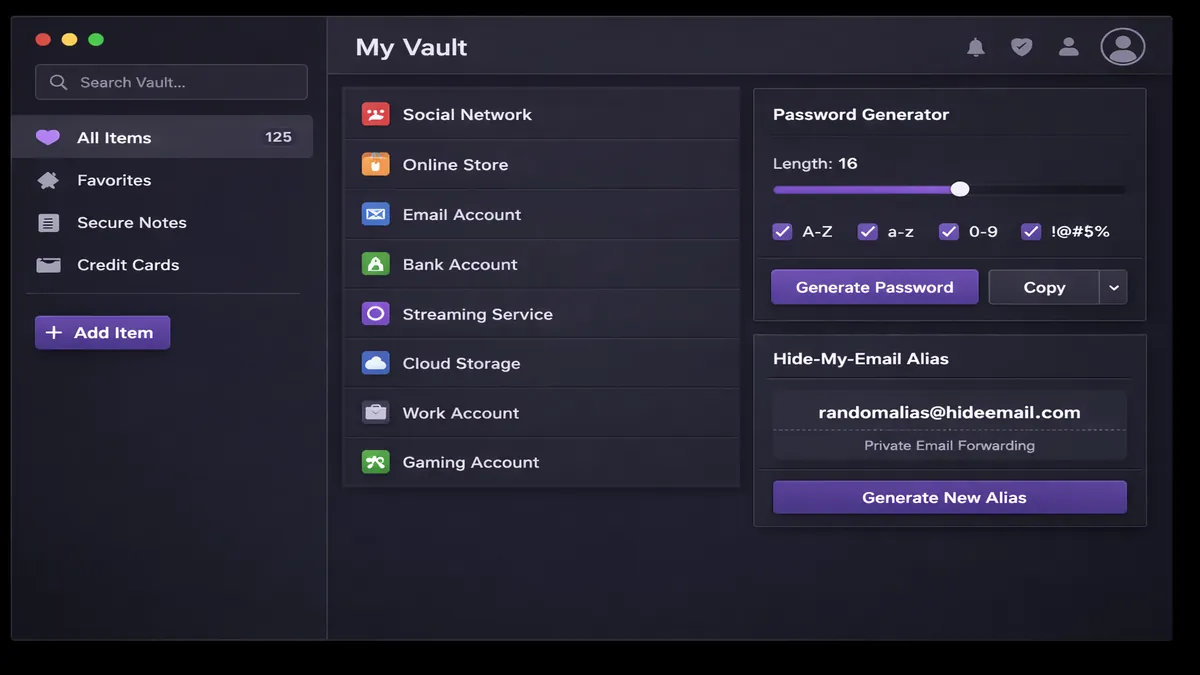
Verdict: Proton Pass is our top privacy pick—seamlessly integrated into the privacy-focused Proton ecosystem with unmatched zero-knowledge security and a unique email alias feature.
✅ Pros
- • Swiss-based, strict Swiss privacy laws
- • Zero-knowledge E2E encryption
- • Integrated with Proton Mail, VPN, Drive
- • Hide-my-email aliases — unique feature vs. competitors
- • Open source, independently audited
❌ Cons
- • Features still evolving vs. established competitors
- • Free plan has limitations
Why Proton Pass Stands Out
The standout feature of Proton Pass is its Hide-my-email aliases. When you sign up for a new service, Proton Pass can generate a unique, random email address that forwards to your real inbox. This prevents websites from tracking you across the web and protects your real email address from being leaked in a data breach.
In 2026, Proton Pass has also significantly improved its Passkey support, making it one of the easiest ways to transition to a passwordless future. Its integration with the broader Proton ecosystem means that if you're already using Proton Mail or VPN, adding Proton Pass is a no-brainer.
2. Bitwarden: The Best Free Password Manager
Bitwarden has long been the darling of the tech community, and for good reason. It is fully open-source, meaning its code is publicly available for anyone to inspect. This transparency builds a level of trust that proprietary competitors simply can't match.
Bitwarden
Score: 9.5/10
Verdict: Bitwarden is the best free password manager—offering most premium features for free including cross-device sync and 2FA. Fully open source.
✅ Pros
- • 100% free core plan
- • Open source, zero-knowledge
- • Unlimited devices on free plan
- • US-hosted with strong security
- • Self-hosting option for advanced users
❌ Cons
- • UI feels less modern vs. competitors
- • Some advanced features require premium ($1.65/mo)
The Power of Open Source
Bitwarden's free tier is arguably the most generous in the industry. Unlike many competitors who limit the number of devices or passwords on their free plans, Bitwarden allows unlimited passwords on unlimited devices for free.
In early 2026, Bitwarden updated its pricing to $1.65/mo for individuals, which is still incredibly affordable. This premium plan adds features like encrypted file attachments, advanced 2FA options (like YubiKey), and security health reports. For those who want complete control, Bitwarden even allows you to self-host your vault on your own server.
3. 1Password: The Best Overall User Experience
If you're looking for a password manager that "just works" and looks great doing it, 1Password is the gold standard. It consistently ranks as the top choice for families and non-technical users because of its polished interface and intuitive features.
1Password
Score: 9.7/10
Verdict: 1Password offers the best combination of features, compatibility, and security, making it the best choice for most users and families.
✅ Pros
- • Cleanest interface, very easy to use
- • Travel Mode — unique security feature
- • Excellent family plan with shared vaults
- • Watchtower feature for security alerts
- • Strong passkey support
❌ Cons
- • No free tier (only 14-day trial)
- • Slightly more expensive than Bitwarden
Unique Features: Travel Mode and Watchtower
One of 1Password's most innovative features is Travel Mode. When enabled, it removes sensitive vaults from your devices before you cross international borders. Once you've safely arrived, you can restore them with a single click. This is a game-changer for business travelers and privacy-conscious individuals.
The Watchtower feature is another standout. It proactively monitors your vault for weak passwords, reused credentials, and sites that have been breached. It even alerts you if any of your stored credit cards are about to expire. In 2026, 1Password's passkey implementation is widely considered the smoothest in the industry, allowing you to sign in to websites with just a fingerprint or face scan.
4. Dashlane: The Best for Feature-Rich Security
Dashlane is more than just a password manager; it's a comprehensive security suite. While it's one of the more expensive options on our list, it justifies its price tag with a host of premium features that you won't find elsewhere.
Dashlane
Score: 9.4/10
Verdict: Dashlane is the best feature-rich password manager—offering a built-in VPN, dark web monitoring, and excellent admin controls for business users.
✅ Pros
- • Built-in VPN for secure browsing
- • Real-time dark web monitoring
- • Excellent admin console for business
- • SSO integration for enterprise
- • Automatic password changer
❌ Cons
- • Most expensive option on our list
- • No longer offers a desktop app (browser-only)
Beyond Passwords: VPN and Dark Web Monitoring
The inclusion of a VPN (Virtual Private Network) is a major selling point for Dashlane. It allows you to encrypt your internet traffic and hide your IP address, which is especially useful when using public Wi-Fi. In 2026, Dashlane's VPN is powered by Hotspot Shield, providing fast and reliable connections.
Dashlane's dark web monitoring is also top-tier. It scans the dark web for your personal information and alerts you immediately if your data is found in a breach. For business users, Dashlane offers a robust admin console that makes it easy to manage employee access and enforce security policies across the entire organization.
5. NordPass: The Best for Simplicity and Mobile Users
From the creators of NordVPN, NordPass is a modern, streamlined password manager that focuses on simplicity and ease of use. It uses the XChaCha20 encryption algorithm, which is considered more future-proof and efficient than the standard AES-256.
NordPass
Score: 9.3/10
Verdict: NordPass is a simple, secure, and modern password manager that's perfect for users who want a no-fuss experience on both desktop and mobile.
✅ Pros
- • XChaCha20 encryption — modern and fast
- • Very simple and intuitive UI
- • Excellent mobile app experience
- • Data breach scanner included
- • Affordable pricing with frequent deals
❌ Cons
- • Free tier is quite limited (only 1 active device)
- • Fewer advanced features than 1Password or Dashlane
Modern Encryption for a Modern Web
NordPass's use of XChaCha20 encryption is a significant differentiator. While AES-256 is the industry standard, XChaCha20 is often faster on mobile devices and is less susceptible to certain types of attacks. This makes NordPass an excellent choice for users who primarily manage their passwords on their smartphones.
In 2026, NordPass has also introduced a Data Breach Scanner that proactively checks if your email addresses or credit card details have been leaked. Its interface is clean and uncluttered, making it a great choice for those who find other password managers too complex.
6. Keeper: The Best for High-Security and Compliance
Keeper is a security-first password manager that's widely used by government agencies and large corporations. It offers a level of granular control and compliance that is unmatched in the industry.
Keeper
Score: 9.5/10
Verdict: Keeper is a high-security password manager that's perfect for users and businesses that need the highest level of protection and compliance.
✅ Pros
- • Military-grade security and compliance
- • Granular sharing permissions
- • Secure file storage (up to 10GB)
- • BreachWatch dark web monitoring
- • Excellent customer support
❌ Cons
- • UI can feel a bit dated
- • Many features are paid add-ons
Granular Control and Secure Storage
What sets Keeper apart is its granular sharing permissions. You can share individual passwords or entire folders with other users and specify exactly what they can do (view, edit, share, etc.). This makes it an ideal choice for teams and families who need to share sensitive information securely.
Keeper also offers secure file storage, allowing you to store sensitive documents like passports, birth certificates, and tax records in your encrypted vault. In 2026, Keeper's BreachWatch feature is one of the most comprehensive dark web monitoring tools available, scanning billions of records for your information.
7. RoboForm: The Best for Form Filling and Value
RoboForm is one of the oldest password managers on the market, and it has built a reputation for its superior form-filling capabilities. If you frequently fill out long online forms, RoboForm will save you more time than any other manager.
RoboForm
Score: 9.1/10
Verdict: RoboForm is a reliable and affordable password manager that excels at form filling and offers great value for budget-conscious users.
✅ Pros
- • Best-in-class form filling
- • Very affordable pricing
- • Secure folder sharing
- • Emergency access feature
- • Good legacy support
❌ Cons
- • Interface feels a bit old-fashioned
- • Fewer modern security features than competitors
The King of Form Filling
RoboForm's form-filling engine is legendary. It can handle complex forms with ease, automatically filling in your name, address, credit card info, and even custom fields. This makes it a favorite among online shoppers and people who frequently sign up for new services.
In 2026, RoboForm remains one of the most affordable premium options, with plans starting at less than $1 per month. It also includes an Emergency Access feature, which allows you to designate a trusted contact who can access your vault in case of an emergency. While its interface isn't as modern as 1Password's, its reliability and value are hard to beat.
Comparison Table: Side-by-Side Features
To help you make an informed decision, we've compiled a side-by-side comparison of the top 7 password managers for 2026. This table highlights the key features, pricing, and security aspects of each provider.
| Feature | Proton Pass | Bitwarden | 1Password | Dashlane | NordPass | Keeper | RoboForm |
|---|---|---|---|---|---|---|---|
| Zero-Knowledge | ✅ | ✅ | ✅ | ✅ | ✅ | ✅ | ✅ |
| Open Source | ✅ | ✅ | ❌ | ❌ | ❌ | ❌ | ❌ |
| Free Tier | ✅ | ✅ | ❌ | ✅ | ✅ | ✅ | ✅ |
| Passkey Support | ✅ | ✅ | ✅ | ✅ | ✅ | ✅ | ✅ |
| Email Aliases | ✅ | ❌ | ❌ | ❌ | ❌ | ❌ | ❌ |
| Starting Price | $1.99/mo | $1.65/mo | $2.99/mo | $4.99/mo | $1.29/mo | $2.91/mo | $0.99/mo |
Free vs. Paid: Is it Worth Upgrading?
Many people wonder if they should pay for a password manager when so many free options are available. While free tiers can be a great starting point, there are several compelling reasons to consider a premium subscription in 2026.
The Limitations of Free Tiers
Most free password managers come with significant limitations. For example, NordPass only allows you to be logged in on one device at a time, which can be incredibly frustrating if you frequently switch between your phone and laptop. Dashlane's free tier limits you to a certain number of passwords, which most users will quickly exceed.
What You Get with a Premium Subscription
When you upgrade to a paid plan, you're not just paying for convenience; you're paying for enhanced security and peace of mind. Premium features often include:
- Advanced 2FA Support: Use hardware security keys like YubiKey for the ultimate protection.
- Dark Web Monitoring: Get real-time alerts if your information is found on the dark web.
- Encrypted File Storage: Store sensitive documents like IDs and tax records in your vault.
- Emergency Access: Designate a trusted contact who can access your vault in case of an emergency.
- Family Sharing: Share passwords and sensitive info with family members through shared vaults.
The Verdict: Is it Worth It?
For most users, a premium subscription is well worth the investment. At around $2 to $3 per month, it's a small price to pay for the security of your entire digital life. If you're on a tight budget, Bitwarden is the best free option, but even its premium plan is incredibly affordable at $1.65/mo.
Security Best Practices: How to Use Your Password Manager Like a Pro
Simply having a password manager is not enough. To truly secure your digital life, you need to use it correctly. Here are some essential security best practices for 2026.
1. Choose a Strong Master Password
Your master password is the single most important password you'll ever create. It's the key to your entire vault. If someone gets their hands on it, they have access to everything.
- Make it long: Aim for at least 15-20 characters.
- Use a passphrase: Instead of a random string of characters, use a phrase that's easy for you to remember but hard for others to guess. For example, "TheBlueElephantDancedInTheRain!"
- Avoid personal info: Don't use your name, birthday, or common words.
- Never reuse it: Your master password should be unique and not used for any other account.
2. Enable Multi-Factor Authentication (MFA)
Even with a strong master password, you should always enable multi-factor authentication (MFA) on your password manager. This adds an extra layer of security by requiring a second factor (like a code from an app or a hardware key) to access your vault.
In 2026, we recommend using hardware security keys like YubiKey for the highest level of protection. If that's not an option, use an authenticator app like Google Authenticator or Authy. Avoid SMS-based 2FA, as it's vulnerable to SIM-swapping attacks.
3. Regularly Audit Your Vault
Most modern password managers have a security audit feature (like 1Password's Watchtower or Bitwarden's Security Reports). Use it regularly to identify weak, reused, or compromised passwords.
Make it a habit to change any passwords that are flagged as weak or reused. This will significantly reduce your risk of being a victim of a credential stuffing attack.
4. Use the Password Generator
Don't try to create your own passwords. Use the built-in password generator in your manager to create long, complex, and unique passwords for every account.
Aim for at least 16 characters with a mix of uppercase and lowercase letters, numbers, and symbols. Since your password manager will remember them for you, there's no reason to use simple passwords.
How to Switch: A Step-by-Step Migration Guide
If you're currently using your browser's built-in password manager or a different third-party tool, switching to a new one is easier than you might think. Here's a step-by-step guide to help you migrate your data securely.
Step 1: Export Your Data
The first step is to export your passwords from your current manager. Most tools allow you to export your data as a CSV or JSON file.
- In Chrome: Go to Settings > Autofill > Password Manager > Settings > Export Passwords.
- In 1Password: Go to File > Export > All Items.
- In Bitwarden: Go to Tools > Export Vault.
Warning: The exported file is unencrypted. Be sure to delete it permanently once you've finished the migration.
Step 2: Import Your Data
Once you've exported your data, you can import it into your new password manager. Most tools have a dedicated import feature that can handle files from other popular managers.
- In Proton Pass: Go to Settings > Import.
- In Bitwarden: Go to Tools > Import Data.
- In 1Password: Go to File > Import.
Step 3: Clean Up Your Vault
After importing your data, take some time to clean up your vault. Delete any duplicate entries and use the security audit feature to identify and change any weak or reused passwords.
Step 4: Disable Your Old Manager
Once you're sure that all your data has been successfully migrated, disable your old password manager. If you were using your browser's built-in manager, be sure to turn off the "Offer to save passwords" and "Auto Sign-in" features.
The Future of Passwords: Passkeys and Beyond
As we look ahead to 2026 and beyond, the way we authenticate ourselves online is undergoing a fundamental shift. The era of traditional passwords is slowly coming to an end, replaced by Passkeys.
What are Passkeys?
Passkeys are a more secure, passwordless alternative to traditional logins. They are based on the FIDO2 and WebAuthn standards and use public-key cryptography to authenticate you.
When you create a passkey, your device generates a unique pair of keys: a public key that's stored on the website's server and a private key that's stored securely on your device. To sign in, you simply use your biometric data (like FaceID or TouchID) or a hardware security key to prove your identity.
Why Passkeys are the Future
Passkeys offer several significant advantages over traditional passwords:
- Phishing-Resistant: Since there's no password to steal, passkeys are virtually immune to phishing attacks.
- No More Password Reuse: Each passkey is unique to a specific website, so there's no risk of credential stuffing.
- Easier to Use: Signing in with a fingerprint or face scan is much faster and more convenient than typing in a long password.
In 2026, all the top password managers on our list offer full passkey support, allowing you to store and manage your passkeys alongside your traditional passwords.
Frequently Asked Questions (FAQ)
Is it safe to store all my passwords in one place?
Yes, as long as you use a reputable password manager with zero-knowledge architecture. This means that only you have the key to your vault, and even the provider can't access your data. Using a password manager is far more secure than reusing the same password across multiple sites.
What happens if I lose my master password?
Because of zero-knowledge encryption, most password managers cannot reset your master password. If you lose it, you may lose access to your entire vault. This is why it's essential to create a recovery key and store it in a safe, physical location.
Can I use a password manager on multiple devices?
Yes, all the password managers on our list offer cross-device sync, allowing you to access your passwords on your phone, tablet, and computer. Some free tiers may limit the number of active devices, so be sure to check the details before signing up.
Are browser-based password managers safe?
While browser-based managers (like those in Chrome or Safari) have improved, they are generally less secure and less feature-rich than dedicated third-party managers. They often lack advanced features like dark web monitoring, emergency access, and cross-browser support.
Do I still need a password manager if I use passkeys?
Yes. While passkeys are the future, it will take years for every website to support them. In the meantime, you'll still need a password manager to store your traditional passwords. Additionally, a password manager provides a secure way to sync your passkeys across different platforms and devices.
Conclusion: Which Password Manager Should You Choose?
Choosing the right password manager is a personal decision that depends on your specific needs and budget. However, based on our extensive testing for 2026, here are our final recommendations:
- For the best overall experience: Choose 1Password. Its polished interface and intuitive features make it the best choice for most users and families.
- For the privacy-conscious: Choose Proton Pass. Its Swiss-based privacy and unique email alias feature are unmatched in the industry.
- For the budget-conscious: Choose Bitwarden. Its generous free tier and affordable premium plan make it the best value on the market.
- For business users: Choose Dashlane. Its built-in VPN and robust admin controls are ideal for securing your organization.
No matter which one you choose, the most important thing is to start using a password manager today. It's the single most effective step you can take to protect your digital identity and secure your online life in 2026.