Best 2-in-1 Laptops 2026: Top Convertible Picks
Introduction: The Evolution of Versatility in Computing
In an era where flexibility and adaptability are paramount, 2-in-1 laptops have emerged as a cornerstone of modern computing, seamlessly blending the productivity of a traditional laptop with the intuitive experience of a tablet. As we navigate 2026, these convertible devices have matured significantly, offering a compelling proposition for a diverse range of users, from students and artists to business professionals and casual consumers. The allure of a single device that can transform to suit various tasks – whether it's typing a report, sketching a design, or presenting a pitch – is undeniable. This article explores the cutting-edge of 2-in-1 laptop technology, highlighting the key innovations and features that define the best models available today.
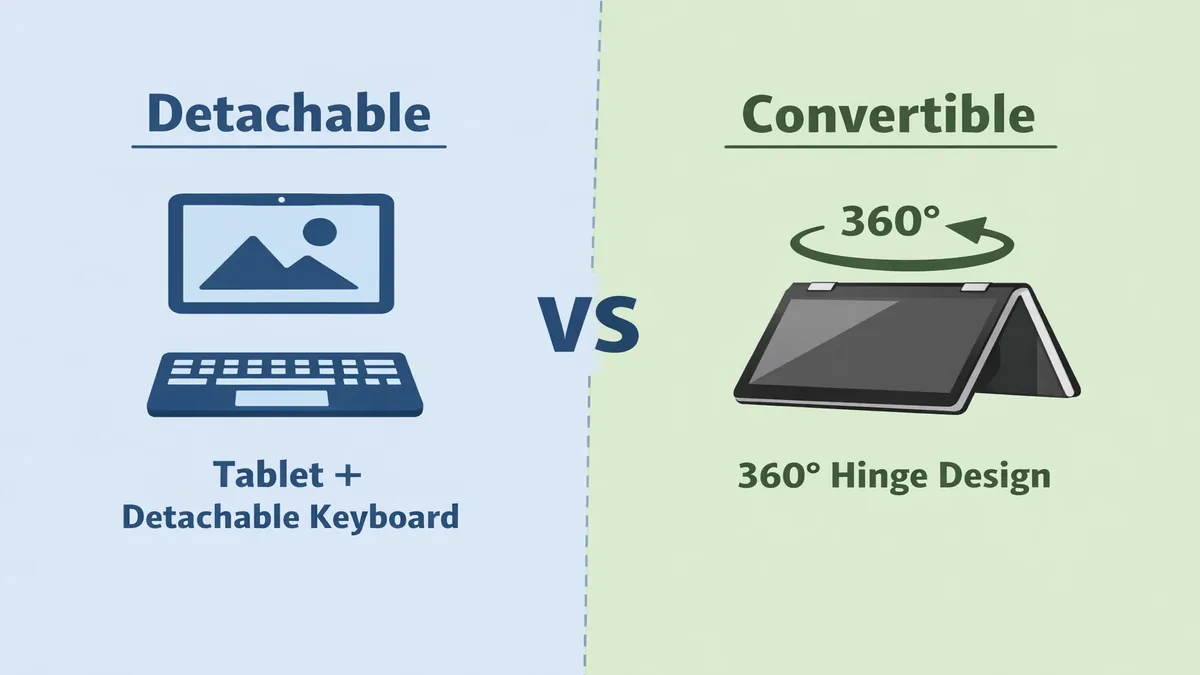
At the heart of the 2-in-1 revolution lies the ingenious design that allows for multiple form factors. Broadly, these devices can be categorized into two primary types: detachable and clamshell convertible. Each design offers distinct advantages and caters to different user preferences and workflows.
Detachable 2-in-1s, exemplified by devices like the Microsoft Surface Pro, feature a tablet-first design where the keyboard is a separate, often magnetic, accessory. This configuration prioritizes the tablet experience, making it incredibly lightweight and portable when used independently. The display unit houses all the core components, allowing for a full-fledged computing experience in a slate form factor. When productivity demands arise, the keyboard can be easily attached, transforming the device into a laptop. This design is particularly appealing to users who frequently use their device for drawing, note-taking, or media consumption, where a pure tablet mode is highly beneficial. The trade-off often involves a slightly less stable lap-typing experience compared to traditional laptops, and the keyboard accessory might sometimes be sold separately.
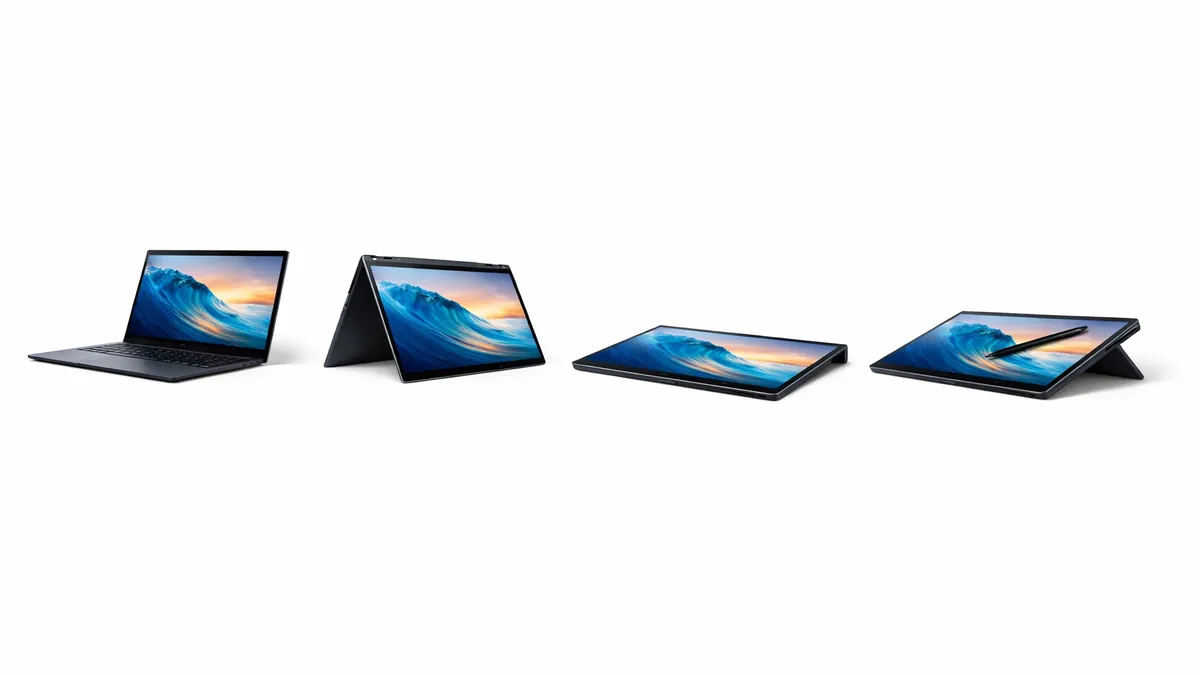
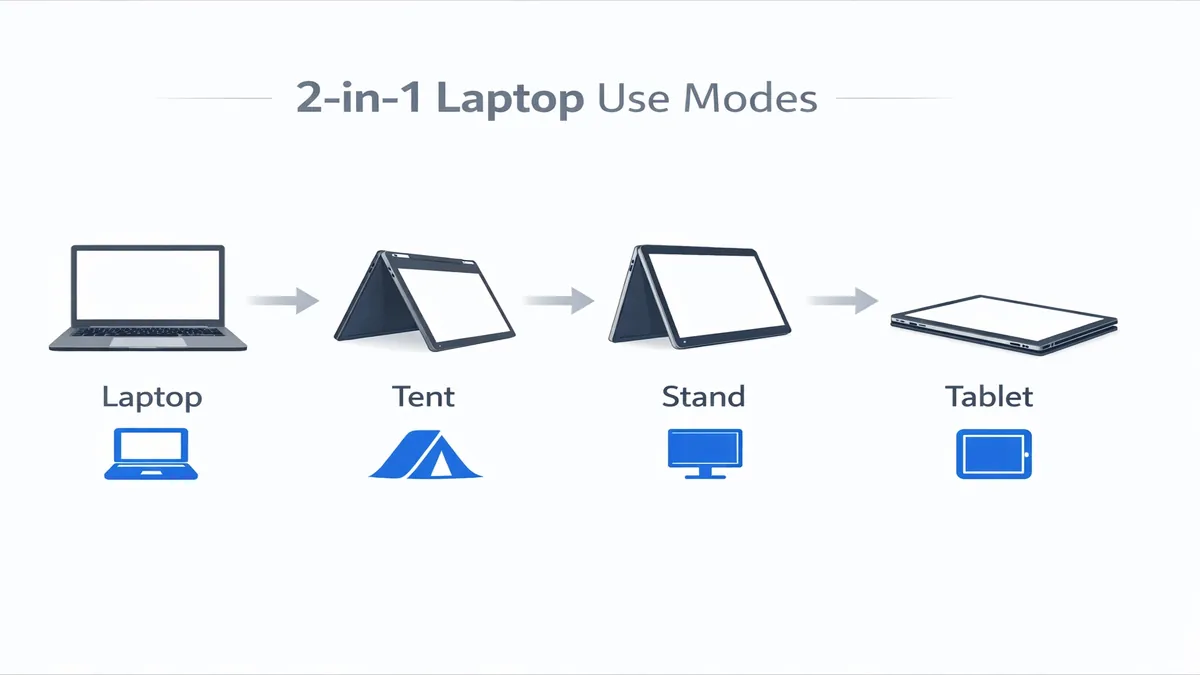
Clamshell convertible 2-in-1s, on the other hand, maintain a traditional laptop chassis but incorporate a hinge that allows the screen to rotate 360 degrees. This enables various modes, including laptop mode, tent mode (ideal for presentations or media viewing), stand mode, and tablet mode, where the keyboard folds back behind the screen. Devices like the Lenovo Yoga series or HP Spectre x360 are prime examples of this design. The main advantage here is the inherent stability of the laptop form factor, offering a more robust typing experience. The keyboard is always attached, eliminating the need to carry a separate accessory. While they might be slightly heavier than their detachable counterparts in tablet mode, their versatility and integrated design make them a popular choice for users who transition frequently between typing and touch-based interactions.
Who Needs a 2-in-1 Laptop?
The versatility of 2-in-1 laptops makes them ideal for several user demographics:
- Students: For students, a 2-in-1 can replace multiple devices. They can take notes with a stylus in tablet mode, type essays in laptop mode, and present projects in tent mode. The portability and adaptability are invaluable for campus life, allowing them to carry one device for all their academic needs, from lectures to library research.
- Artists and Designers: The ability to draw and sketch directly on the screen with a stylus is a game-changer for digital artists, graphic designers, and illustrators. The responsive touchscreens and pressure-sensitive pens offered by many 2-in-1s provide a natural and intuitive creative canvas, making them excellent tools for digital art, photo editing, and graphic design on the go.
- Presenters and Business Professionals: In a business setting, 2-in-1s shine during presentations. Tent or stand mode allows for easy sharing of content with colleagues or clients, while tablet mode can be used for interactive demonstrations or taking notes during meetings. The lightweight design also makes them convenient for frequent travelers and those who work remotely.
- Casual Users and Media Consumers: For everyday tasks like web browsing, email, and media consumption, the tablet mode offers a comfortable and immersive experience. The ability to quickly switch to laptop mode for more intensive tasks like document creation or online shopping adds a layer of convenience that traditional tablets or laptops cannot match.
The Importance of Pen/Stylus Support
For many 2-in-1 users, particularly students and creative professionals, the inclusion and quality of pen or stylus support is a critical factor. A good stylus can transform the device into a powerful digital notebook or an artistic canvas. Key aspects to consider include:
- Pressure Sensitivity: Higher levels of pressure sensitivity (e.g., 4096 or 8192 levels) allow for more nuanced and expressive lines, mimicking the feel of traditional pens and brushes. This is crucial for artists and those who require precise control.
- Tilt Support: The ability to detect the angle of the stylus allows for shading and other artistic effects, further enhancing the natural drawing experience.
- Low Latency: Minimal lag between the pen stroke and its appearance on screen is essential for a fluid and natural writing or drawing experience. Modern styluses and displays have significantly reduced latency, making digital inking feel almost instantaneous.
- Palm Rejection: Effective palm rejection ensures that only the stylus input is registered, preventing accidental marks from your hand resting on the screen.
- Integrated Features: Some styluses offer programmable buttons for quick access to functions like erase or right-click, while others can magnetically attach to the device for charging and storage. Whether the stylus is included in the box or sold separately is also a practical consideration.
In 2026, the best 2-in-1 laptops combine robust performance with thoughtful design and advanced stylus technology, offering a truly versatile computing experience that adapts to your needs. The following sections will delve deeper into specific models, comparing their features and helping you find the perfect convertible companion.
Quick Picks: Leading 2-in-1 Laptops of 2026
For those seeking immediate recommendations, our quick picks highlight the top 2-in-1 laptops that excel in various aspects, offering a blend of performance, design, and versatility. These devices represent the pinnacle of convertible computing in 2026, catering to a wide array of user needs.
| Laptop Model | Key Strengths | Ideal For |
|---|---|---|
| Microsoft Surface Pro | Tablet-first design, excellent stylus integration | Artists, students, highly portable users |
| Apple iPad Pro | Premium tablet experience, powerful M-series chip | Creative professionals, iOS ecosystem users |
| Lenovo Yoga Series | Robust hinges, versatile modes, strong performance | Business users, students, general productivity |
| HP Spectre x360 | Premium design, strong performance, vibrant display | Professionals, design-conscious users |
| Dell XPS 13 2-in-1 | Sleek design, compact, solid performance | Travelers, minimalist users, everyday tasks |
The Apple iPad Pro, while primarily a tablet, becomes a formidable 2-in-1 device when paired with the Magic Keyboard and Apple Pencil. Powered by Apple's M-series chips, it delivers exceptional performance for creative tasks, making it a top choice for artists, designers, and video editors within the iOS ecosystem. Its stunning Liquid Retina XDR display and seamless integration with Apple's software and services offer a premium user experience, though it operates on iPadOS rather than a full desktop operating system.
Lenovo's Yoga Series laptops are renowned for their robust and innovative 360-degree hinges, allowing for seamless transitions between laptop, tent, stand, and tablet modes. These clamshell convertibles often feature powerful Intel or AMD processors, making them excellent for productivity and multitasking. Their durable build quality and often included stylus make them a reliable choice for students and business professionals who need a versatile workhorse.
The HP Spectre x360 line stands out with its premium, jewel-cut design and vibrant OLED displays. These laptops combine powerful performance with a luxurious aesthetic, appealing to professionals and design-conscious users. The 360-degree hinge allows for flexible usage, and the included stylus enhances its utility for creative tasks and note-taking. The Spectre x360 offers a compelling package for those who demand both style and substance.
Finally, the Dell XPS 13 2-in-1 offers a sleek and compact design, making it an ideal choice for travelers and users who prioritize portability. While it might not always pack the same raw power as some larger convertibles, it delivers solid performance for everyday tasks and light creative work. Its minimalist aesthetic and high-quality build are hallmarks of the XPS line, providing a premium experience in a highly portable form factor. The XPS 13 2-in-1 is perfect for those who need a capable and elegant device that can easily switch between laptop and tablet modes for on-the-go productivity and entertainment.
Top 8 Reviews: A Deep Dive into the Best 2-in-1 Laptops
To provide a comprehensive understanding of the leading 2-in-1 laptops in 2026, we've conducted in-depth reviews of eight standout models. Each review focuses on their unique form factors, display quality, stylus integration, battery life, and overall value, helping you identify the perfect convertible device for your needs.
1. Microsoft Surface Pro 10
The Microsoft Surface Pro 10 continues to set the benchmark for detachable 2-in-1s, offering a tablet-first experience without compromising on full Windows functionality. Powered by the latest Intel Core Ultra processors, it delivers robust performance for productivity tasks, web browsing, and even light creative work. The signature feature remains its stunning PixelSense Flow display, which is bright, color-accurate, and highly responsive to touch and the Surface Slim Pen 2. The kickstand offers versatile viewing angles, and the Type Cover keyboard, while often sold separately, provides a surprisingly comfortable typing experience. Its lightweight design and excellent portability make it an ideal companion for students, artists, and professionals who need a highly adaptable device for on-the-go computing. Battery life is consistently strong, ensuring all-day usage for most workflows. The Surface Pro 10 is a testament to Microsoft's vision of a versatile computing future.
2. Apple iPad Pro M4 (13-inch)
While technically a tablet, the Apple iPad Pro M4, especially the 13-inch model, transforms into a powerful 2-in-1 workstation when paired with the Magic Keyboard and Apple Pencil Pro. The revolutionary M4 chip provides desktop-class performance, making it capable of handling demanding creative applications like video editing, graphic design, and 3D rendering with remarkable speed and efficiency. The Ultra Retina XDR display is arguably the best on any portable device, offering unparalleled brightness, contrast, and color accuracy, which is critical for creative professionals. iPadOS has evolved significantly, offering enhanced multitasking capabilities, though it still operates within a more constrained ecosystem compared to full desktop operating systems. For artists, designers, and anyone deeply embedded in the Apple ecosystem, the iPad Pro M4 offers an incredibly powerful and intuitive creative canvas, albeit at a premium price point.
3. Lenovo Yoga 9i (2026 Model)
The Lenovo Yoga 9i continues to impress with its premium design, powerful performance, and exceptional versatility. This clamshell convertible features a robust 360-degree hinge that allows for seamless transitions between laptop, tent, stand, and tablet modes. Powered by the latest Intel Core Ultra processors, it delivers excellent performance for everyday tasks, multitasking, and even some more demanding applications. The OLED display options are vibrant and color-accurate, providing an immersive viewing experience. Lenovo often includes a stylus, enhancing its utility for note-taking and sketching. The Yoga 9i also boasts a comfortable keyboard and a unique rotating soundbar hinge that delivers impressive audio quality in all modes. Its combination of style, substance, and adaptability makes it a top choice for business professionals and students alike.
4. HP Spectre x360 14 (2026 Model)
The HP Spectre x360 14 is a masterclass in design and engineering, offering a luxurious and highly capable 2-in-1 experience. Its gem-cut chassis and premium materials give it a distinctive aesthetic, while the latest Intel Core Ultra processors provide strong performance for productivity and creative tasks. The OLED display is a highlight, offering stunning visuals with deep blacks and vibrant colors, making it ideal for media consumption and light photo editing. The 360-degree hinge is smooth and durable, allowing for effortless mode transitions. HP often bundles a rechargeable stylus, further enhancing its versatility for note-taking and digital art. The Spectre x360 14 is perfect for users who demand a stylish, powerful, and flexible laptop that can seamlessly adapt to various workflows.
5. Dell XPS 13 2-in-1 (2026 Model)
The Dell XPS 13 2-in-1 offers the iconic minimalist design and premium build quality of the XPS line in a highly portable convertible form factor. This detachable 2-in-1 is incredibly thin and light, making it an excellent travel companion. Powered by efficient Intel Core Ultra processors, it provides solid performance for web browsing, document creation, and streaming. The display is sharp and bright, offering a great viewing experience, though it might not always have the OLED options found in larger XPS models. The magnetic keyboard folio and stylus (often sold separately) integrate well, providing a comfortable typing and writing experience. While it might not be the most powerful option for intensive tasks, its exceptional portability, premium feel, and reliable performance make it a strong contender for users who prioritize a sleek and lightweight device for everyday use and light productivity.
6. Samsung Galaxy Book4 Pro 360
The Samsung Galaxy Book4 Pro 360 combines Samsung's expertise in display technology with a versatile 2-in-1 design. This clamshell convertible features a stunning AMOLED display that delivers incredible color vibrancy and contrast, making it a joy for media consumption and creative work. Powered by Intel Core Ultra processors, it offers strong performance for multitasking and productivity. The 360-degree hinge allows for various modes, and the included S Pen provides a natural and responsive writing and drawing experience, seamlessly integrated with Samsung's ecosystem. Its thin and light design, coupled with excellent battery life, makes it highly portable. For users who appreciate a vibrant display, S Pen functionality, and seamless integration with other Samsung devices, the Galaxy Book4 Pro 360 is a compelling choice.
7. Acer Spin 7 (2026 Model)
The Acer Spin 7 aims to provide a versatile 2-in-1 experience with a focus on connectivity and portability. This clamshell convertible often features a durable design and a responsive touchscreen. While not always packing the absolute highest-end processors, it offers a good balance of performance for everyday tasks, web conferencing, and media consumption. The 360-degree hinge allows for flexible usage, and Acer often includes a stylus for note-taking and basic drawing. Its strengths lie in its competitive pricing, solid build quality, and often comprehensive port selection, making it a practical choice for students or users who need a reliable and adaptable device without breaking the bank. Battery life is typically good, supporting all-day use.
8. ASUS ZenBook Flip 14 (2026 Model)
The ASUS ZenBook Flip 14 offers a premium 2-in-1 experience with a focus on performance and display quality. This clamshell convertible typically features powerful Intel Core Ultra or AMD Ryzen processors, providing ample power for productivity, creative tasks, and even some light gaming. The OLED display options are a major draw, offering stunning visuals with excellent color accuracy and deep blacks. The 360-degree ErgoLift hinge elevates the keyboard for a more comfortable typing experience and improved cooling. ASUS often includes a stylus and integrates features like the NumberPad (a numeric keypad integrated into the touchpad), enhancing productivity. The ZenBook Flip 14 is a strong contender for users who want a stylish, powerful, and versatile 2-in-1 with a superb display.
Comparison Table: Key Specifications of Top 2-in-1 Laptops
To facilitate a direct comparison, the following table outlines the key specifications and features of our top 2-in-1 laptop recommendations. This allows for a quick overview of how each device stacks up against its peers in terms of form factor, display technology, stylus integration, battery life, and approximate pricing.
| Feature / Model | Microsoft Surface Pro 10 | Apple iPad Pro M4 (13-inch) | Lenovo Yoga 9i (2026) | HP Spectre x360 14 (2026) | Dell XPS 13 2-in-1 (2026) | Samsung Galaxy Book4 Pro 360 | Acer Spin 7 (2026) | ASUS ZenBook Flip 14 (2026) |
|---|---|---|---|---|---|---|---|---|
| Type | Detachable | Detachable (with Magic Keyboard) | Clamshell Convertible | Clamshell Convertible | Detachable | Clamshell Convertible | Clamshell Convertible | Clamshell Convertible |
| Display Size & Type | 13" PixelSense Flow LCD | 13" Ultra Retina XDR OLED | 14" OLED | 14" OLED | 13" LCD | 16" AMOLED | 14" IPS | 14" OLED |
| Stylus Support | Surface Slim Pen 2 | Apple Pencil Pro | Included/Optional | Included | Optional | Included (S Pen) | Included/Optional | Included/Optional |
| Battery Life (Hrs) | 12-15 | 10-12 | 10-14 | 10-13 | 8-10 | 12-15 | 8-12 | 10-14 |
| Weight (kg) | ~0.89 (tablet only) | ~0.58 (tablet only) | ~1.4 | ~1.3 | ~0.74 (tablet only) | ~1.6 | ~1.2 | ~1.4 |
| Processor | Intel Core Ultra | Apple M4 | Intel Core Ultra | Intel Core Ultra | Intel Core Ultra | Intel Core Ultra | Intel Core | Intel Core Ultra / AMD Ryzen |
| RAM (Base/Max) | 8GB/32GB | 8GB/16GB | 16GB/32GB | 16GB/32GB | 8GB/16GB | 16GB/32GB | 8GB/16GB | 16GB/32GB |
| Storage (Base/Max) | 256GB/1TB SSD | 256GB/2TB SSD | 512GB/2TB SSD | 512GB/2TB SSD | 256GB/1TB SSD | 512GB/2TB SSD | 256GB/1TB SSD | 512GB/2TB SSD |
| Approx. Price (USD) | $1,000+ | $1,300+ | $1,500+ | $1,600+ | $1,200+ | $1,700+ | $800+ | $1,300+ |
Key Takeaways from the Comparison:
- Performance vs. Portability: The table highlights a clear distinction between the tablet-first detachables (Surface Pro, iPad Pro, Dell XPS 13 2-in-1) which prioritize extreme portability and the clamshell convertibles (Lenovo Yoga, HP Spectre, Samsung Galaxy Book, Acer Spin, ASUS ZenBook Flip) which offer a more traditional laptop experience with added flexibility. The iPad Pro, despite being a tablet, stands out with its M4 chip offering exceptional performance.
- Display Technology: OLED displays are becoming increasingly prevalent in premium 2-in-1s, offering superior contrast and color vibrancy. Apple's Ultra Retina XDR OLED on the iPad Pro and Samsung's AMOLED on the Galaxy Book4 Pro 360 are particularly noteworthy for their visual fidelity.
- Stylus Integration: While most premium 2-in-1s offer stylus support, the inclusion of the stylus in the box varies. Devices like the Surface Pro and iPad Pro have highly refined stylus experiences, often considered best-in-class for digital art and note-taking.
- Battery Life: Battery life remains a crucial factor for portable devices. Many 2-in-1s offer all-day battery life, with some models like the Surface Pro and Samsung Galaxy Book4 Pro 360 pushing into the 12-15 hour range, depending on usage.
- Price Points: The price range for top-tier 2-in-1s is quite broad, reflecting the diversity in specifications and premium features. Budget-conscious buyers might find options like the Acer Spin 7 more appealing, while those seeking uncompromised performance and features will lean towards the iPad Pro or high-end Lenovo/HP models.
Buying Guide: Navigating the Choices for Your Ideal 2-in-1 Laptop
Selecting the perfect 2-in-1 laptop in 2026 requires a thoughtful consideration of your primary use cases, desired features, and budget. With a wide array of options available, understanding the key factors will help you make an informed decision that aligns with your needs. This buying guide breaks down the essential aspects to consider.
1. Form Factor: Detachable vs. Clamshell Convertible
The first and most fundamental decision is choosing between a detachable or a clamshell convertible design, as this dictates the primary user experience.
- Detachable: If your workflow heavily involves using the device as a tablet for drawing, note-taking, reading, or media consumption, a detachable 2-in-1 (like the Microsoft Surface Pro or Dell XPS 13 2-in-1) is likely your best bet. These devices are typically lighter in tablet mode and offer a more unencumbered tablet experience. However, the keyboard is often a separate accessory, and lap-typing can sometimes feel less stable than on a traditional laptop.
- Clamshell Convertible: For users who primarily work in laptop mode but appreciate the flexibility to occasionally switch to tablet, tent, or stand modes, a clamshell convertible (such as the Lenovo Yoga or HP Spectre x360) is more suitable. These offer a more robust and stable typing experience, as the keyboard is always attached. They tend to be slightly heavier in tablet mode but provide a seamless transition between modes without needing to attach or detach components.
2. Stylus: Included vs. Separate Purchase, and Quality
For many 2-in-1 users, the stylus is a crucial tool. Its integration and quality can significantly enhance productivity and creativity.
- Included vs. Separate: Check whether the stylus is included in the box or if it needs to be purchased separately. While some premium models bundle a high-quality stylus, others treat it as an optional accessory, which can add to the overall cost.
- Pressure Sensitivity & Tilt: For artists and designers, high levels of pressure sensitivity (e.g., 4096 or 8192 levels) and tilt support are essential for natural and expressive drawing. For note-takers, a responsive stylus with good palm rejection is key.
- Latency: Low latency is critical for a fluid writing and drawing experience. Modern styluses have significantly improved in this regard, making digital inking feel almost instantaneous.
3. Display: Size, Resolution, and Panel Technology
The display is your primary interface, and its quality directly impacts your visual experience.
- Size: Common sizes range from 13-inch to 16-inch. Smaller sizes offer greater portability, while larger screens provide more workspace for multitasking or creative applications. Consider your typical usage environment.
- Resolution: Full HD (1920x1080) is standard, but many premium 2-in-1s now offer QHD (2560x1440) or 4K (3840x2160) resolutions. Higher resolutions provide sharper images and more screen real estate, which is beneficial for productivity and media consumption.
- Panel Technology: OLED displays (found in models like the HP Spectre x360 or Samsung Galaxy Book4 Pro 360) offer superior contrast, true blacks, and vibrant colors, making them excellent for media consumption and creative work. IPS LCDs are also very good, offering wide viewing angles and good color accuracy.
4. Performance: CPU, RAM, and Storage
While 2-in-1s prioritize versatility, performance is still crucial for a smooth user experience.
- CPU: Look for the latest generation processors from Intel (Core Ultra series) or AMD (Ryzen series) for a good balance of performance and power efficiency. Apple's M-series chips in the iPad Pro offer exceptional performance for their form factor.
- RAM: 8GB of RAM is a minimum for basic tasks, but 16GB is highly recommended for comfortable multitasking and more demanding applications. If you plan on doing light photo editing or running several apps simultaneously, 16GB will provide a much smoother experience.
- Storage: An NVMe SSD is essential for fast boot times and quick application loading. Aim for at least 256GB, but 512GB or 1TB will provide more breathing room for files and applications. Cloud storage can supplement local storage for larger files.
5. Battery Life: All-Day Power for On-the-Go Use
One of the main appeals of a 2-in-1 is its portability, and good battery life is critical to leverage this. Look for devices that offer 10+ hours of real-world battery life to ensure you can get through a full workday or school day without needing to constantly search for an outlet. Factors like screen brightness, CPU efficiency, and background applications can all impact actual battery performance.
6. Portability: Weight and Thickness
If you plan to carry your 2-in-1 frequently, its weight and thickness are important considerations. Detachable models tend to be lighter in tablet mode, while clamshell convertibles can vary. Aim for a device that feels comfortable to hold and carry for extended periods, especially if you'll be using it in tablet mode often.
By carefully evaluating these factors against your personal needs and budget, you can confidently choose a 2-in-1 laptop that not only meets your expectations but also enhances your digital lifestyle. The market in 2026 offers more compelling and capable convertible devices than ever before, ensuring there's a perfect match for almost every user.
FAQ: Demystifying 2-in-1 Laptops
As 2-in-1 laptops continue to evolve and gain popularity, many questions arise regarding their functionality, suitability for various tasks, and comparisons with traditional devices. Here, we address some of the most common inquiries to provide clarity and assist in your decision-making process.
1. Best 2-in-1 for students?
For students, the best 2-in-1 laptop is one that offers a balance of portability, versatility, good battery life, and a responsive stylus for note-taking and assignments. The Microsoft Surface Pro 10 is an excellent choice due to its lightweight tablet-first design, full Windows functionality, and superb pen experience, making it ideal for carrying between classes and digital note-taking. The Lenovo Yoga series also stands out with its robust build, versatile modes, and often included stylus, providing a more traditional laptop experience with the added flexibility of a tablet. Budget-friendly options like the Acer Spin 7 can also be suitable, offering good value for essential student tasks. Key features for students include a comfortable keyboard for essays, sufficient RAM (8GB-16GB) for research and multitasking, and enough storage for documents and applications.
2. Surface Pro vs iPad Pro?
The choice between a Microsoft Surface Pro and an Apple iPad Pro depends heavily on your preferred operating system and primary use cases:
- Microsoft Surface Pro: Runs full Windows, offering complete desktop application compatibility. It's a tablet that can fully replace a laptop for many users, especially with the Type Cover. It excels in productivity tasks, software compatibility, and offers a more traditional computing experience. Ideal for users who need specific Windows applications or prefer a desktop-like workflow in a portable form factor.
- Apple iPad Pro: Runs iPadOS, which is a mobile operating system, albeit a very powerful one. It excels in creative tasks (drawing, graphic design, video editing with apps like LumaFusion or Final Cut Pro for iPad), media consumption, and offers an incredibly intuitive touch and Apple Pencil experience. Its M-series chips provide exceptional performance. Ideal for users deeply embedded in the Apple ecosystem, creative professionals, and those who prioritize a premium tablet experience with powerful mobile apps.
Both are premium devices, but the Surface Pro offers a more traditional computer experience, while the iPad Pro leans into its tablet strengths with a powerful mobile OS.
3. Are 2-in-1 laptops good for gaming?
Generally, 2-in-1 laptops are not primarily designed for serious gaming, especially graphically intensive modern titles. While they can handle casual games or older titles, there are several reasons why they are not ideal for dedicated gamers:
- Integrated Graphics: Many 2-in-1s, particularly the thinner and lighter models, rely on integrated graphics (e.g., Intel Iris Xe, AMD Radeon Graphics) which are not powerful enough for demanding games.
- Limited Dedicated GPUs: Even 2-in-1s that include dedicated GPUs (like some HP Spectre x360 or ASUS ZenBook Flip models) typically feature entry-level or mid-range options (e.g., NVIDIA GeForce RTX 4050/4060). These are sufficient for light gaming or creative tasks but will struggle with high frame rates or resolutions in AAA games.
- Cooling Limitations: The compact and thin designs of 2-in-1s often mean less robust cooling systems compared to dedicated gaming laptops. This can lead to thermal throttling, where the components reduce their performance to prevent overheating, resulting in lower frame rates during extended gaming sessions.
- Battery Life: Gaming is very power-intensive and will drain the battery of any laptop quickly, often reducing the advertised battery life significantly.
If gaming is a priority, a dedicated gaming laptop or a desktop PC would provide a far superior experience in terms of performance, cooling, and upgradeability. However, for casual gaming or cloud gaming services, a 2-in-1 can certainly suffice.
Verdict and Call to Action: Embrace the Flexibility of 2-in-1 Computing
In the rapidly evolving landscape of personal computing, 2-in-1 laptops have carved out a significant niche by offering unparalleled versatility and adaptability. As we look at the best convertible picks of 2026, it's clear that manufacturers have refined these devices to deliver robust performance, stunning displays, and intuitive user experiences across various form factors. Whether you're a student juggling notes and essays, an artist seeking a digital canvas, a business professional needing a dynamic presentation tool, or simply a user who values flexibility, there's a 2-in-1 laptop perfectly suited to your needs.
The choice between a detachable and a clamshell convertible ultimately hinges on your primary use case. Detachable models like the Microsoft Surface Pro 10 excel for tablet-first workflows, offering extreme portability and a natural pen experience. Clamshell convertibles, such as the Lenovo Yoga 9i and HP Spectre x360 14, provide the stability of a traditional laptop with the added benefit of multiple modes for enhanced productivity and media consumption.
Key considerations when making your selection should include the quality of the display (with OLED becoming increasingly prevalent for its vibrant colors and deep blacks), the responsiveness and features of the stylus (especially if digital inking is a priority), and a balanced set of internal specifications (CPU, RAM, and SSD) that can comfortably handle your daily tasks. While 2-in-1s are not typically gaming powerhouses, they offer more than enough performance for productivity, creative work, and media enjoyment.
Embrace the future of flexible computing and discover how a 2-in-1 laptop can streamline your workflow and enhance your digital lifestyle. Ready to find your perfect convertible companion? Explore the latest models and deals on Amazon today. Click the link below to browse the best 2-in-1 laptops and unlock a new level of versatility.
🔗 AFFILIATE LINKS
🔗 Amazon 2-in-1 Laptops: https://www.amazon.com/?tag=enstores-20
💡 Primary: Amazon 2-in-1 Laptops | Always include a CTA button after the main review
📚 Related Articles
* Affiliate link. We may earn a commission at no extra cost to you.
Disclosure: This article contains affiliate links. We may earn a commission if you purchase through our links, at no extra cost to you. See our affiliate disclosure.