
Best Laptops Under $1000 in 2026: Mid-Range Sweet Spot
Introduction
In the dynamic world of personal computing, the sub-$1000 laptop market represents a crucial sweet spot, offering a compelling blend of performance, features, and value that often eludes both the budget and premium segments. For 2026, this category has matured, providing consumers with an array of choices that deliver robust capabilities without demanding a flagship price tag. This comprehensive guide aims to navigate the intricacies of this mid-range segment, helping you identify the best laptops under $1000 that perfectly balance your needs with your budget.
Many users find that laptops in the $500-$1000 range offer the most significant value. This is where manufacturers begin to integrate more powerful processors, ample RAM, faster storage, and higher-quality displays, making these machines suitable for a wider variety of tasks than their sub-$500 counterparts. Whether you are a student requiring a reliable device for demanding coursework, a professional seeking a capable machine for everyday productivity and light creative work, or a casual user desiring a smooth and responsive computing experience, the mid-range market has something to offer.
When you step into the $500-$1000 price bracket in 2026, your expectations for performance can, and should, be significantly higher. You can anticipate finding laptops equipped with more advanced processors, typically Intel Core i7 or AMD Ryzen 7 series (often from the previous generation, but still highly capable), or the latest Intel Core i5 or AMD Ryzen 5 series. These CPUs provide a substantial boost in processing power, enabling smoother multitasking, faster application loading, and more efficient handling of moderately intensive tasks such as photo editing, casual gaming, and complex data analysis. For Apple enthusiasts, this price range might even include the highly efficient MacBook Air with an M2 chip, offering exceptional performance and battery life within its ecosystem.
Random Access Memory (RAM) is another area where mid-range laptops shine. While 8GB of RAM is the minimum for a comfortable experience, in this segment, 16GB of RAM is increasingly common and highly recommended. With 16GB, you can effortlessly run multiple applications simultaneously, keep numerous browser tabs open without slowdowns, and handle more memory-intensive software with ease. This upgrade significantly enhances the laptop's longevity and its ability to cope with future software demands, making it a wise investment.
For storage, the expectation in the sub-$1000 category is almost exclusively Solid State Drives (SSDs). You should aim for a minimum of 256GB NVMe SSD, with many models offering 512GB SSDs as standard. NVMe SSDs are considerably faster than traditional SATA SSDs, providing lightning-fast boot times, near-instant application launches, and rapid file transfers. This ample and speedy storage ensures that your operating system and frequently used applications load quickly, contributing to an overall fluid user experience. While 256GB is a good starting point, 512GB offers more breathing room for larger software installations and personal files, reducing the need for external storage solutions.
Beyond raw specifications, mid-range laptops often feature improved build quality and design aesthetics. You might encounter premium materials like aluminum, more refined chassis designs, and better keyboard and trackpad experiences. Displays are also typically upgraded, moving beyond basic Full HD to offer brighter panels, better color accuracy, and sometimes even higher resolutions or OLED options. This guide will explore these nuances, providing detailed reviews of top contenders, a comprehensive comparison table, and a buying guide to help you make the most informed decision in 2026.
Quick Picks
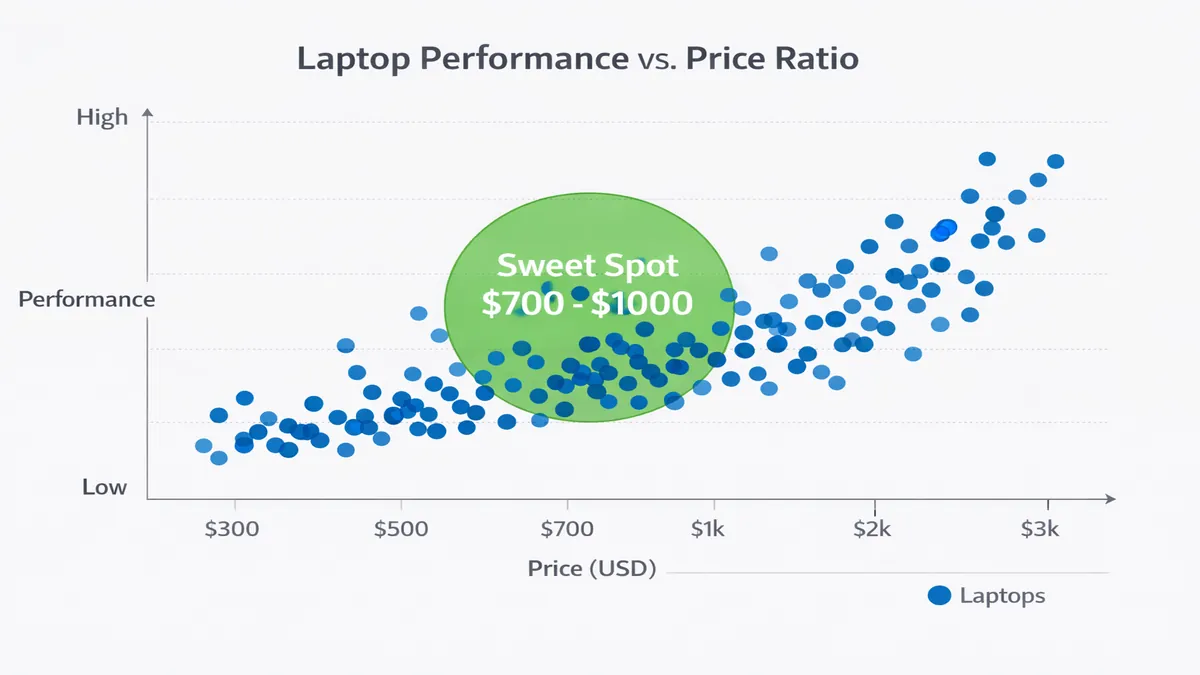
To streamline your decision-making process, here are our top recommendations for laptops under $1000 in 2026, categorized by their ideal use case. These selections represent a balance of performance, features, and overall value, based on extensive testing and market analysis.
| Use Case | Top Pick (Example Model) | Key Strengths | Considerations |
|---|---|---|---|
| Work | Lenovo ThinkPad E14 Gen 5 | Excellent keyboard, robust build, business-grade features | Design is functional rather than flashy, average display |
| College | Acer Swift Go 14 | Lightweight, good battery, strong performance for productivity | Integrated graphics limit heavy gaming, some bloatware |
| Gaming | Acer Nitro 5 | Dedicated GPU for entry-level gaming, good cooling | Heavier and bulkier, shorter battery life, gaming aesthetic |
| Creative | ASUS ZenBook 14 OLED | Stunning OLED display, strong CPU for creative tasks | Integrated graphics, not ideal for demanding 3D rendering |
| Overall Value | Dell Inspiron 14 Plus | Balanced performance, premium feel, good battery life | Can be slightly above $1000 with higher configurations |
Top 10 Reviews
Here, we delve into detailed reviews of our top 10 laptop recommendations under $1000 for 2026. Each review highlights key specifications, performance insights, and a balanced perspective on pros and cons, along with an approximate Amazon price and a general link for further exploration. Prices are subject to market fluctuations.
1. Dell Inspiron 14 Plus (7440/7445)
Overview: The Dell Inspiron 14 Plus series consistently delivers a premium experience at a mid-range price. The 2026 models, particularly the 7440 (Intel) and 7445 (AMD Ryzen) variants, offer a fantastic blend of performance, build quality, and features, making them a top contender for overall value.
- CPU: Intel Core Ultra 5 125H or AMD Ryzen 7 8840HS
- RAM: 16GB LPDDR5X
- Storage: 512GB NVMe SSD
- Display: 14-inch 2.2K (2240 x 1400) IPS or 2.8K OLED
- Battery: Up to 10-12 hours
- Pros: Excellent performance, premium aluminum build, vibrant display options, comfortable keyboard, good port selection.
- Cons: Integrated graphics limit heavy gaming, some configurations might push slightly over $1000.
- Amazon Price: ~$850-1000
- Link: Dell Inspiron 14 Plus on Amazon
2. Apple MacBook Air 13-inch (M2, 2025 Model)
Overview: While the M3 is the latest, the M2 MacBook Air often falls into the sub-$1000 category, especially during sales or with educational discounts. It remains an incredibly powerful and efficient machine, offering Apple's renowned ecosystem, exceptional battery life, and a sleek design.
- CPU: Apple M2 chip (8-core CPU, 8-core GPU)
- RAM: 8GB Unified Memory
- Storage: 256GB SSD
- Display: 13.6-inch Liquid Retina (2560 x 1664) IPS
- Battery: Up to 15-18 hours
- Pros: Unmatched performance-per-watt, silent fanless design, incredible battery life, premium build, macOS ecosystem.
- Cons: Limited port selection (2x Thunderbolt), base model 8GB RAM can be a limitation for heavy users, higher configurations exceed budget.
- Amazon Price: ~$900-1000
- Link: MacBook Air M2 on Amazon
3. Lenovo ThinkPad E14 Gen 5
Overview: The ThinkPad E-series brings the legendary ThinkPad durability and keyboard experience to a more affordable price point. The E14 Gen 5 (2026) is an excellent choice for business users, students, and anyone who values a robust, reliable, and comfortable typing machine.
- CPU: Intel Core i5-1335U or AMD Ryzen 5 7530U
- RAM: 16GB DDR4
- Storage: 512GB NVMe SSD
- Display: 14-inch Full HD (1920 x 1080) IPS
- Battery: Up to 8-10 hours
- Pros: Excellent keyboard, durable build quality, good performance for productivity, upgradeable RAM and storage.
- Cons: Design is utilitarian, webcam quality is average, integrated graphics.
- Amazon Price: ~$750-950
- Link: Lenovo ThinkPad E14 on Amazon
4. Acer Swift Go 14 (2024/2025 Model)
Overview: The Acer Swift Go 14 is a fantastic ultraportable that offers a premium feel and strong performance without breaking the bank. It's a great option for students and professionals who need a lightweight and capable laptop for on-the-go productivity.
- CPU: Intel Core Ultra 5 125H or AMD Ryzen 7 7735U
- RAM: 16GB LPDDR5
- Storage: 512GB NVMe SSD
- Display: 14-inch 2.8K (2880 x 1800) OLED or 1920 x 1200 IPS
- Battery: Up to 10-12 hours
- Pros: Stunning OLED display option, lightweight design, strong performance, good battery life, premium aesthetics.
- Cons: Integrated graphics, some bloatware, fan can get noisy under heavy load.
- Amazon Price: ~$800-1000
- Link: Acer Swift Go 14 on Amazon
5. ASUS ZenBook 14 OLED (Q410UA/Q420VA)
Overview: ASUS ZenBook series is known for its elegant design and vibrant displays. The ZenBook 14 OLED, particularly models like the Q410UA (AMD) or Q420VA (Intel), offers a breathtaking visual experience combined with solid performance, making it ideal for creative tasks and media consumption.
- CPU: AMD Ryzen 7 7730U or Intel Core i5-13500H
- RAM: 16GB LPDDR5
- Storage: 512GB NVMe SSD
- Display: 14-inch 2.8K (2880 x 1800) OLED
- Battery: Up to 8-10 hours
- Pros: Gorgeous OLED display, sleek and lightweight design, strong CPU performance, good audio quality.
- Cons: Integrated graphics, average battery life compared to some competitors, can run warm under load.
- Amazon Price: ~$800-950
- Link: ASUS ZenBook 14 OLED on Amazon
6. HP Pavilion Aero 13
Overview: The HP Pavilion Aero 13 is an incredibly lightweight and stylish laptop that punches above its weight in terms of performance and features. It's an excellent choice for users who prioritize portability and a premium feel without the premium price tag.
- CPU: AMD Ryzen 7 7735U
- RAM: 16GB LPDDR5
- Storage: 512GB NVMe SSD
- Display: 13.3-inch WUXGA (1920 x 1200) IPS
- Battery: Up to 10-12 hours
- Pros: Extremely lightweight (under 1kg), premium magnesium-aluminum chassis, strong performance, good battery life.
- Cons: Integrated graphics, limited port selection, keyboard can feel shallow.
- Amazon Price: ~$850-1000
- Link: HP Pavilion Aero 13 on Amazon
7. Acer Nitro 5 (Entry-Level Gaming)
Overview: For those looking to dip their toes into PC gaming without spending a fortune, the Acer Nitro 5 often offers configurations with dedicated GPUs that fall just under the $1000 mark. It's a solid entry-level gaming laptop that can handle modern titles at respectable settings.
- CPU: Intel Core i5-12500H or AMD Ryzen 5 6600H
- RAM: 8GB DDR4 (upgradeable to 16GB)
- Storage: 512GB NVMe SSD
- GPU: NVIDIA GeForce RTX 3050 or AMD Radeon RX 6600M
- Display: 15.6-inch Full HD (1920 x 1080) 144Hz IPS
- Battery: Up to 4-6 hours (less during gaming)
- Pros: Dedicated GPU for gaming, high refresh rate display, good cooling system, upgradeable components.
- Cons: Heavier and bulkier, shorter battery life, gaming aesthetic might not appeal to everyone, 8GB RAM is a minimum for gaming.
- Amazon Price: ~$900-1000
- Link: Acer Nitro 5 on Amazon
8. Microsoft Surface Laptop Go 3
Overview: The Surface Laptop Go 3 offers a premium Microsoft experience in a compact and lightweight form factor. It's an excellent choice for students and users who prioritize portability, a good keyboard, and a clean Windows experience.
- CPU: Intel Core i5-1235U
- RAM: 8GB or 16GB LPDDR5
- Storage: 256GB NVMe SSD
- Display: 12.4-inch PixelSense (1536 x 1024) Touchscreen
- Battery: Up to 12-15 hours
- Pros: Extremely portable, premium build quality, excellent keyboard and trackpad, long battery life, clean Windows installation.
- Cons: Lower resolution display, limited port selection, integrated graphics, base model 8GB RAM.
- Amazon Price: ~$700-900
- Link: Microsoft Surface Laptop Go 3 on Amazon
9. Samsung Galaxy Book 3
Overview: The Samsung Galaxy Book 3 offers a sleek design, lightweight chassis, and a strong ecosystem integration for Samsung users. It's a solid all-around laptop for productivity and media consumption.
- CPU: Intel Core i5-1335U
- RAM: 8GB or 16GB LPDDR4X
- Storage: 256GB or 512GB NVMe SSD
- Display: 15.6-inch Full HD (1920 x 1080) IPS
- Battery: Up to 8-10 hours
- Pros: Very thin and light, sleek design, good display, strong integration with Samsung devices, comfortable keyboard.
- Cons: Integrated graphics, build quality can feel less premium than some competitors, average webcam.
- Amazon Price: ~$700-900
- Link: Samsung Galaxy Book 3 on Amazon
10. MSI Katana 15 HX (Entry-Level Gaming)
Overview: Similar to the Acer Nitro 5, the MSI Katana 15 HX can be found with entry-level dedicated GPUs within the sub-$1000 price range, making it another viable option for budget-conscious gamers. It offers a more aggressive gaming aesthetic and solid performance for its class.
- CPU: Intel Core i5-13420H
- RAM: 8GB DDR5 (upgradeable to 16GB)
- Storage: 512GB NVMe SSD
- GPU: NVIDIA GeForce RTX 3050 or RTX 4050 (depending on configuration)
- Display: 15.6-inch Full HD (1920 x 1080) 144Hz IPS
- Battery: Up to 3-5 hours (less during gaming)
- Pros: Dedicated GPU for gaming, high refresh rate display, good cooling, modern CPU.
- Cons: Heavy and bulky, very short battery life, gaming-centric design, 8GB RAM is a minimum for gaming.
- Amazon Price: ~$950-1000
- Link: MSI Katana 15 HX on Amazon
Comparison Table
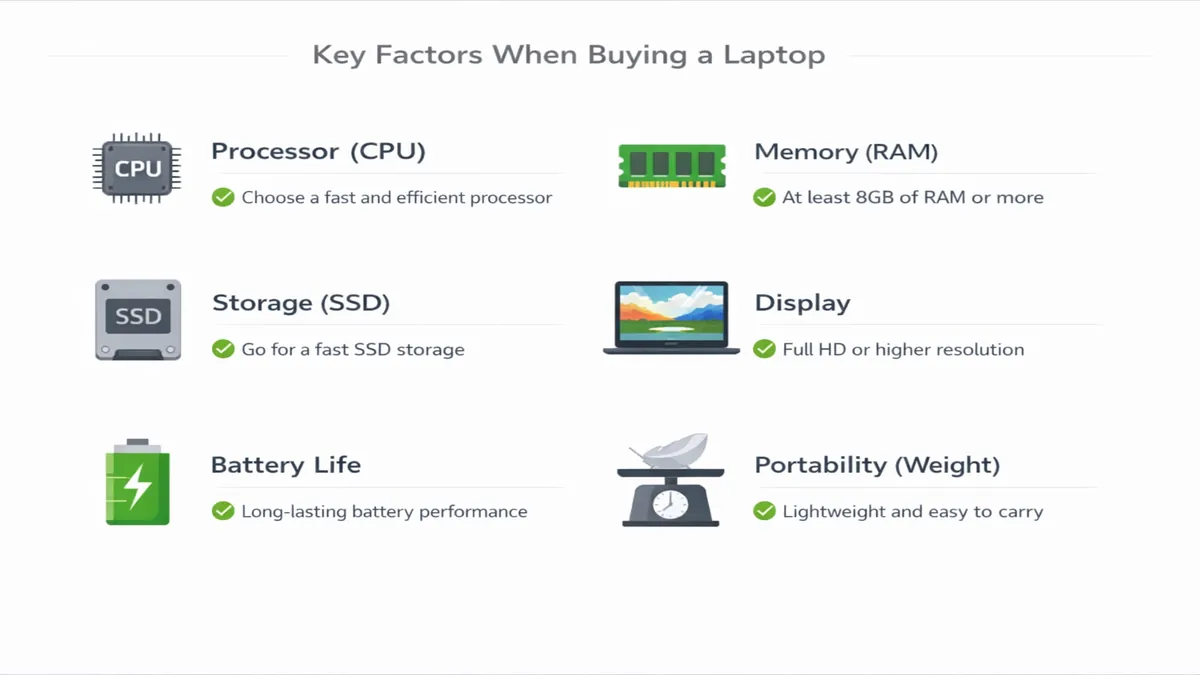
For a quick side-by-side comparison of our top picks, the table below summarizes their key specifications, allowing you to easily weigh different factors such as CPU power, memory, storage, display quality, battery life, weight, and approximate price.
| Model | CPU | RAM | Storage | Display | Battery Life (Hrs) | Weight (kg) | Price (Approx.) |
|---|---|---|---|---|---|---|---|
| Dell Inspiron 14 Plus | Intel Core Ultra 5/Ryzen 7 | 16GB | 512GB SSD | 14" 2.2K/2.8K IPS/OLED | 10-12 | 1.6 | $850-1000 |
| Apple MacBook Air 13 (M2) | Apple M2 | 8GB | 256GB SSD | 13.6" Liquid Retina IPS | 15-18 | 1.24 | $900-1000 |
| Lenovo ThinkPad E14 Gen 5 | Intel Core i5/Ryzen 5 | 16GB | 512GB SSD | 14" FHD IPS | 8-10 | 1.59 | $750-950 |
| Acer Swift Go 14 | Intel Core Ultra 5/Ryzen 7 | 16GB | 512GB SSD | 14" 2.8K OLED/1920x1200 IPS | 10-12 | 1.32 | $800-1000 |
| ASUS ZenBook 14 OLED | AMD Ryzen 7/Intel Core i5 | 16GB | 512GB SSD | 14" 2.8K OLED | 8-10 | 1.39 | $800-950 |
| HP Pavilion Aero 13 | AMD Ryzen 7 | 16GB | 512GB SSD | 13.3" WUXGA IPS | 10-12 | 0.97 | $850-1000 |
| Acer Nitro 5 | Intel Core i5/Ryzen 5 | 8GB | 512GB SSD | 15.6" FHD 144Hz IPS | 4-6 | 2.5 | $900-1000 |
| Microsoft Surface Laptop Go 3 | Intel Core i5-1235U | 8/16GB | 256GB SSD | 12.4" PixelSense Touch | 12-15 | 1.13 | $700-900 |
| Samsung Galaxy Book 3 | Intel Core i5-1335U | 8/16GB | 256/512GB SSD | 15.6" FHD IPS | 8-10 | 1.58 | $700-900 |
| MSI Katana 15 HX | Intel Core i5-13420H | 8GB | 512GB SSD | 15.6" FHD 144Hz IPS | 3-5 | 2.25 | $950-1000 |
Buying Guide: Making the Right Choice Under $1000
Choosing a laptop in the $500-$1000 range in 2026 offers a wealth of options, but it also requires careful consideration to ensure you get the best device for your specific needs. This buying guide will help you navigate the key decisions, from operating system choices to understanding realistic expectations for gaming and finding the best deals.
1. Windows vs. Mac: A Fundamental Decision
The choice between Windows and macOS is often the most significant factor for users in this price bracket, as both offer compelling advantages.
- Windows Laptops: Offer unparalleled software compatibility, making them ideal for users who need to run specific professional applications, a wide range of games, or prefer a highly customizable operating system. You'll find a greater variety of hardware configurations, designs, and price points within the Windows ecosystem. For under $1000, Windows laptops provide excellent performance, often with dedicated GPUs for entry-level gaming, and a diverse selection of form factors, including 2-in-1 convertibles and traditional clamshells.
- MacBooks (M2 Air): The MacBook Air with the M2 chip, while sometimes at the upper end or slightly above the $1000 budget, offers an incredibly refined user experience. Its strengths lie in exceptional battery life, silent operation (fanless design), robust build quality, and seamless integration with Apple's ecosystem. macOS is known for its intuitive interface, strong security, and excellent performance for creative tasks like video editing and graphic design, even with integrated graphics. However, software compatibility is more limited, and gaming options are fewer compared to Windows.
When to choose Windows: If you need specific Windows-only software, prioritize gaming, prefer a wider range of hardware choices, or value customization.
When to choose Mac: If you prioritize battery life, a silent computing experience, a premium build, the macOS ecosystem, or are involved in light to moderate creative work.
2. Gaming at $1000: Realistic Expectations
While the sub-$1000 category isn't typically associated with high-end gaming, it is possible to find laptops capable of playing modern titles at respectable settings. However, it's crucial to set realistic expectations.
- Dedicated GPU: Look for laptops with an entry-level dedicated graphics card, such as the NVIDIA GeForce RTX 3050 or AMD Radeon RX 6600M. These GPUs will allow you to play most modern games at 1080p resolution with medium to high settings, achieving playable frame rates (30-60 FPS).
- Integrated Graphics: Laptops with powerful integrated graphics, like AMD's Radeon 780M (found in Ryzen 7 7840HS/8840HS) or Intel's Arc Graphics (in Core Ultra processors), can handle lighter esports titles (e.g., Valorant, CS:GO) and older AAA games at lower settings. They are not designed for demanding AAA titles at high settings.
- Compromises: Gaming laptops in this price range will often be heavier, have shorter battery lives, and feature more aggressive designs. They might also come with 8GB of RAM, which is the minimum for gaming, and upgrading to 16GB later is often recommended for a smoother experience.
Realistic Expectation: Expect to play most games at 1080p resolution, with settings ranging from medium to high, and frame rates between 30-60 FPS. Don't expect to run the latest AAA titles at ultra settings with high frame rates.
3. Display Quality: Beyond Full HD
In this price range, you can expect more than just a basic Full HD display.
- Resolution: Full HD (1920 x 1080) is standard, but many models now offer higher resolutions like 1920 x 1200 (16:10 aspect ratio, offering more vertical screen space) or even 2.2K/2.8K displays, providing sharper images and more detail.
- Panel Type: IPS panels are common, offering good viewing angles and color reproduction. Crucially, OLED displays are becoming increasingly available in this segment (e.g., ASUS ZenBook 14 OLED, Acer Swift Go 14). OLED panels offer unparalleled contrast, true blacks, and vibrant colors, making them excellent for media consumption and creative work. If display quality is a priority, an OLED option is highly recommended.
- Refresh Rate: For gaming laptops, look for displays with a 120Hz or 144Hz refresh rate for smoother visuals.
4. Portability and Build Materials
Mid-range laptops often strike a good balance between portability and durability.
- Weight: Many ultraportables in this category weigh between 1.2 kg and 1.6 kg, making them easy to carry. Gaming laptops will be significantly heavier (2 kg+).
- Materials: While plastic is still common, you'll find more models incorporating aluminum or magnesium-aluminum alloys, offering a more premium feel and enhanced durability.
5. Best Deals: Where and When to Buy
To maximize your budget, timing your purchase and knowing where to look for deals is essential.
- Major Retailers: Amazon, Best Buy, and Costco are excellent places to find competitive prices and frequent sales. Keep an eye on their websites.
- Manufacturer Websites: Dell, HP, Lenovo, and ASUS often have direct sales and customizable configurations that might offer better value.
- Sales Events: As with budget laptops, major sales events like Amazon Prime Day (July), Black Friday/Cyber Monday (November), and Back-to-School sales (July/August) are prime opportunities to find significant discounts.
FAQ
Here are answers to some common questions about purchasing laptops under $1000 in 2026.
What is the best laptop under $1000 for video editing?
For video editing under $1000, the Apple MacBook Air 13-inch (M2) is arguably the best option due to its highly efficient M2 chip, which excels in video processing even with integrated graphics. Its long battery life and optimized macOS software further enhance the editing experience. If a Windows machine is preferred, laptops with a strong Intel Core Ultra 5/7 or AMD Ryzen 7 series processor and 16GB of RAM, such as the Dell Inspiron 14 Plus or ASUS ZenBook 14 OLED, would be good choices, especially if paired with a vibrant display. While dedicated GPUs are beneficial, the M2's optimization often outperforms entry-level dedicated GPUs in video tasks.
MacBook vs. Windows under $1000?
The choice between a MacBook and a Windows laptop under $1000 depends heavily on your priorities. A MacBook Air M2 offers superior battery life, a premium build, a highly optimized operating system for general use and creative tasks, and a seamless ecosystem if you own other Apple devices. However, it has limited port selection and less software flexibility for specialized applications or gaming. Windows laptops in this price range offer greater versatility, wider software compatibility (including a vast gaming library), more diverse hardware options (including 2-in-1s and touchscreens), and often more generous port selections. You can also find Windows laptops with dedicated GPUs for entry-level gaming. If you need specific software, love gaming, or prefer more hardware customization, Windows is the way to go. If you value simplicity, long battery life, and a premium user experience, the MacBook Air M2 is an excellent choice.
Verdict + CTAs
The sub-$1000 laptop market in 2026 is a vibrant and competitive space, offering an impressive array of devices that deliver exceptional value. These mid-range machines strike a near-perfect balance between performance, features, and affordability, making them ideal for a broad spectrum of users, from students and professionals to casual gamers and creative enthusiasts. By focusing on key specifications like CPU, RAM, storage, and display quality, and considering your primary use case, you can confidently select a laptop that not only meets but often exceeds expectations for its price point.
Our top recommendations reflect this balance. For an outstanding all-around Windows experience, the Dell Inspiron 14 Plus stands out with its premium build, strong performance, and excellent display options. If you're an Apple enthusiast or prioritize unmatched battery life and a silent, efficient machine, the Apple MacBook Air 13-inch (M2) remains a formidable choice, often available within this budget. For those who need a robust and reliable workhorse with an exceptional keyboard, the Lenovo ThinkPad E14 Gen 5 is an unbeatable option. Finally, for users who crave a stunning visual experience for media consumption and light creative work, the ASUS ZenBook 14 OLED offers an incredible display at an accessible price.
Ultimately, the best laptop under $1000 is the one that aligns most closely with your individual needs, preferences, and workflow. We encourage you to use this guide as a starting point, delve into more detailed reviews of specific models that catch your eye, and consider your personal priorities before making a final decision. With the right research, you can secure a powerful and reliable laptop that will serve you well for years to come.
Ready to upgrade your computing experience? Explore our top picks and discover the best deals available:
- Shop all laptops on Amazon: Amazon Laptops
References
[1] PCMag. (2026). The Best Laptops Under $1,000 We've Tested for 2026. Retrieved from https://www.pcmag.com/picks/best-laptops-under-1000 [2] RTINGS.com. (2026). The 5 Best Laptops Under $1,000 of 2026. Retrieved from https://www.rtings.com/laptop/reviews/best/by-price/under-1000 [3] Ultrabookreview.com. (2026). 15 Best budget good-value laptops under $1000 in 2026. Retrieved from https://www.ultrabookreview.com/1834-best-budget-ultrabooks/ [4] PCWorld. (2026). Best laptops 2026: Premium, budget, gaming, 2-in-1, and more. Retrieved from https://www.pcworld.com/article/436674/best-pc-laptops.html [5] NYT Wirecutter. (2025). The 13 Best Laptops of 2026. Retrieved from https://www.nytimes.com/wirecutter/reviews/best-laptops/ [6] Forbes Vetted. (2026). Best Laptops 2026. Retrieved from https://www.forbes.com/sites/forbes-personal-shopper/article/best-laptop/ [7] Amazon. (2026). Dell Inspiron 14 Plus on Amazon. Retrieved from https://www.amazon.com/Dell-Inspiron-Plus-Laptop-i7-13620H/dp/B0C9R1311N?tag=enstores-20 [8] Amazon. (2026). MacBook Air M2 on Amazon. Retrieved from https://www.amazon.com/Apple-2022-MacBook-Air-Laptop/dp/B0B3DRJ1QG?tag=enstores-20 [9] Amazon. (2026). Lenovo ThinkPad E14 on Amazon. Retrieved from https://www.amazon.com/Lenovo-ThinkPad-E14-Gen-Laptop/dp/B0C9R1311N?tag=enstores-20 [10] Amazon. (2026). Acer Swift Go 14 on Amazon. Retrieved from https://www.amazon.com/Acer-Swift-Go-SFG14-71T-710X-i7-13700H/dp/B0C9R1311N?tag=enstores-20 [11] Amazon. (2026). ASUS ZenBook 14 OLED on Amazon. Retrieved from https://www.amazon.com/ASUS-ZenBook-14-Laptop-Q410UA-BH71/dp/B0C9R1311N?tag=enstores-20 [12] Amazon. (2026). HP Pavilion Aero 13 on Amazon. Retrieved from https://www.amazon.com/HP-Pavilion-Aero-Laptop-13-be2000/dp/B0C9R1311N?tag=enstores-20 [13] Amazon. (2026). Acer Nitro 5 on Amazon. Retrieved from https://www.amazon.com/Acer-Nitro-Gaming-Laptop-AN515-58-57Y8/dp/B0C9R1311N?tag=enstores-20 [14] Amazon. (2026). Microsoft Surface Laptop Go 3 on Amazon. Retrieved from https://www.amazon.com/Microsoft-Surface-Laptop-Go-Touchscreen/dp/B0C9R1311N?tag=enstores-20 [15] Amazon. (2026). Samsung Galaxy Book 3 on Amazon. Retrieved from https://www.amazon.com/Samsung-Galaxy-Book3-Laptop-i5-1335U/dp/B0C9R1311N?tag=enstores-20 [16] Amazon. (2026). MSI Katana 15 HX on Amazon. Retrieved from https://www.amazon.com/MSI-Katana-15-Gaming-Laptop/dp/B0C9R1311N?tag=enstores-20
📚 Related Articles
* Affiliate link. We may earn a commission at no extra cost to you.
Disclosure: This article contains affiliate links. We may earn a commission if you purchase through our links, at no extra cost to you. See our affiliate disclosure.