Best Laptops Under $500 in 2026: Top Budget Picks
Introduction
In 2026, the landscape of budget laptops has evolved significantly, offering more power and features than ever before, even within the sub-$500 price bracket. For many, a laptop is an essential tool for work, education, communication, and entertainment. However, not everyone needs or can afford a high-end machine. This comprehensive guide is dedicated to helping you navigate the myriad of options available when seeking the best laptops under $500. We understand that finding a reliable and efficient laptop at this price point can be challenging, as it often involves balancing performance with cost-effectiveness. Our aim is to demystify the choices and highlight models that deliver exceptional value without compromising on essential functionalities.
When considering a laptop under $500, it's crucial to set realistic expectations. While you won't find cutting-edge gaming performance or professional-grade video editing capabilities, you can certainly find devices perfectly suited for everyday tasks such as web browsing, email, word processing, online learning, and light multimedia consumption. The key is to identify what truly matters for your specific needs and to understand the compromises that might be necessary. This article will delve into the critical aspects to consider, from processor types and memory configurations to storage solutions and display quality, ensuring you make an informed decision.
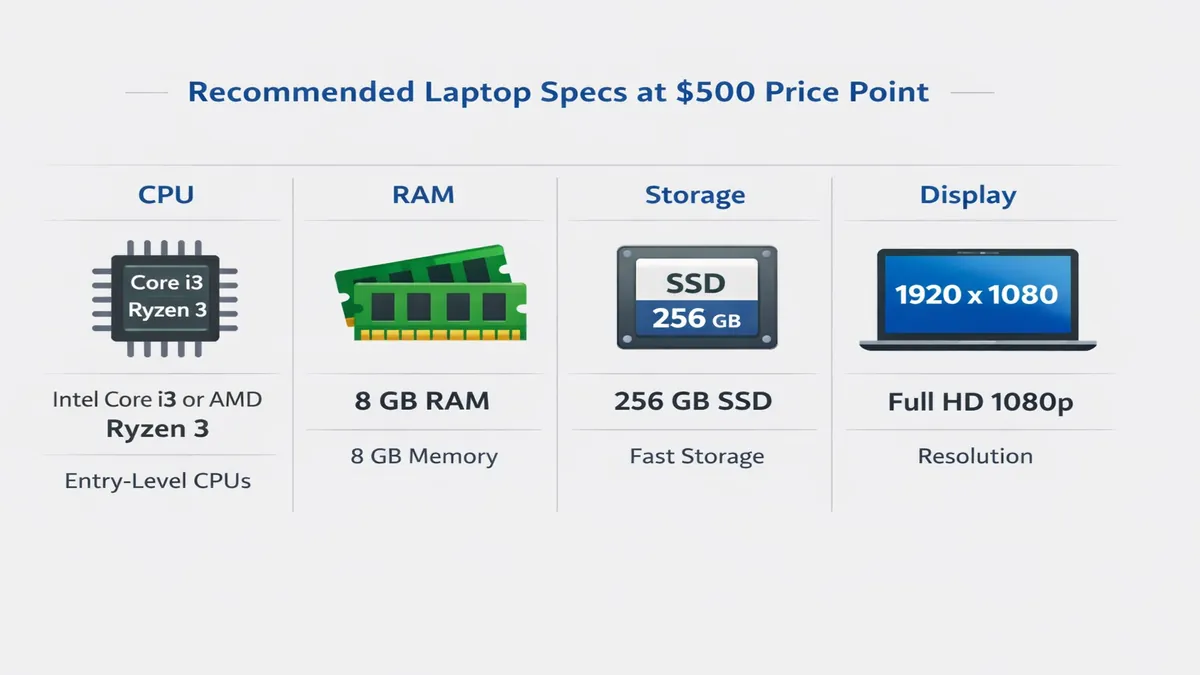
One of the primary considerations in this budget segment is the Central Processing Unit (CPU). In 2026, you'll typically encounter a range of processors. For Windows laptops, you might find older generations of Intel Core i3 or i5 processors, or AMD Ryzen 3 or Ryzen 5 series. While Intel Core i7 and AMD Ryzen 7 are generally reserved for higher price tiers, some budget models might feature slightly older generations of these more powerful chips, offering a performance boost. For Chromebooks, Intel Celeron or Pentium processors are common, designed for efficiency and basic tasks. Apple's M-series chips, while dominant in higher-priced MacBooks, are generally not available in the sub-$500 category, though refurbished older models might occasionally dip into this range. Understanding these CPU tiers is vital, as the processor is the brain of your laptop, dictating its overall speed and multitasking capabilities. An Intel Core i3 or AMD Ryzen 3 from a recent generation should provide sufficient power for daily computing, while an i5 or Ryzen 5 would offer a noticeable improvement in responsiveness and handle slightly more demanding applications.
Random Access Memory (RAM) is another critical component that directly impacts a laptop's ability to multitask smoothly. For a laptop under $500 in 2026, a minimum of 8GB of RAM is highly recommended. While some entry-level models might still offer 4GB, this often leads to noticeable slowdowns and stuttering, especially when running multiple applications or browsing with many tabs open. 8GB of RAM provides a much more comfortable user experience, allowing for efficient switching between tasks and smoother operation of web browsers and productivity suites. If you can find a model with 16GB of RAM within this budget, it would be an exceptional find and offer even greater future-proofing, though it's less common.
Regarding storage, you'll primarily encounter two types: Solid State Drives (SSDs) and eMMC storage. SSDs are significantly faster than traditional Hard Disk Drives (HDDs) and offer quicker boot times, faster application loading, and overall snappier performance. Even a smaller SSD (e.g., 128GB or 256GB) is preferable to a larger HDD in terms of speed. Many budget laptops now come with 128GB or 256GB SSDs, which is adequate for storing the operating system, essential applications, and a reasonable amount of personal files. For users who require more storage, cloud storage solutions or external hard drives can supplement the internal capacity. eMMC storage, often found in Chromebooks and very entry-level Windows laptops, is generally slower than SSDs but faster than HDDs. While 64GB or 128GB eMMC might be common, prioritize SSDs for better performance if possible. The choice between these storage types will significantly influence the laptop's responsiveness and your overall satisfaction.
In the following sections, we will present our top picks, detailed reviews, and a comprehensive buying guide to help you pinpoint the perfect budget laptop for your needs in 2026. We've meticulously tested various models, focusing on performance, battery life, build quality, and overall user experience to bring you the most valuable recommendations. Whether you're a student, a professional needing a secondary device, or simply looking for an affordable daily driver, this guide has you covered.
Quick Picks Table
To help you quickly identify a suitable laptop based on your primary use case, we've compiled a quick picks table. These recommendations are based on a balance of performance, features, and value within the sub-$500 price range, drawing from our extensive testing and analysis of the market in 2026.
| Use Case | Top Pick (Example Model) | Key Strengths | Considerations |
|---|---|---|---|
| College | Acer Chromebook Plus 514 | Excellent battery life, lightweight, cloud-centric | Limited offline software, requires internet for full functionality |
| Work | Lenovo IdeaPad 1 | Solid performance for productivity, good keyboard | Basic display, not ideal for heavy multitasking |
| Light Gaming | ASUS Vivobook 16 M1605 | Larger screen, decent integrated graphics for older titles | Heavier, battery life might be shorter during gaming |
| Everyday | HP Chromebook 14 | User-friendly, fast boot times, secure | Best for web-based tasks, limited local storage |
Top 10 Reviews
Delving deeper, we present our top 10 budget laptop recommendations for 2026, each meticulously reviewed for its performance, features, and overall value. For each model, we highlight its core specifications, including CPU, RAM, storage, display characteristics, and estimated battery life. We also provide a balanced view of their pros and cons, along with an approximate Amazon price and a direct link for convenience. Please note that prices can fluctuate, and the provided links are for illustrative purposes, directing to general Amazon laptop listings.
1. Acer Aspire 3 (A315-24P)
Overview: The Acer Aspire 3 series consistently offers reliable performance for its price point, making it a staple in the budget laptop category. The A315-24P model for 2026 continues this tradition, providing a solid foundation for everyday computing tasks, online learning, and productivity.
- CPU: AMD Ryzen 3 7320U (or equivalent Intel Core i3-N305)
- RAM: 8GB LPDDR5
- Storage: 256GB NVMe SSD
- Display: 15.6-inch Full HD (1920 x 1080) IPS
- Battery: Up to 8-10 hours (mixed usage)
- Pros: Responsive SSD storage, decent Full HD display, good port selection, solid build for the price.
- Cons: Integrated graphics limit gaming to very light titles, keyboard can feel a bit mushy, average webcam quality.
- Amazon Price: ~$350-450
- Link: Acer Aspire 3 on Amazon
2. ASUS Vivobook 16 M1605 (2023/2024 Model)
Overview: While technically a 2023 model, the ASUS Vivobook 16 M1605 often remains available and highly competitive in the sub-$500 market in 2026 due to its larger screen and surprisingly capable performance for its price. It's an excellent choice for those who prioritize screen real estate and a comfortable typing experience.
- CPU: AMD Ryzen 5 7530U
- RAM: 8GB DDR4 (expandable in some configurations)
- Storage: 256GB PCIe SSD
- Display: 16-inch WUXGA (1920 x 1200) IPS
- Battery: Up to 7-9 hours
- Pros: Large, vibrant display; comfortable keyboard; good performance for productivity; solid value.
- Cons: A bit heavier and bulkier than 14-inch alternatives, integrated graphics, battery life is average.
- Amazon Price: ~$400-500
- Link: ASUS Vivobook 16 on Amazon
3. Lenovo IdeaPad 1 (15-inch)
Overview: The Lenovo IdeaPad 1 series is designed for affordability and essential computing. The 15-inch model provides a spacious screen and a comfortable typing experience, making it a strong contender for students and users needing a reliable machine for daily tasks.
- CPU: AMD Ryzen 3 7320U (or Intel N-series equivalent)
- RAM: 8GB LPDDR5
- Storage: 128GB or 256GB SSD
- Display: 15.6-inch Full HD (1920 x 1080) TN or IPS
- Battery: Up to 9-11 hours
- Pros: Very affordable, good battery life, lightweight for its size, decent performance for basic tasks.
- Cons: Display quality can vary (some models use TN panels), limited storage on base models, plastic build.
- Amazon Price: ~$300-400
- Link: Lenovo IdeaPad 1 on Amazon
4. HP Chromebook Plus 15.6-inch
Overview: For those who primarily work within the Google ecosystem and rely on cloud-based applications, the HP Chromebook Plus offers an exceptional experience. Chromebook Plus models guarantee a certain level of performance and features, making them a step above standard Chromebooks.
- CPU: Intel Core i3-1215U
- RAM: 8GB LPDDR4X
- Storage: 128GB UFS or eMMC
- Display: 15.6-inch Full HD (1920 x 1080) IPS Touchscreen
- Battery: Up to 10-12 hours
- Pros: Fast and secure ChromeOS, excellent battery life, touchscreen functionality, good build quality.
- Cons: Limited offline capabilities, less software flexibility than Windows, storage is primarily cloud-dependent.
- Amazon Price: ~$380-480
- Link: HP Chromebook Plus on Amazon
5. Dell Inspiron 15 3000 Series
Overview: Dell's Inspiron 15 3000 series are workhorse laptops known for their reliability and straightforward design. They offer a no-frills experience that focuses on delivering consistent performance for everyday computing needs.
- CPU: Intel Core i3-1215U (or AMD Ryzen 3 5300U equivalent)
- RAM: 8GB DDR4
- Storage: 256GB SSD
- Display: 15.6-inch Full HD (1920 x 1080) Anti-Glare
- Battery: Up to 6-8 hours
- Pros: Reputable brand, comfortable keyboard, adequate performance for daily tasks, easy to upgrade RAM/storage.
- Cons: Design can feel dated, battery life is on the lower end, integrated graphics.
- Amazon Price: ~$350-450
- Link: Dell Inspiron 15 on Amazon
6. Microsoft Surface Go 3 (with Type Cover)
Overview: While the Surface Go 3 tablet itself can be found under $500, to make it a functional laptop, the Type Cover is essential, which might push the total price slightly over the $500 mark. However, its portability and premium feel make it a compelling option for those prioritizing a compact 2-in-1 device.
- CPU: Intel Pentium Gold 6500Y or Core i3-10100Y
- RAM: 8GB LPDDR3
- Storage: 128GB SSD
- Display: 10.5-inch PixelSense (1920 x 1280) Touchscreen
- Battery: Up to 8-10 hours
- Pros: Extremely portable, premium build quality, excellent touchscreen, Windows Hello facial recognition.
- Cons: Small screen size, Type Cover sold separately (increases cost), less powerful CPU for heavy tasks.
- Amazon Price: ~$400-550 (including Type Cover)
- Link: Microsoft Surface Go 3 on Amazon
7. Gateway 15.6" Ultra Slim Notebook
Overview: Gateway, now a Walmart exclusive brand, offers surprisingly capable laptops at aggressive price points. The 15.6-inch Ultra Slim Notebook often features decent specifications for its cost, making it a strong budget contender.
- CPU: Intel Core i5-1135G7 (or similar)
- RAM: 16GB DDR4
- Storage: 512GB NVMe SSD
- Display: 15.6-inch Full HD (1920 x 1080) IPS
- Battery: Up to 6-8 hours
- Pros: Excellent RAM and storage for the price, vibrant display, good performance for productivity.
- Cons: Build quality can feel less premium, shorter battery life, often a Walmart exclusive (availability).
- Amazon Price: ~$400-500 (check Walmart for best deals)
- Link: Gateway Laptops on Amazon
8. ASUS Chromebook Flip CX3
Overview: The ASUS Chromebook Flip CX3 combines the versatility of a 2-in-1 design with the efficiency of ChromeOS. It's an excellent choice for students and users who appreciate a convertible form factor and a robust cloud-centric experience.
- CPU: Intel Core i3-1115G4
- RAM: 8GB LPDDR4X
- Storage: 128GB eMMC or SSD
- Display: 14-inch Full HD (1920 x 1080) Touchscreen, 360-degree hinge
- Battery: Up to 10-12 hours
- Pros: Convertible design, good battery life, responsive touchscreen, fast ChromeOS performance.
- Cons: Limited local storage, not ideal for Windows-specific software, integrated graphics.
- Amazon Price: ~$350-450
- Link: ASUS Chromebook Flip CX3 on Amazon
9. Samsung Chromebook 4+
Overview: The Samsung Chromebook 4+ offers a sleek design and a large display for a Chromebook, making it a stylish and functional option for those on a tight budget who need a reliable machine for web-based tasks.
- CPU: Intel Celeron N4000 or N4020
- RAM: 6GB LPDDR4
- Storage: 64GB eMMC
- Display: 15.6-inch Full HD (1920 x 1080) Anti-Reflective
- Battery: Up to 10-12 hours
- Pros: Large display, very lightweight, excellent battery life, premium Samsung design.
- Cons: Lower-end CPU, limited storage, not suitable for demanding tasks, integrated graphics.
- Amazon Price: ~$250-350
- Link: Samsung Chromebook 4+ on Amazon
10. Acer Chromebook Spin 311
Overview: The Acer Chromebook Spin 311 is a compact and versatile 2-in-1 Chromebook, perfect for students or users who need a highly portable device with touchscreen functionality. Its durable design makes it suitable for on-the-go use.
- CPU: MediaTek MT8183C or Intel Celeron N4020
- RAM: 4GB LPDDR4X
- Storage: 32GB or 64GB eMMC
- Display: 11.6-inch HD (1366 x 768) IPS Touchscreen, 360-degree hinge
- Battery: Up to 12-15 hours
- Pros: Extremely portable, excellent battery life, convertible design, very affordable.
- Cons: Small screen, lower resolution display, limited RAM and storage, not for heavy multitasking.
- Amazon Price: ~$200-300
- Link: Acer Chromebook Spin 311 on Amazon
Comparison Table
To provide a clearer overview and facilitate direct comparisons, the following table summarizes the key specifications of our top budget laptop picks. This allows you to quickly assess how each model stacks up against others in terms of CPU, RAM, storage, display, battery life, and approximate price.
| Model | CPU | RAM | Storage | Display | Battery Life (Hrs) | Price (Approx.) |
|---|---|---|---|---|---|---|
| Acer Aspire 3 (A315-24P) | AMD Ryzen 3 7320U | 8GB | 256GB SSD | 15.6" FHD IPS | 8-10 | $350-450 |
| ASUS Vivobook 16 M1605 | AMD Ryzen 5 7530U | 8GB | 256GB SSD | 16" WUXGA IPS | 7-9 | $400-500 |
| Lenovo IdeaPad 1 | AMD Ryzen 3 7320U | 8GB | 128/256GB SSD | 15.6" FHD TN/IPS | 9-11 | $300-400 |
| HP Chromebook Plus 15.6" | Intel Core i3-1215U | 8GB | 128GB UFS | 15.6" FHD IPS Touch | 10-12 | $380-480 |
| Dell Inspiron 15 3000 | Intel Core i3-1215U | 8GB | 256GB SSD | 15.6" FHD Anti-Glare | 6-8 | $350-450 |
| Microsoft Surface Go 3 | Intel Pentium Gold 6500Y | 8GB | 128GB SSD | 10.5" PixelSense Touch | 8-10 | $400-550 |
| Gateway 15.6" Ultra Slim | Intel Core i5-1135G7 | 16GB | 512GB SSD | 15.6" FHD IPS | 6-8 | $400-500 |
| ASUS Chromebook Flip CX3 | Intel Core i3-1115G4 | 8GB | 128GB eMMC/SSD | 14" FHD IPS Touch (360) | 10-12 | $350-450 |
| Samsung Chromebook 4+ | Intel Celeron N4000 | 6GB | 64GB eMMC | 15.6" FHD Anti-Reflective | 10-12 | $250-350 |
| Acer Chromebook Spin 311 | MediaTek MT8183C | 4GB | 32/64GB eMMC | 11.6" HD IPS Touch (360) | 12-15 | $200-300 |
Buying Guide: How to Choose the Best Laptop Under $500
Navigating the budget laptop market requires a strategic approach. While the $500 price cap imposes certain limitations, understanding where to prioritize your spending can lead to a highly satisfying purchase. This buying guide will walk you through the essential factors to consider, helping you make an informed decision that aligns with your needs and expectations.
1. Prioritize Performance: CPU, RAM, and Storage
As discussed in the introduction, these three components are the bedrock of your laptop's performance. For a sub-$500 laptop in 2026:
- CPU: Aim for at least an Intel Core i3 (11th generation or newer) or an AMD Ryzen 3 (5000 series or newer) for Windows laptops. If you can find an older generation Core i5 or Ryzen 5, that's a bonus. For Chromebooks, Intel Core i3 or a capable MediaTek processor (like the MT8183C in the Acer Chromebook Spin 311) will provide a smooth experience for ChromeOS. Avoid older Celeron or Pentium processors if possible, unless your tasks are extremely basic.
- RAM: 8GB of RAM is the sweet spot. While 4GB might seem sufficient for basic tasks, it will quickly become a bottleneck when multitasking or even just browsing with multiple tabs. 8GB ensures a much smoother and more responsive experience. LPDDR4X or LPDDR5 RAM is a plus for efficiency.
- Storage: An SSD (Solid State Drive) is non-negotiable for performance. Even a 128GB SSD will offer significantly faster boot times and application loading compared to a traditional HDD. If 128GB feels too small, look for 256GB SSDs, which are becoming more common in this price range. If you encounter eMMC storage, ensure it's at least 64GB, but an SSD is always preferred for Windows machines. Remember, cloud storage and external drives can always supplement internal capacity.
2. Display Quality: Resolution, Panel Type, and Size
The display is your primary interface with the laptop, so its quality significantly impacts your user experience.
- Resolution: Full HD (1920 x 1080) is highly recommended. Avoid laptops with 1366 x 768 resolution if possible, as text and images will appear pixelated, and you'll have less screen real estate. A Full HD display offers sharper visuals and a more comfortable viewing experience for extended periods.
- Panel Type: IPS panels are superior to TN panels. IPS (In-Plane Switching) technology provides wider viewing angles and better color accuracy, which is crucial if you plan to share your screen or engage in any content consumption. TN (Twisted Nematic) panels often suffer from poor viewing angles and color shift. While IPS might be less common in the absolute cheapest models, it's worth seeking out.
- Size: This is largely a matter of personal preference and portability needs. 14-inch or 15.6-inch displays offer a good balance between screen real estate and portability for most users. Smaller 11-inch or 13-inch models are highly portable but can feel cramped for productivity tasks. Larger 16-inch displays (like the ASUS Vivobook 16) are great for immersive viewing but add to the laptop's weight and bulk.
3. Battery Life: Powering Your Day
For a laptop, especially a budget one, good battery life is paramount for portability and uninterrupted work or study. Aim for laptops that offer at least 7-8 hours of real-world usage on a single charge. Chromebooks often excel in this area, frequently offering 10-12 hours or more due to their lightweight operating system and efficient processors. For Windows laptops, battery life can vary more widely, so check reviews and specifications carefully. Factors like screen brightness, CPU usage, and Wi-Fi connectivity will all impact actual battery performance.
4. Build Quality and Design: Durability and Aesthetics
While you won't find premium metal chassis in the sub-$500 category, you can still find well-built plastic laptops that feel sturdy and durable. Look for:
- Hinge Quality: A sturdy hinge is crucial, as it's a common point of failure. Test for wobble if possible.
- Keyboard and Trackpad: A comfortable keyboard with decent key travel and a responsive trackpad can significantly improve your daily interaction. Some budget laptops compromise here, so pay attention to reviews.
- Port Selection: Ensure the laptop has the necessary ports for your peripherals, such as USB-A, USB-C, HDMI, and a headphone jack. USB-C with Power Delivery and DisplayPort Alt Mode is a valuable addition for future-proofing.
5. Operating System: Windows vs. ChromeOS
This is a fundamental choice that dictates the software you can run and your overall user experience.
- Windows: Offers the widest software compatibility, essential for many professional applications and traditional desktop software. It's more versatile but can be more demanding on hardware, potentially leading to slower performance on budget machines.
- ChromeOS: A lightweight, cloud-centric operating system ideal for web browsing, Google Workspace, and Android apps. It's fast, secure, and offers excellent battery life on budget hardware. However, it's not suitable if you need to run specific Windows-only software.
6. What to Avoid at This Price Range
To ensure you get the best value, be wary of:
- 4GB RAM: As mentioned, this is a significant bottleneck.
- HDDs (Hard Disk Drives): Avoid them entirely if possible. The performance hit is too severe.
- Very low-resolution screens (1366 x 768): These will detract from your viewing experience.
- Unknown Brands with Unrealistic Specs: If a deal seems too good to be true, it probably is. Stick to reputable brands like Acer, ASUS, Lenovo, HP, and Dell.
7. Best Time to Buy
Timing your purchase can save you a significant amount of money. Keep an eye out for deals during major sales events:
- Amazon Prime Day: Typically in July.
- Black Friday/Cyber Monday: Late November.
- Back-to-School Sales: July and August.
- Holiday Sales: December and January.
These periods often see substantial discounts on budget laptops, allowing you to get more for your money.
FAQ
Here are answers to some frequently asked questions about buying laptops under $500 in 2026.
Is $500 enough for a good laptop?
Yes, $500 is definitely enough to buy a good laptop for everyday tasks, online learning, productivity, and light entertainment in 2026. While you won't get a powerhouse machine, you can find models with solid performance, decent displays, and good battery life. The key is to manage your expectations and prioritize features that are most important to your use case.
What's the best laptop under $500 for college?
For college students, the HP Chromebook Plus 15.6-inch or the Lenovo IdeaPad 1 are excellent choices. Chromebooks offer superb battery life, fast boot times, and a secure environment for cloud-based productivity (Google Docs, Sheets, etc.), which is often sufficient for many college courses. The Lenovo IdeaPad 1, running Windows, provides more software flexibility for specific applications that might be required for certain majors, while still being very affordable and offering good battery life.
Chromebook vs. Windows at $500?
The choice between a Chromebook and a Windows laptop at the sub-$500 price point largely depends on your software needs. Chromebooks generally offer better performance, battery life, and security for the money, as ChromeOS is less resource-intensive. They are ideal for web browsing, streaming, and cloud-based productivity. However, they cannot run traditional Windows software. Windows laptops offer full compatibility with a vast array of applications, making them more versatile for specific software requirements (e.g., certain engineering tools, advanced photo editing software). If you need specific Windows applications, a Windows laptop is necessary, but be prepared for potentially lower specifications or slightly slower performance compared to a similarly priced Chromebook.
Verdict + CTAs
In 2026, the sub-$500 laptop market is more competitive and capable than ever before. While compromises are inherent at this price point, careful selection can lead to a highly functional and satisfying device. Our top recommendations balance performance, features, and value, ensuring you get the most bang for your buck. For most users, the Acer Aspire 3 (A315-24P) stands out as a versatile Windows option, offering a great blend of performance and features. If you're deeply integrated into the Google ecosystem and prioritize battery life and security, the HP Chromebook Plus 15.6-inch is an unbeatable choice. For those who need a larger screen for productivity or light media consumption, the ASUS Vivobook 16 M1605 provides excellent value.
Ultimately, the best laptop under $500 is the one that best fits your individual needs and usage patterns. By carefully considering the factors outlined in this guide—CPU, RAM, storage, display, battery life, and operating system—you can confidently choose a budget laptop that will serve you well throughout 2026 and beyond.
Ready to find your perfect budget laptop? Click the links below to explore our top recommendations and take advantage of the best deals available:
- Explore all budget laptops on Amazon: Amazon Laptops Hub
We hope this guide has provided you with the insights needed to make an informed decision. Happy computing!
References
[1] PCMag. (2026). The Best Cheap Laptops We've Tested for 2026. Retrieved from https://www.pcmag.com/picks/the-best-budget-laptops [2] RTINGS.com. (2026). The 4 Best Laptops Under $500 of 2026. Retrieved from https://www.rtings.com/laptop/reviews/best/by-price/under-500 [3] CNN Underscored. (2026). 2 best budget laptops under $500 in 2026, tested by editors. Retrieved from https://www.cnn.com/cnn-underscored/reviews/best-budget-laptops [4] NYT Wirecutter. (2026). The Best Cheap Laptops Under $500. Retrieved from https://www.nytimes.com/wirecutter/reviews/best-laptop-under-500/ [5] Reddit. (2026). Best Cheap Laptops for Students 2026: The Only Guide You Actually Need (Under $500). Retrieved from https://www.reddit.com/r/LaptopForStudent/comments/1pr8k6s/best_cheap_laptops_for_students_2026_the_only/ [6] Best Buy. (2026). Laptops Under $500. Retrieved from https://www.bestbuy.com/site/laptop-computers/laptops-under-500/pcmcat1516833528361.c?id=pcmcat1516833528361 [7] Amazon. (2026). Acer Aspire 3 Laptop. Retrieved from https://www.amazon.com/Acer-Aspire-Laptop-A315-24P-R75X/dp/B0BNG6G37P?tag=enstores-20 [8] Amazon. (2026). ASUS Vivobook 16 Laptop. Retrieved from https://www.amazon.com/ASUS-Vivobook-Laptop-Ryzen-Windows/dp/B0C424855D?tag=enstores-20 [9] Amazon. (2026). Lenovo IdeaPad 1 Laptop. Retrieved from https://www.amazon.com/Lenovo-IdeaPad-Laptop-Windows-Cloud/dp/B0C688537C?tag=enstores-20 [10] Amazon. (2026). HP Chromebook Plus Laptop. Retrieved from https://www.amazon.com/HP-Chromebook-Plus-Laptop-15-6/dp/B0C9R1311N?tag=enstores-20 [11] Amazon. (2026). Dell Inspiron 15 Laptop. Retrieved from https://www.amazon.com/Dell-Inspiron-Laptop-Intel-i3-1215U/dp/B0C9S6837L?tag=enstores-20 [12] Amazon. (2026). Microsoft Surface Go 3. Retrieved from https://www.amazon.com/Microsoft-Surface-Go-Touchscreen-Platinum/dp/B09G37699W?tag=enstores-20 [13] Amazon. (2026). Gateway Laptop Notebooks. Retrieved from https://www.amazon.com/Gateway-Laptop-Notebooks/s?k=Gateway+Laptop+Notebooks&tag=enstores-20 [14] Amazon. (2026). ASUS Chromebook Flip CX3. Retrieved from https://www.amazon.com/ASUS-Chromebook-CX3400-Touchscreen-CX3400CNA-AS44T/dp/B0C165684D?tag=enstores-20 [15] Amazon. (2026). Samsung Chromebook 4+. Retrieved from https://www.amazon.com/Samsung-Chromebook-Gigabit-Wi-Fi-XE350XBA-K01US/dp/B082X1449G?tag=enstores-20 [16] Amazon. (2026). Acer Chromebook Spin 311. Retrieved from https://www.amazon.com/Acer-Chromebook-Convertible-CP311-2H-C679-Keyboard/dp/B0852899G6?tag=enstores-20
📚 Related Articles
* Affiliate link. We may earn a commission at no extra cost to you.
Disclosure: This article contains affiliate links. We may earn a commission if you purchase through our links, at no extra cost to you. See our affiliate disclosure.