Best USB-C Hubs 2026: Top Picks for Laptops & MacBooks
Introduction
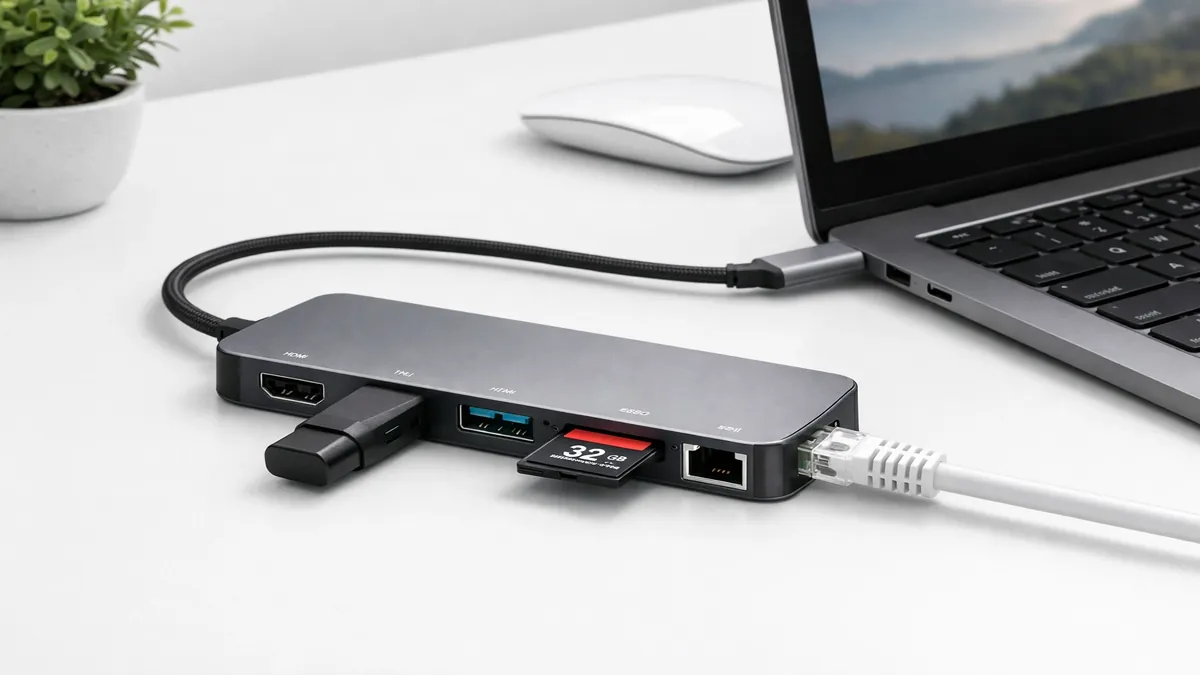
In 2026, the ubiquitous USB-C port has become the single most important connector on modern laptops, particularly for slim and ultralight models like Apple MacBooks, Dell XPS, and Microsoft Surface devices. While offering incredible versatility for charging, data transfer, and video output, the trend towards thinner designs has often come at the cost of traditional ports. This is where USB-C hubs and docking stations become not just convenient accessories, but essential tools for productivity and connectivity. These devices expand the single USB-C port into a multitude of connections, allowing users to connect legacy peripherals, external displays, Ethernet, and SD cards, all while often providing power passthrough to charge the host laptop. [1] [4]
The evolution of USB-C technology has been rapid and, at times, confusing, with various standards like Thunderbolt 4, USB 3.2, and USB4 coexisting. Understanding these distinctions is crucial for selecting the right hub that meets your performance needs. USB 3.2 is a foundational standard, with different generations offering varying data transfer speeds. For instance, USB 3.2 Gen 1 (formerly USB 3.0) offers 5Gbps, while USB 3.2 Gen 2 provides 10Gbps, and USB 3.2 Gen 2x2 doubles that to 20Gbps by utilizing two lanes. [7]
USB4 represents a significant leap, building on the underlying Thunderbolt protocol. It offers speeds of up to 40Gbps and is designed to be compatible with Thunderbolt 3 and 4, as well as older USB standards. This means a USB4 port can often function as a Thunderbolt port, offering similar capabilities for high-bandwidth applications like connecting multiple 4K displays or external GPUs. [8] [9]
Thunderbolt 4 is the pinnacle of USB-C connectivity, offering a guaranteed 40Gbps bandwidth, regardless of the connected device. It ensures consistent performance for data, video, and power delivery, making it the preferred choice for power users, creative professionals, and anyone with high-performance peripherals. Thunderbolt 4 also mandates support for two 4K displays or one 8K display, enhanced security, and backward compatibility with previous Thunderbolt and USB standards. [10]
Another critical aspect of USB-C hubs is Power Delivery (PD) passthrough. This feature allows you to connect your laptop's USB-C power adapter to the hub, which then passes power through to charge the laptop while simultaneously providing connectivity for other peripherals. This eliminates the need for multiple cables and keeps your workspace tidy. When choosing a hub, it's essential to look for one that supports sufficient wattage (e.g., 60W, 85W, 100W) to match or exceed your laptop's charging requirements. [13] [14]
However, not all USB-C hubs are created equal. The market is flooded with options, ranging from simple dongles that add a few USB-A ports to sophisticated docking stations that can power multiple displays and provide a plethora of connectivity options. The quality of these hubs can vary significantly, with cheap, no-name hubs sometimes leading to data corruption, unstable connections, or insufficient power delivery. Therefore, investing in a reputable brand and understanding the specifications is paramount. [6]
This guide aims to demystify the world of USB-C hubs in 2026, presenting our top picks for laptops and MacBooks. We'll cover a range of options, from portable travel hubs to powerful desktop docking stations, evaluating them based on port selection, data speed, power delivery capabilities, and overall build quality. Whether you're a professional needing to connect multiple monitors, a creative working with high-speed storage, or a casual user looking to expand your laptop's connectivity, this article will help you find the best USB-C hub to enhance your productivity and streamline your workflow.
Quick Picks
For those seeking immediate recommendations, here are our top quick picks for USB-C hubs in 2026, offering a balance of features, performance, and reliability:
- Anker 552 USB-C Hub (9-in-1): A popular choice known for its robust build quality, comprehensive port selection, and reliable performance, making it an excellent all-around hub for most users. It often includes HDMI, USB-A, Ethernet, and SD card slots. [5]
- CalDigit TS4 Thunderbolt 4 Dock: While a premium option, the TS4 is the gold standard for Thunderbolt 4 docks, offering unparalleled connectivity, power delivery, and performance for power users and professionals with Thunderbolt-enabled laptops. [2]
- Belkin Connect Thunderbolt 4 Dock: Another high-performance Thunderbolt 4 solution, the Belkin dock provides extensive port options and reliable power delivery, ideal for creating a powerful desktop workstation with a single cable connection.
- HyperDrive 6-in-1 USB-C Hub: A sleek and portable option, particularly favored by MacBook users for its design and essential port expansion, often including HDMI, USB-A, and SD card readers.
These quick picks represent a spectrum of USB-C hub solutions, from versatile portable hubs to high-performance docking stations, catering to diverse user needs and budgets.
Top 10 Reviews
Let's delve into detailed reviews of some of the best USB-C hubs available in 2026, examining their features, performance, and ideal use cases.
1. Anker 552 USB-C Hub (9-in-1)
The Anker 552 USB-C Hub is a highly regarded and versatile accessory that has consistently earned praise for its balanced feature set and reliable performance. As a 9-in-1 hub, it provides a comprehensive array of ports, making it an excellent choice for users who need to expand their laptop's connectivity without investing in a full docking station. Anker is known for its quality accessories, and the 552 lives up to that reputation.
Key Features:
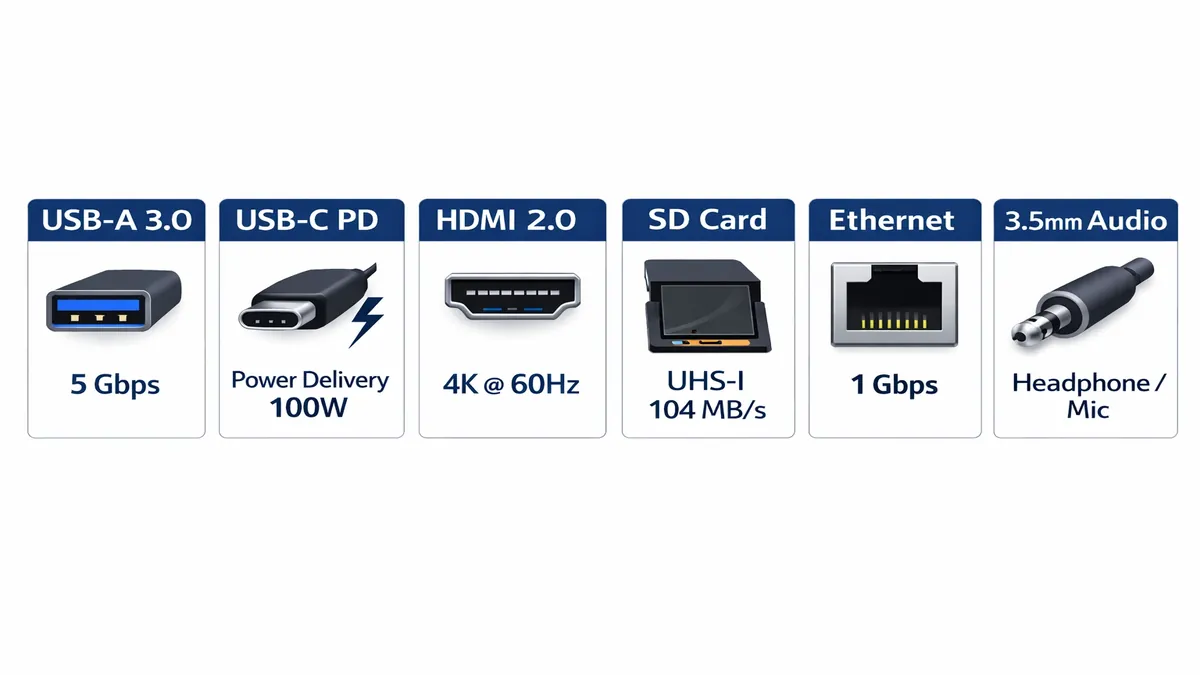
- Port Selection: Typically includes a range of essential ports such as HDMI (supporting 4K@30Hz or 4K@60Hz, depending on the specific model), multiple USB-A 3.0/3.2 Gen 1 ports (5Gbps), a USB-C Power Delivery input (often up to 100W passthrough), an Ethernet port (Gigabit), and SD/microSD card readers. This combination covers most common peripheral needs. [5]
- Power Delivery: Supports USB-C Power Delivery passthrough, allowing you to charge your laptop through the hub while using its other ports. This is crucial for laptops with limited USB-C ports, ensuring you don't sacrifice charging capability for connectivity. The wattage supported is usually sufficient for most modern laptops.
- Data Speed: The USB-A ports typically offer 5Gbps data transfer speeds, adequate for most external drives, keyboards, and mice. The Ethernet port provides stable Gigabit internet connectivity, which is often more reliable and faster than Wi-Fi in certain scenarios.
- Build Quality: Anker products are generally well-built, and the 552 hub features a durable aluminum casing that helps with heat dissipation and provides a premium feel. Its compact size makes it highly portable, fitting easily into a laptop bag.
Performance: The Anker 552 delivers consistent performance across all its ports. Users report stable video output, reliable data transfers, and efficient power passthrough. It's a workhorse hub that handles everyday tasks with ease, making it a go-to for professionals and students alike.
Ideal for: Most laptop users, including MacBook and Windows laptop owners, who need a versatile and portable hub for everyday use, presentations, and connecting essential peripherals. It's particularly good for those who frequently travel or work in different locations.
2. CalDigit TS4 Thunderbolt 4 Dock
The CalDigit TS4 is not just a USB-C hub; it's a full-fledged Thunderbolt 4 docking station, representing the pinnacle of connectivity for compatible laptops. Designed for power users, creative professionals, and anyone requiring maximum bandwidth and port options, the TS4 transforms a single Thunderbolt 4 port into a comprehensive workstation hub. [2]
Key Features:
- Thunderbolt 4 Connectivity: Offers three downstream Thunderbolt 4 ports (40Gbps), allowing for daisy-chaining multiple Thunderbolt devices or connecting high-resolution displays. It also includes multiple USB-A (10Gbps and 5Gbps), USB-C (10Gbps), DisplayPort 1.4, 2.5 Gigabit Ethernet, and SD/microSD card readers.
- High Power Delivery: Provides up to 98W of power delivery to the host laptop, ensuring even power-hungry machines like MacBook Pros can be charged efficiently through a single cable.
- Display Support: Supports up to dual 4K displays at 60Hz or a single 8K display at 30Hz (or 6K at 60Hz for MacBooks), making it ideal for graphic designers, video editors, and multi-monitor setups.
- 2.5 Gigabit Ethernet: Offers faster wired network speeds than standard Gigabit Ethernet, beneficial for large file transfers and demanding online activities.
- Robust Build: Features a sturdy, high-quality aluminum enclosure designed for desktop use, with excellent heat management.
Performance: The CalDigit TS4 delivers exceptional performance, leveraging the full bandwidth of Thunderbolt 4. It provides stable, high-speed data transfers, flawless multi-monitor support, and reliable power delivery. It's known for its rock-solid stability and compatibility across a wide range of Thunderbolt-enabled laptops.
Ideal for: Professionals in creative fields (video editing, graphic design), developers, and power users with Thunderbolt 4 or Thunderbolt 3 laptops (Mac or Windows) who need a comprehensive, high-performance desktop docking solution.
3. Belkin Connect Thunderbolt 4 Dock
The Belkin Connect Thunderbolt 4 Dock is another premium offering in the Thunderbolt 4 ecosystem, providing a powerful and reliable solution for expanding connectivity and creating a streamlined workstation. Belkin is a trusted brand in accessories, and their Thunderbolt 4 dock is built with quality and performance in mind.
Key Features:
- Thunderbolt 4 Ports: Features multiple Thunderbolt 4 ports (40Gbps) for connecting high-speed peripherals, external GPUs, and multiple displays. It also includes a variety of USB-A (10Gbps), USB-C (10Gbps), DisplayPort 1.4, HDMI 2.0, Gigabit Ethernet, and SD card readers.
- Power Delivery: Offers substantial power delivery to the host laptop, typically up to 90W, sufficient for most high-performance laptops.
- Dual Display Support: Supports dual 4K displays at 60Hz or a single 8K display, catering to users with demanding visual requirements.
- Universal Compatibility: Designed to work seamlessly with Thunderbolt 4, Thunderbolt 3, and USB4 laptops, ensuring broad compatibility across different brands and operating systems.
Performance: The Belkin Connect Thunderbolt 4 Dock provides excellent performance, delivering fast data speeds, stable video output, and reliable power. Its robust design ensures consistent operation, making it a dependable choice for professional environments.
Ideal for: Users with Thunderbolt 4/3 or USB4 laptops who need a high-performance docking solution for a permanent desk setup, supporting multiple displays and a wide range of peripherals.
4. HyperDrive 6-in-1 USB-C Hub
The HyperDrive 6-in-1 USB-C Hub is a popular choice, especially among MacBook users, due to its sleek design, compact form factor, and essential port selection. HyperDrive specializes in Apple accessories, and their hubs are often designed to complement the aesthetics and functionality of MacBooks.
Key Features:
- Essential Port Selection: Typically includes HDMI (4K@30Hz or 4K@60Hz), multiple USB-A 3.0/3.2 Gen 1 ports (5Gbps), a USB-C Power Delivery input (often up to 100W passthrough), and SD/microSD card readers. This provides the most commonly needed ports for everyday use.
- Compact and Portable: Its small size and lightweight design make it an ideal travel companion, easily fitting into any laptop bag or even a pocket.
- Power Delivery Passthrough: Allows for charging the host laptop through the hub, maintaining a single-cable connection for power and peripherals.
- Durable Construction: Often features an aluminum enclosure that matches the finish of MacBooks, providing both durability and effective heat dissipation.
Performance: The HyperDrive 6-in-1 delivers reliable performance for its intended use cases. Video output is stable, data transfers are consistent, and power passthrough works as expected. It's a solid performer for expanding basic connectivity on the go.
Ideal for: MacBook users and other laptop owners who need a highly portable and aesthetically pleasing hub for essential port expansion, especially for travel, presentations, or working in different locations.
5. LENTION USB C Hub with 100W Charging (CB-CE18)
The LENTION USB C Hub (CB-CE18) is often highlighted as an excellent all-around hub, providing a strong balance of features, performance, and value. LENTION has gained recognition for producing reliable and well-designed USB-C accessories.
Key Features:
- Comprehensive Port Array: Typically includes HDMI (4K@30Hz or 4K@60Hz), multiple USB-A 3.0/3.2 Gen 1 ports (5Gbps), a USB-C Power Delivery input (up to 100W passthrough), Gigabit Ethernet, and SD/microSD card readers. Some models may also include a VGA port for older displays.
- High Power Delivery: The 100W Power Delivery passthrough is a significant advantage, ensuring that even high-power laptops can be charged efficiently through the hub.
- Stable Connectivity: Known for providing stable connections across all ports, minimizing interruptions during data transfer or video output.
- Durable and Compact: Features a sturdy aluminum alloy casing that is both durable and aids in heat dissipation, while maintaining a relatively compact form factor for portability.
Performance: The LENTION CB-CE18 delivers consistent and reliable performance. Users praise its ability to handle multiple peripherals simultaneously without significant performance drops. The video output is clear, and data transfer speeds are as expected for its USB standards.
Ideal for: General users who need a versatile and reliable USB-C hub for both desktop and portable use, offering a wide range of ports and strong power delivery capabilities for various laptops.
6. UGREEN Revodok Pro 210 10-in-1 USB-C Hub
The UGREEN Revodok Pro 210 is a feature-rich 10-in-1 USB-C hub that aims to provide a comprehensive connectivity solution for modern laptops. UGREEN is a well-established brand known for its wide range of affordable yet high-quality electronic accessories.
Key Features:
- Extensive Port Selection: This hub typically includes dual HDMI ports (often supporting dual 4K@60Hz displays), a DisplayPort, multiple USB-A (5Gbps and 10Gbps), a USB-C data port, a USB-C Power Delivery input (up to 100W passthrough), Gigabit Ethernet, and SD/microSD card readers. The inclusion of dual HDMI and a DisplayPort makes it particularly appealing for multi-monitor setups.
- Dual Display Support: A key selling point is its ability to support two external monitors, which is crucial for productivity users and those who require an extended desktop workspace.
- High-Speed Data Transfer: With a mix of 5Gbps and 10Gbps USB ports, it caters to both standard peripherals and faster external storage devices.
- Robust Power Delivery: The 100W PD passthrough ensures efficient charging for most laptops, including power-hungry models.
Performance: The UGREEN Revodok Pro 210 generally performs very well, especially in its ability to drive multiple external displays and handle various peripherals simultaneously. Data transfer speeds are consistent, and the overall stability is commendable for a hub in its price range.
Ideal for: Users who need to connect multiple external displays (especially dual 4K monitors) to their laptop, professionals who require a wide array of ports for various peripherals, and those looking for a comprehensive desktop hub solution without the full cost of a Thunderbolt dock.
7. Plugable USB-C Hub (9-in-1)
The Plugable USB-C Hub (often a 9-in-1 model) is a strong contender, particularly noted for its reliability and compatibility across different operating systems. Plugable is a brand that focuses on connectivity solutions, and their hubs are generally well-regarded for their performance and driver support.
Key Features:
- Versatile Port Configuration: Typically includes HDMI (4K@30Hz or 4K@60Hz), multiple USB-A 3.0/3.2 Gen 1 ports (5Gbps), a USB-C Power Delivery input (up to 100W passthrough), Gigabit Ethernet, and enhanced SD/microSD card readers that often offer faster transfer speeds. [5]
- Improved SD Card Readers: Some Plugable models are specifically praised for their faster SD card reader performance, which is a significant advantage for photographers and videographers.
- Broad Compatibility: Known for excellent compatibility with a wide range of USB-C laptops, including MacBooks, Windows PCs, and Chromebooks, often requiring no additional drivers.
- Durable Design: Features a sturdy construction, often with an aluminum housing, designed for longevity and efficient heat dissipation.
Performance: The Plugable USB-C Hub delivers consistent and stable performance. Users report reliable video output, fast and stable data transfers, and efficient power delivery. Its focus on core functionality and compatibility makes it a dependable choice.
Ideal for: Users who need a reliable, no-fuss USB-C hub with good all-around performance, especially those who frequently use SD cards or require broad compatibility across different laptop brands.
8. Sabrent 10-Port USB Hub
While the Sabrent 10-Port USB Hub is primarily a USB data hub rather than a full-fledged USB-C hub with video output and power delivery, it deserves mention for its exceptional build quality and ability to significantly expand USB-A connectivity. For users with many USB-A peripherals, this hub is a robust solution. [3]
Key Features:
- Extensive USB-A Ports: Offers a large number of USB-A 3.0/3.2 Gen 1 ports (5Gbps), typically 10 ports, allowing you to connect numerous legacy devices like external hard drives, keyboards, mice, and printers.
- Powered Hub: Crucially, it's a powered hub, meaning it comes with its own power adapter. This ensures that all connected devices receive sufficient power, preventing issues like external drives disconnecting or peripherals underperforming due to insufficient power from the host laptop. [13]
- Excellent Build Quality: Sabrent is known for its high-quality construction, and this hub features a durable metal casing that is built to last and effectively dissipates heat.
- Individual Power Switches: Each port often has an individual power switch, allowing you to turn off specific peripherals when not in use, which can be convenient for power management.
Performance: The Sabrent 10-Port USB Hub delivers reliable 5Gbps data transfer speeds across all its ports. The external power supply ensures stable operation even with multiple power-hungry devices connected. It's a workhorse for expanding USB-A connectivity.
Ideal for: Desktop users, creative professionals, or anyone with a large collection of USB-A peripherals who needs to connect them all to a single USB-C port (via a USB-C to USB-A adapter if necessary) or an existing USB-A port. It's particularly useful for managing multiple external drives or input devices.
9. Baseus Dual Monitor 10-in-1 Docking Station
The Baseus Dual Monitor 10-in-1 Docking Station is a strong contender for users looking for a comprehensive USB-C hub that supports multiple external displays. Baseus is a brand that often offers feature-rich accessories at competitive price points. [2]
Key Features:
- Dual Monitor Support: A primary highlight is its ability to support two external monitors, typically via HDMI and/or DisplayPort, often at 4K@30Hz or 4K@60Hz, depending on the specific model and host laptop capabilities. This is essential for enhanced productivity.
- Wide Range of Ports: Includes a variety of ports such as multiple USB-A (5Gbps and/or 10Gbps), a USB-C data port, a USB-C Power Delivery input (often up to 100W passthrough), Gigabit Ethernet, and SD/microSD card readers.
- Strong Performance: Designed to provide stable video output and reliable data transfer across all connected peripherals.
- Sleek Design: Often features a modern and compact design that fits well on a desk, making it a good choice for a semi-permanent workstation setup.
Performance: The Baseus Dual Monitor Docking Station generally performs well in supporting dual displays and providing a wide array of connectivity options. Users find it to be a reliable solution for expanding their laptop's capabilities for a multi-monitor setup.
Ideal for: Users who primarily work with dual external monitors and need a comprehensive USB-C hub that can handle both display output and a variety of peripherals, offering a cost-effective alternative to full Thunderbolt docks.
10. UGREEN 7-in-1 USB C Hub
The UGREEN 7-in-1 USB C Hub is a compact and highly portable option that provides essential port expansion for everyday use. It's a popular choice for its balance of functionality, small footprint, and affordability, making it a great travel companion.
Key Features:
- Essential Port Selection: Typically includes HDMI (4K@30Hz or 4K@60Hz), multiple USB-A 3.0/3.2 Gen 1 ports (5Gbps), a USB-C Power Delivery input (often up to 100W passthrough), and SD/microSD card readers. This covers the most common needs for connecting external displays, USB peripherals, and memory cards.
- Compact and Lightweight: Its small size makes it extremely portable, ideal for slipping into a laptop sleeve or pocket, making it perfect for users on the go.
- Power Delivery Passthrough: Allows for convenient charging of the host laptop through the hub, ensuring you can power your device while expanding its connectivity.
- Durable Construction: Features a sturdy aluminum alloy casing that helps with heat dissipation and provides a robust feel for daily use.
Performance: The UGREEN 7-in-1 hub delivers reliable performance for its intended purpose. Video output is stable, data transfers are consistent, and power passthrough functions efficiently. It's a dependable choice for basic port expansion.
Ideal for: Users who need a highly portable and affordable USB-C hub for essential connectivity on the go, such as connecting to a projector for presentations, using a mouse and keyboard, or transferring photos from an SD card.
Comparison Table

To provide a clearer overview of our top USB-C hub picks, the following table summarizes their key specifications and features:
| Feature | Anker 552 (9-in-1) | CalDigit TS4 (Dock) | Belkin Connect (Dock) | HyperDrive 6-in-1 | LENTION CB-CE18 | UGREEN Revodok Pro 210 (10-in-1) | Plugable (9-in-1) | Sabrent 10-Port (Hub) | Baseus Dual Monitor (10-in-1) | UGREEN 7-in-1 |
|---|---|---|---|---|---|---|---|---|---|---|
| Type | Portable Hub | Thunderbolt 4 Dock | Thunderbolt 4 Dock | Portable Hub | Portable Hub | Desktop Hub | Portable Hub | Powered USB-A Hub | Desktop Hub | Portable Hub |
| Video Output | 1x HDMI (4K) | DP 1.4, TB4 | DP 1.4, HDMI 2.0, TB4 | 1x HDMI (4K) | 1x HDMI (4K) | 2x HDMI, 1x DP (Dual 4K) | 1x HDMI (4K) | None | 2x HDMI/DP (Dual 4K) | 1x HDMI (4K) |
| USB-A Ports | 3x (5Gbps) | 5x (10Gbps/5Gbps) | 4x (10Gbps) | 2x (5Gbps) | 3x (5Gbps) | 3x (5Gbps/10Gbps) | 3x (5Gbps) | 10x (5Gbps) | 3x (5Gbps/10Gbps) | 3x (5Gbps) |
| USB-C Ports | 1x PD, 1x Data | 3x TB4, 1x USB-C | 3x TB4, 1x USB-C | 1x PD | 1x PD | 1x PD, 1x Data | 1x PD | None | 1x PD, 1x Data | 1x PD |
| Ethernet | Gigabit | 2.5 Gigabit | Gigabit | None | Gigabit | Gigabit | Gigabit | None | Gigabit | Gigabit |
| Card Reader | SD/microSD | SD/microSD | SD/microSD | SD/microSD | SD/microSD | SD/microSD | SD/microSD | None | SD/microSD | SD/microSD |
| Power Delivery | Up to 100W | Up to 98W | Up to 90W | Up to 100W | Up to 100W | Up to 100W | Up to 100W | External Power | Up to 100W | Up to 100W |
| Price (USD) | ~$50-80 | ~$300-400 | ~$250-350 | ~$60-90 | ~$40-70 | ~$80-120 | ~$50-80 | ~$30-50 | ~$70-100 | ~$30-60 |
Buying Guide
Choosing the best USB-C hub or docking station in 2026 requires careful consideration of your specific needs, your laptop's capabilities, and your budget. Here's a comprehensive buying guide to help you make an informed decision:
1. Understand Your Laptop's USB-C Port Capabilities
Not all USB-C ports are created equal. Before purchasing a hub, identify what kind of USB-C port your laptop has:
- USB 3.2 (Gen 1, Gen 2, Gen 2x2): These ports offer data transfer speeds ranging from 5Gbps to 20Gbps. They typically support DisplayPort Alternate Mode (Alt Mode) for video output and USB Power Delivery for charging. A USB 3.2 hub will be sufficient for most everyday tasks and connecting a single external display. [7]
- USB4: This standard offers up to 40Gbps and is backward compatible with Thunderbolt 3 and 4. If your laptop has a USB4 port, it can often leverage the higher bandwidth for more demanding tasks, even with a USB4-compatible hub. [8]
- Thunderbolt 3/4: These are the most powerful USB-C ports, offering a guaranteed 40Gbps bandwidth for data, video, and power. If your laptop has Thunderbolt, investing in a Thunderbolt 4 dock will unlock the full potential of your machine, supporting multiple high-resolution displays and high-speed peripherals. MacBooks with Apple Silicon (M1, M2, M3 chips) and many high-end Windows laptops feature Thunderbolt 4 ports. [10]
Recommendation: For MacBooks, especially Pro models, a Thunderbolt 4 dock is highly recommended for full speed and display support. For most Windows laptops, a high-quality USB 3.2 Gen 2 or USB4 hub will often suffice, but check if your laptop supports Thunderbolt for maximum performance.
2. Port Selection: What Do You Need to Connect?
Make a list of all the peripherals you intend to connect. This will dictate the type and number of ports your hub needs:
- Video Output: Do you need to connect one or two external monitors? What resolution and refresh rate do you require (e.g., 4K@60Hz)? Look for hubs with HDMI, DisplayPort, or even VGA if you have older monitors. For dual displays, ensure the hub explicitly supports it and that your laptop's USB-C port can output to two displays.
- USB-A Ports: How many legacy USB-A devices (mouse, keyboard, external hard drives, flash drives) do you have? Look for hubs with at least USB 3.0 (5Gbps) ports for decent speeds.
- USB-C Data Ports: Some hubs offer additional USB-C ports for data transfer, which can be useful for connecting newer USB-C peripherals.
- Ethernet: For stable and faster internet, a Gigabit Ethernet port is essential, especially if your laptop lacks one or your Wi-Fi is unreliable.
- Card Readers: If you're a photographer or videographer, integrated SD and microSD card readers are a must. Look for faster UHS-II compatible readers if speed is critical.
- Audio Jack: Some hubs include a 3.5mm audio jack, which can be convenient if your laptop has removed it.
3. Power Delivery (PD) Passthrough
This is a crucial feature. A hub with PD passthrough allows you to charge your laptop by plugging its power adapter into the hub. This means you only need one cable connected to your laptop for power, data, and video. [14]
- Wattage: Ensure the hub's PD passthrough wattage (e.g., 60W, 85W, 100W) meets or exceeds your laptop's charging requirements. Underspecified PD can lead to slow charging or even battery drain under heavy load.
4. Portability vs. Desktop Docking
- Portable Hubs: These are compact, lightweight, and ideal for travel or occasional use. They typically offer a smaller selection of essential ports and are bus-powered (draw power from the laptop). [4]
- Desktop Docks: These are larger, often require external power, and offer a wider array of ports, including multiple display outputs, faster Ethernet, and more USB ports. They are designed for a permanent workstation setup. Thunderbolt docks fall into this category. [2]
5. Build Quality and Heat Management
Cheap hubs can overheat, leading to performance issues or even damage. Look for hubs made from durable materials like aluminum, which helps dissipate heat. Reputable brands generally offer better build quality and internal components.
6. Brand Reputation and Reviews
Stick to well-known brands like Anker, CalDigit, Belkin, HyperDrive, UGREEN, LENTION, and Plugable. Read user reviews to gauge real-world performance, compatibility, and reliability.
7. Avoid Cheap, No-Name Hubs
While tempting due to their low price, generic, unbranded USB-C hubs can be unreliable, offer poor performance, and in some cases, even damage your laptop. They often lack proper shielding, leading to interference, or use substandard components that fail prematurely. [6]
FAQ
Here are answers to some common questions about USB-C hubs:
Best USB-C hub for MacBook Pro?
For MacBook Pro users, especially those with M1, M2, or M3 chips, the CalDigit TS4 Thunderbolt 4 Dock is arguably the best choice for a desktop setup, offering unparalleled performance, extensive port selection, and high power delivery. The Belkin Connect Thunderbolt 4 Dock is another excellent premium option. For a more portable solution, the HyperDrive 6-in1 USB-C Hub or a high-quality Anker or UGREEN hub with HDMI, USB-A, and PD passthrough will serve most needs well. Always ensure the hub supports the full capabilities of your MacBook's Thunderbolt ports for optimal performance. [5]
USB-C hub vs docking station?
The terms are often used interchangeably, but there's a distinction. A USB-C hub is generally a smaller, more portable device that expands a single USB-C port into a few additional ports (e.g., HDMI, USB-A, SD card reader). It's typically bus-powered. A docking station is usually larger, requires external power, and offers a much wider array of ports, often including multiple display outputs, Ethernet, and more robust power delivery. Docking stations are designed to create a full desktop workstation experience with a single cable connection to your laptop. Thunderbolt docks are a subset of docking stations, offering the highest performance. [2]
Do USB-C hubs slow down laptops?
A well-designed, high-quality USB-C hub should not noticeably slow down your laptop. However, several factors can impact performance:
- Bandwidth Saturation: If you're running multiple high-bandwidth peripherals simultaneously (e.g., two 4K monitors, an external SSD, and Gigabit Ethernet) through a standard USB 3.2 hub, you might experience some slowdowns as the available bandwidth (e.g., 10Gbps) gets saturated. Thunderbolt 4 docks (40Gbps) are much better at handling multiple demanding devices. [10]
- Power Delivery: If the hub's power delivery is insufficient for your laptop, it might charge slowly or even drain battery under heavy use, which can indirectly affect performance.
- Cheap/Poorly Designed Hubs: Low-quality hubs can have inefficient chipsets or poor shielding, leading to data corruption, intermittent connections, or interference, which can manifest as a perceived slowdown. [6]
To avoid slowdowns, choose a hub with sufficient bandwidth for your needs, adequate power delivery, and from a reputable brand.
Verdict + CTAs
In 2026, USB-C hubs and docking stations are indispensable accessories for maximizing the utility of modern laptops. The market offers a vast array of options, from compact travel hubs to powerful Thunderbolt 4 docks, each designed to cater to different user needs and budgets. The key to making the right choice lies in understanding your laptop's USB-C capabilities, identifying your specific connectivity requirements, and prioritizing reputable brands that offer reliable performance and robust build quality.
For the majority of users seeking a versatile and portable solution for everyday tasks, the Anker 552 USB-C Hub (9-in-1) or the LENTION USB C Hub with 100W Charging (CB-CE18) stand out as excellent choices. They offer a comprehensive port selection, reliable power delivery, and solid performance, making them ideal for presentations, connecting essential peripherals, and general productivity.
If your workflow demands multiple high-resolution displays and maximum data transfer speeds, especially for creative professionals or power users, investing in a Thunderbolt 4 dock like the CalDigit TS4 or Belkin Connect Thunderbolt 4 Dock is highly recommended. These docks unlock the full potential of Thunderbolt-enabled laptops, providing unparalleled bandwidth and a seamless desktop workstation experience.
For those who need to connect multiple external monitors without the premium cost of a Thunderbolt dock, the UGREEN Revodok Pro 210 (10-in-1) or the Baseus Dual Monitor 10-in-1 Docking Station offer compelling solutions with their dual display output capabilities and extensive port arrays.
Ultimately, the best USB-C hub is the one that seamlessly integrates with your workflow, provides all the necessary connections, and ensures your laptop operates at its full potential. By carefully considering the factors outlined in this guide, you can confidently select a USB-C hub that enhances your productivity and streamlines your digital life in 2026.
Expand your laptop's capabilities and streamline your workspace:
References
[1] PCWorld. "Best USB-C hubs and dongles: Add ports to your laptop or tablet." PCWorld, www.pcworld.com/article/402858/the-best-usb-c-hubs-for-your-laptop-tablet-or-2-in-1.html. [2] NYTimes.com. "The 2 Best USB Hubs of 2026 | Reviews by Wirecutter." NYTimes.com, www.nytimes.com/wirecutter/reviews/best-usb-c-hubs-and-docks/. [3] Tom's Hardware. "Best USB Hubs: Powered, Portable and Type-C." Tom's Hardware, www.tomshardware.com/best-picks/best-usb-hubs. [4] LENTION. "Best USB-C Hubs for Laptops in 2026 | Power, Display & Connectivity." LENTION, www.lention.com/blogs/news/best-usb-c-hubs-laptops. [5] Macworld. "Best USB-C hubs and adapters for Mac 2026." Macworld, www.macworld.com/article/668462/best-usb-c-hubs-and-adapters-for-mac.html. [6] YouTube. "Top 5 Best USB-C Hubs 2026 [Don't Buy Before Watching!]." YouTube, www.youtube.com/watch?v=k7OuSbZ-CEo. [7] Crest.com.au. "USB4 vs USB 3.2 vs Thunderbolt - What's the difference?" Crest.com.au, www.crest.com.au/blogs/learn/usb4-vs-usb3-whats-the-difference?srsltid=AfmBOore63wou91S85ltx0EQ0KS7__NkZGuhinaDzh0o5wz4ZPUZn3at. [8] Reddit. "USB 3.2 Gen 2x2 Type-C vs Thunderbolt 4 : r/UsbCHardware." Reddit, www.reddit.com/r/UsbCHardware/comments/ui3bo0/usb_32_gen_2x2_typec_vs_thunderbolt_4/. [9] Kensington.com. "Exploring Thunderbolt™ 4, USB4®, and USB-C® 3.2." Kensington.com, www.kensington.com/news/docking-connectivity-blog/exploring-usb4-thunderbolt-4-and-usb-c-3.2/?srsltid=AfmBOoolBUw5eWLgQHSO_MxR-PPWwu1BS30Xtmp0_r_lzpuoyyiOUDJn. [10] BenQ.com. "USB4 vs Thunderbolt 4: Understanding the differences." BenQ.com, www.benq.com/en-us/knowledge-center/knowledge/what-is-usb4-thunderbolt4-usbc.html. [11] FYCables.com. "USB 3.2 vs. USB4 vs. Thunderbolt 3/4: Differences & Uses." FYCables.com, fycables.com/usb-3-2-vs-usb4-vs-thunderbolt-3-4-differences-uses/. [12] TI.com. "A Primer on USB Type-C and Power Delivery Applications ..." TI.com, www.ti.com/lit/slyy109. [13] Reddit. "Can anyone properly explain power limitations on a USB ..." Reddit, www.reddit.com/r/UsbCHardware/comments/108e1en/can_anyone_properly_explain_power_limitations_on/. [14] Baseus.com. "What Is USB-C Power Delivery and How Does It Work?" Baseus.com, www.baseus.com/blogs/content/what-is-usb-c-power-delivery?srsltid=AfmBOooAWfVNsFRGGM8hqpJ462VXLqZq_dTaUT71Kn8o7Cv9KtNg6Ps5. [15] Startech.com. "What is USB-C Power Delivery (PD) pass-through?" Startech.com, www.startech.com/en-us/blog/what-is-usb-c-power-delivery-pass-through?srsltid=AfmBOoog1oXrvMQJsAPfCsKZAWdQewOSrA4J_a7DBGl00escxdGl22Ui.
📚 Related Articles
* Affiliate link. We may earn a commission at no extra cost to you.
Disclosure: This article contains affiliate links. We may earn a commission if you purchase through our links, at no extra cost to you. See our affiliate disclosure.