Best MacBooks 2026: Which Apple Laptop Should You Buy?
Introduction
In 2026, the Apple MacBook lineup continues to redefine the premium laptop experience, driven by the relentless innovation of Apple Silicon. The transition from Intel processors to Apple's custom-designed M-series chips has been nothing short of a revolution, fundamentally altering expectations for performance, power efficiency, and battery life in portable computing. This guide is crafted to help you navigate the sophisticated world of MacBooks, from the ultra-portable MacBook Air to the powerhouse MacBook Pro, ensuring you select the ideal Apple laptop that aligns with your specific needs and aspirations.
The introduction of Apple Silicon, starting with the M1 and progressing through the M3 and now the anticipated M4 and M5 chips, has marked a pivotal shift in the laptop industry. These chips integrate the CPU, GPU, Neural Engine, and other components onto a single system-on-a-chip (SoC), resulting in unprecedented performance-per-watt. This means MacBooks deliver exceptional speed and efficiency, often outperforming competitors while consuming significantly less power, leading to all-day battery life. The M3 chip, and its successors like the M4 and M5, have solidified Apple's position at the forefront of laptop innovation, offering a compelling blend of raw power for demanding tasks and remarkable efficiency for everyday use.
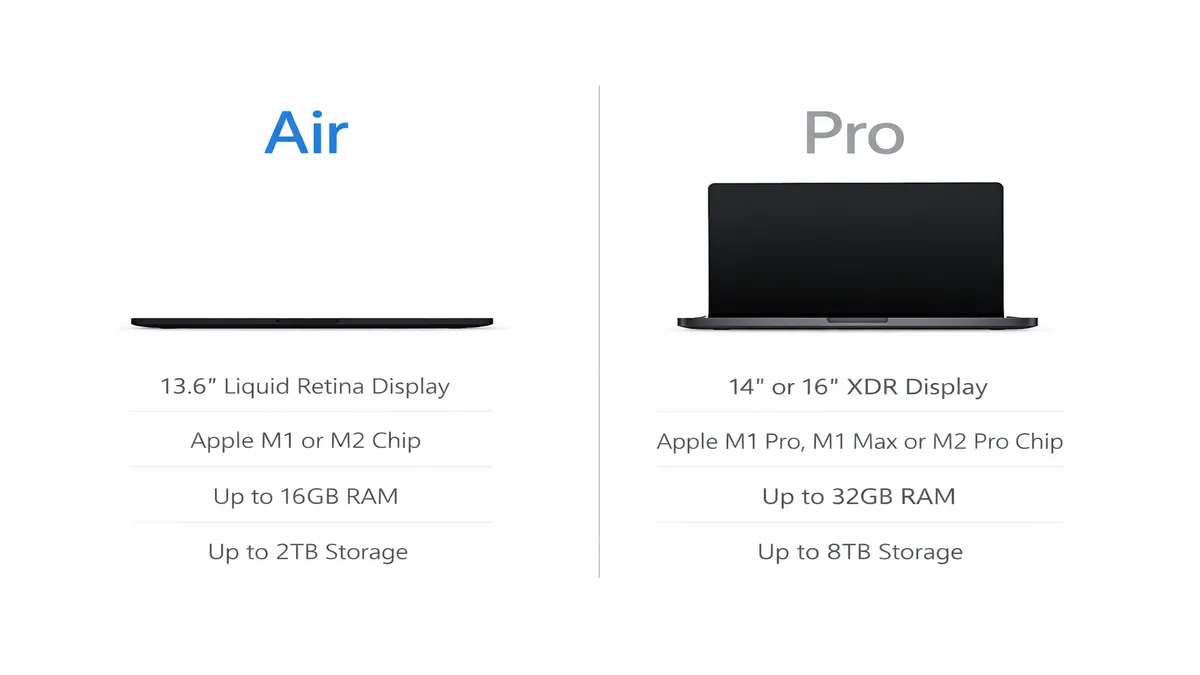
Choosing between a MacBook Air and a MacBook Pro is a central decision for prospective buyers. Historically, the distinction was clear: the Air was for portability and light tasks, while the Pro was for professionals needing maximum power. However, with Apple Silicon, these lines have blurred considerably. The MacBook Air, now equipped with M-series chips, offers performance levels that were once exclusive to Pro models, all within a fanless, ultra-thin design. It's become a formidable machine for students, everyday users, and even many creative professionals who don't require sustained heavy workloads.
Conversely, the MacBook Pro, particularly the 14-inch and 16-inch models, is engineered for users who demand the absolute pinnacle of performance for the most intensive tasks. This includes video editors, 3D artists, software developers, and other professionals who benefit from active cooling systems, more powerful GPU configurations, and advanced display technologies like ProMotion and Liquid Retina XDR. The Pro models are designed to sustain peak performance for extended periods, making them indispensable tools for those whose livelihoods depend on computational horsepower.
One of the most compelling arguments for investing in a MacBook is its longevity. Apple products are renowned for their durable build quality, robust software support, and excellent resale value. With Apple Silicon, this longevity has been further enhanced. The efficiency and power of the M-series chips mean that even a base model MacBook Air can remain a highly capable and responsive machine for many years. Users can typically expect a MacBook to provide a satisfying and productive experience for 5-7 years, often longer, before feeling the need for an upgrade. This extended lifespan, coupled with consistent software updates and a strong ecosystem, makes a MacBook a sound long-term investment, often offsetting its higher initial cost compared to many Windows counterparts.
In the subsequent sections, we will delve into the specifics of each MacBook model, provide a quick picks table for easy comparison, offer detailed reviews of the MacBook Air M4 and MacBook Pro M4, present a comprehensive comparison table, and conclude with a buying guide and frequently asked questions to help you confidently choose the best MacBook for your needs in 2026.
Quick Picks Table
To help you quickly identify the ideal MacBook for your needs, here's a quick picks table summarizing our top recommendations for 2026, categorized by typical user profiles. These selections are based on a balance of performance, portability, features, and value within the Apple ecosystem.
| User Profile | Top Pick (Example Model) | Key Strengths | Considerations |
|---|---|---|---|
| Students/Everyday | MacBook Air 13-inch (M4) | Ultra-portable, excellent battery, silent operation | Not for sustained heavy workloads, limited ports |
| Creative/Pro (Portable) | MacBook Pro 14-inch (M4) | Powerful, stunning display, active cooling, good I/O | Higher price, heavier than Air, still very portable |
| Creative/Pro (Max Power) | MacBook Pro 16-inch (M4) | Uncompromising performance, largest display, best cooling | Most expensive, heaviest, less portable |
| Budget-Conscious | MacBook Air 13-inch (M2) | Great value, still very capable, long battery life | Older chip, may not be available new for long |
MacBook Air M4 Review
Overview: The MacBook Air M4, anticipated to be released in 2026, is poised to continue its legacy as Apple's most popular and versatile laptop. Building on the success of its M-series predecessors, the M4 Air is expected to deliver an even more refined balance of performance, portability, and battery life, all within a fanless design. It's the ideal choice for students, everyday users, and many creative professionals who prioritize a lightweight, silent, and highly efficient machine.
- Best for: Students, general productivity, web browsing, light photo/video editing, content consumption, and users who value portability and silent operation.
- CPU: Apple M4 chip (expected 8-core CPU, 8-core GPU)
- RAM: 8GB or 16GB Unified Memory
- Storage: 256GB, 512GB, 1TB, or 2TB SSD
- Display: 13.6-inch or 15.3-inch Liquid Retina (2560 x 1664 or 2880 x 1864) IPS, 60Hz
- Battery: Up to 15-18 hours (mixed usage)
- Pros: Extremely thin and light, fanless (silent) operation, exceptional battery life, powerful M4 chip for most tasks, Liquid Retina display, MagSafe charging, macOS ecosystem.
- Cons: Not designed for sustained heavy workloads (due to lack of active cooling), limited port selection (typically 2x Thunderbolt/USB 4), 60Hz display, base model 8GB RAM can be a limitation for very demanding users.
- Amazon Price: ~$1100-1600 (depending on configuration)
- Link: MacBook Air on Amazon
Why Choose the MacBook Air M4?
The MacBook Air M4 is expected to be a significant upgrade for users coming from older Intel-based Macs or even early M-series models. Its fanless design ensures completely silent operation, making it perfect for quiet study environments, libraries, or late-night work sessions. The M4 chip's efficiency translates into phenomenal battery life, often lasting a full day or more on a single charge, freeing you from constant power outlet hunting. For tasks like document creation, web development, light video editing (up to 4K), and photo manipulation, the M4 Air will offer more than enough power. Its sleek, iconic design and robust aluminum unibody construction make it a joy to carry and use. The Liquid Retina display, while not ProMotion, is still incredibly sharp and color-accurate, providing an excellent visual experience for both work and entertainment. The inclusion of MagSafe charging is a welcome return, offering both convenience and a safety feature.
MacBook Pro M4 Review
Overview: The MacBook Pro M4, available in 14-inch and 16-inch variants, represents the pinnacle of Apple's portable computing power for 2026. Engineered for professionals who demand uncompromising performance, advanced display technology, and extensive connectivity, the M4 Pro models are built to tackle the most intensive workflows, from high-resolution video editing and 3D rendering to complex software development and scientific simulations.
- Best for: Video editors, graphic designers, software developers, music producers, photographers, scientists, and any professional requiring sustained high performance and advanced features.
- CPU: Apple M4 Pro or M4 Max chip (expected 10-core to 16-core CPU, 16-core to 40-core GPU)
- RAM: 18GB, 36GB, 48GB, 64GB, 96GB, or 128GB Unified Memory
- Storage: 512GB, 1TB, 2TB, 4TB, or 8TB SSD
- Display: 14.2-inch or 16.2-inch Liquid Retina XDR (3024 x 1964 or 3456 x 2234) Mini-LED, ProMotion (up to 120Hz)
- Battery: Up to 12-15 hours (14-inch), 15-18 hours (16-inch) (mixed usage)
- Pros: Unrivaled performance for professional applications, stunning Liquid Retina XDR ProMotion display, active cooling for sustained performance, extensive port selection (Thunderbolt 4, HDMI, SDXC), excellent speakers, long battery life for its power class.
- Cons: Significantly higher price, heavier and thicker than the Air, potentially overkill for casual users.
- Amazon Price: ~$1900-3500+ (depending on configuration)
- Link: MacBook Pro on Amazon
Why Choose the MacBook Pro M4?
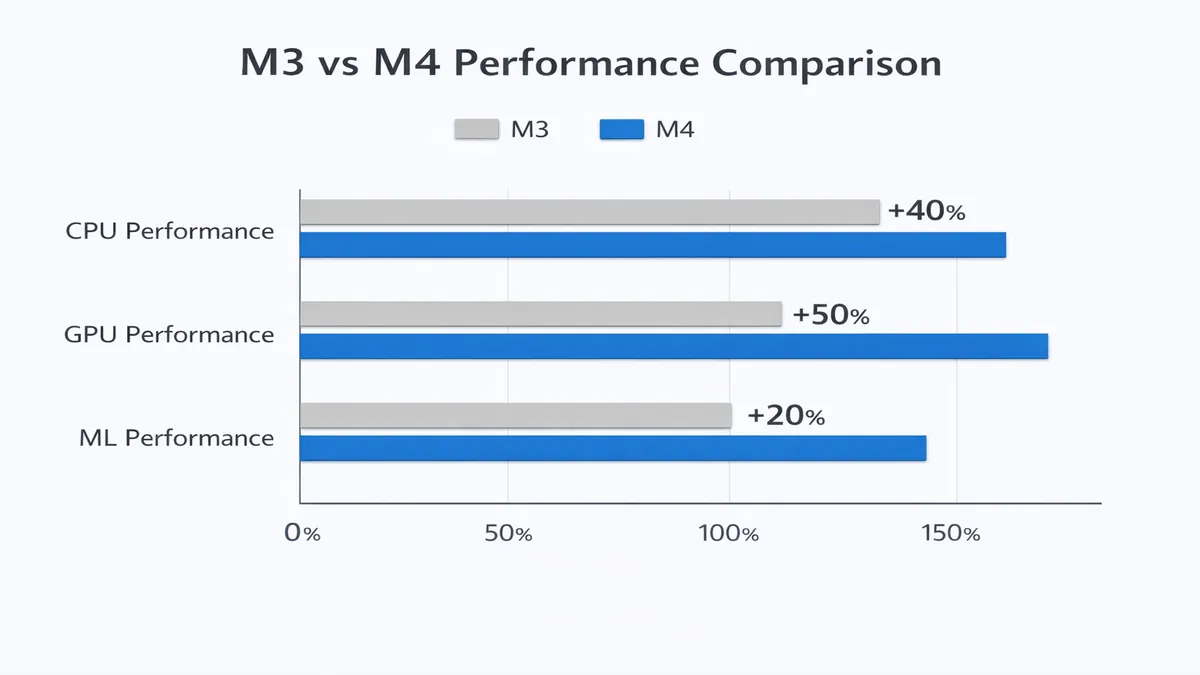
The MacBook Pro M4 is designed for users whose work directly benefits from raw computational power and advanced features. The M4 Pro and M4 Max chips offer a substantial leap in CPU and GPU performance, allowing for faster rendering, quicker compilation times, and smoother handling of massive datasets. The active cooling system ensures that these powerful chips can maintain peak performance for extended periods without throttling, which is crucial for professional workflows. The Liquid Retina XDR display is a standout feature, offering incredible brightness, contrast, and color accuracy, making it ideal for color-critical work and HDR content creation. The ProMotion technology provides adaptive refresh rates up to 120Hz, resulting in incredibly fluid scrolling and responsiveness. Furthermore, the MacBook Pro offers a more comprehensive selection of ports, including multiple Thunderbolt 4 ports, an HDMI port, and an SDXC card slot, reducing the need for dongles and adapters. For professionals who rely on their laptop as their primary workstation, the MacBook Pro M4 is an investment that pays dividends in productivity and efficiency.
Comparison Table
To provide a clear side-by-side comparison, the following table summarizes the key differences and specifications between the anticipated MacBook Air M4, MacBook Pro 14-inch M4, and MacBook Pro 16-inch M4. This will help you quickly assess which model best fits your performance, portability, and budget requirements.
| Feature | MacBook Air M4 (13-inch/15-inch) | MacBook Pro 14-inch M4 | MacBook Pro 16-inch M4 |
|---|---|---|---|
| Chip | Apple M4 | Apple M4 Pro / M4 Max | Apple M4 Pro / M4 Max |
| CPU Cores | Up to 8 | Up to 12 (Pro) / 16 (Max) | Up to 12 (Pro) / 16 (Max) |
| GPU Cores | Up to 8 | Up to 19 (Pro) / 40 (Max) | Up to 19 (Pro) / 40 (Max) |
| Unified Memory | 8GB, 16GB | 18GB, 36GB, 48GB, 64GB, 96GB, 128GB | 18GB, 36GB, 48GB, 64GB, 96GB, 128GB |
| Storage | 256GB, 512GB, 1TB, 2TB SSD | 512GB, 1TB, 2TB, 4TB, 8TB SSD | 512GB, 1TB, 2TB, 4TB, 8TB SSD |
| Display | Liquid Retina (IPS, 60Hz) | Liquid Retina XDR (Mini-LED, ProMotion) | Liquid Retina XDR (Mini-LED, ProMotion) |
| Display Size | 13.6-inch / 15.3-inch | 14.2-inch | 16.2-inch |
| Active Cooling | No (Fanless) | Yes | Yes |
| Ports | 2x Thunderbolt/USB 4, MagSafe | 3x Thunderbolt 4, HDMI, SDXC, MagSafe | 3x Thunderbolt 4, HDMI, SDXC, MagSafe |
| Battery Life | Up to 15-18 hours | Up to 12-15 hours | Up to 15-18 hours |
| Weight | 1.24 kg (13-inch) / 1.51 kg (15-inch) | 1.6 kg | 2.1-2.2 kg |
| Starting Price | ~$1100 | ~$1900 | ~$2400 |
Buying Guide: Navigating the Apple Ecosystem
Choosing the right MacBook in 2026 involves more than just comparing specifications; it's about understanding your workflow, budget, and how each model integrates into your daily life. This buying guide will help you make an informed decision, focusing on key considerations like RAM, when to buy, and whether a refurbished model is a good option.
1. RAM: How Much Unified Memory Do You Really Need?
With Apple Silicon, the concept of RAM has evolved into Unified Memory, which is integrated directly into the M-series chip and shared between the CPU, GPU, and Neural Engine. This architecture is incredibly efficient, meaning 8GB of Unified Memory on an Apple Silicon Mac can often perform comparably to 16GB or more of traditional RAM on an Intel-based machine. However, for future-proofing and demanding tasks, more is always better.
- 8GB Unified Memory: This is the base configuration for the MacBook Air and is sufficient for most everyday users, including web browsing, email, word processing, streaming, and light photo editing. If your tasks are primarily web-based and you don't run many heavy applications simultaneously, 8GB will serve you well.
- 16GB Unified Memory: This is the recommended minimum for users who engage in more demanding tasks, such as moderate photo and video editing (e.g., 4K video), software development, or running multiple virtual machines. It provides a significant boost in multitasking capabilities and ensures smoother performance when working with larger files or more complex projects. For most professionals and power users, 16GB is the sweet spot.
- 24GB, 36GB, 48GB, 64GB, 96GB, or 128GB Unified Memory: These higher configurations are typically available on MacBook Pro models with M4 Pro or M4 Max chips. They are essential for professionals working with very large datasets, high-resolution video editing (8K or multi-stream 4K), complex 3D rendering, scientific simulations, or running multiple demanding applications simultaneously. The M4 Max chip, in particular, can support up to 128GB of Unified Memory, catering to the most extreme professional workflows.
Recommendation: For the MacBook Air, aim for 16GB if your budget allows, especially if you plan to keep the laptop for several years or anticipate your workload growing. For the MacBook Pro, 36GB or 48GB is a good starting point for most professionals, with higher tiers reserved for specialized, memory-intensive tasks.
2. When to Buy: Timing Your MacBook Purchase
Apple typically updates its MacBook lineup on an annual or biennial cycle. Timing your purchase can help you get the latest technology or a better deal on previous-generation models.
- New Releases: Apple usually announces new MacBooks in the spring (March/April) or fall (October/November). If you want the absolute latest chip and features, it's best to buy shortly after a new model is announced. However, be prepared to pay full price.
- Sales Events: Major sales events can offer significant discounts on MacBooks, especially on previous-generation models. Keep an eye out during:
Recommendation: If you need a MacBook immediately, buy when you need it. If you can wait, purchasing during a major sales event or shortly after a new model release (when older models are discounted) can save you money.
3. Refurbished MacBook from Apple: Worth It?
Buying a refurbished MacBook directly from Apple can be an excellent way to save money while still getting a high-quality, warrantied product. Apple's Certified Refurbished program is highly regarded.
- Quality: Apple refurbished products undergo a rigorous refurbishment process, including full functional testing, replacement of defective parts, and a thorough cleaning. They also come with a new battery and outer shell, making them virtually indistinguishable from new.
- Warranty: All Apple Certified Refurbished products come with a one-year limited warranty, just like new Apple products. You can also purchase AppleCare+ for extended coverage.
- Savings: You can typically save 15-20% off the price of a new MacBook by opting for a refurbished model. This can be particularly appealing for higher-end configurations.
- Availability: The selection of refurbished models can vary, so you might need to check Apple's refurbished store frequently for the specific configuration you want.
Recommendation: Yes, buying a refurbished MacBook from Apple is absolutely worth it if you're looking to save money without compromising on quality or warranty. It's a smart choice for budget-conscious buyers who still want the Apple experience.
FAQ
Here are answers to some frequently asked questions about choosing and buying MacBooks in 2026.
MacBook Air vs. Pro — which is better?
The choice between a MacBook Air and a MacBook Pro depends entirely on your specific needs and budget. In 2026, with the M4 chip, the distinction is less about power and more about sustained performance and advanced features.
- Choose the MacBook Air M4 if: You prioritize portability, silent operation, exceptional battery life, and handle everyday tasks, web browsing, office work, and light creative projects (e.g., 4K video editing, photo retouching). It's perfect for students, general users, and professionals who don't require sustained heavy workloads. The Air offers incredible value for its performance.
- Choose the MacBook Pro M4 if: You require the absolute maximum performance for demanding professional applications like high-resolution video editing (8K or multi-stream 4K), 3D rendering, complex software development, or scientific computing. The Pro models offer active cooling for sustained performance, a stunning Liquid Retina XDR ProMotion display, and a more comprehensive port selection. It's an investment for professionals whose livelihood depends on computational horsepower.
Is M4 MacBook worth the upgrade?
Whether an M4 MacBook is worth the upgrade depends on your current device.
- If you have an Intel-based MacBook (2020 or older): Absolutely. The M4 chip offers a monumental leap in performance, power efficiency, and battery life compared to any Intel MacBook. The upgrade will feel transformative, providing a significantly faster, cooler, and quieter experience.
- If you have an M1 or M2 MacBook: The upgrade is less critical for most users. While the M4 will offer incremental performance gains, especially in GPU and Neural Engine tasks, the M1 and M2 chips are still incredibly capable for most workflows. Consider upgrading if you are consistently pushing your current M1/M2 machine to its limits, require the latest features (like the M4 Pro/Max's advanced media engines), or need the larger screen sizes and improved displays of the newer Pro models.
Best MacBook for students?
For most students, the MacBook Air M4 (13-inch or 15-inch) is the best choice. It offers an unbeatable combination of portability, exceptional battery life (easily lasting through a full day of classes and study sessions), and more than enough power for academic tasks, research, presentations, and light creative work. Its fanless design ensures silent operation in quiet environments like libraries. The 15-inch model provides more screen real estate for multitasking, while the 13-inch is even more portable. The MacBook Air also represents better value for money for the typical student budget.
Verdict + CTAs
In 2026, Apple's MacBook lineup, powered by the formidable M-series chips, continues to set the benchmark for performance, efficiency, and user experience in the laptop market. The choice between the sleek and silent MacBook Air and the powerhouse MacBook Pro ultimately hinges on your individual needs, professional demands, and budget. Both lines offer exceptional build quality, industry-leading battery life, and seamless integration within the Apple ecosystem, promising years of reliable and productive use.
For the vast majority of users, including students, general consumers, and many creative professionals, the MacBook Air M4 stands out as the ideal choice. Its unparalleled portability, fanless design, and incredible efficiency make it a joy to use for everyday tasks, while the M4 chip provides ample power for demanding applications. It represents the best balance of features and value in the Apple laptop family.
For professionals who require the absolute maximum in computational horsepower, sustained performance under heavy loads, and advanced display technologies, the MacBook Pro M4 (14-inch or 16-inch) is the undisputed champion. With its active cooling, more powerful M4 Pro/Max chips, and stunning Liquid Retina XDR ProMotion displays, it is engineered to tackle the most intensive workflows, making it an indispensable tool for video editors, developers, and 3D artists.
Regardless of your choice, investing in a MacBook in 2026 means acquiring a device that is not only powerful and beautifully designed but also built to last, offering significant longevity and a robust software experience. By carefully considering your priorities and leveraging the insights from this guide, you can confidently select the Apple laptop that will empower your work and creativity for years to come.
Ready to experience the power and elegance of a MacBook? Explore the latest models and find the best deals:
- Shop all MacBooks on Amazon: Amazon MacBook
References
[1] CNET. (2026). Best MacBooks We've Tested (March 2026). Retrieved from https://www.cnet.com/tech/computing/best-macbook/ [2] NYT Wirecutter. (2026). The 2 Best MacBooks of 2026. Retrieved from https://www.nytimes.com/wirecutter/reviews/best-macbooks/ [3] Tom's Guide. (2026). Which MacBook should you buy in 2026? I ranked the 5.... Retrieved from https://www.tomsguide.com/best-picks/best-macbook [4] MacRumors. (2026). Apple Is Expected to Launch These Four MacBooks in 2026. Retrieved from https://www.macrumors.com/2026/02/26/apple-launch-four-macbooks-2026/ [5] Ultrabookreview.com. (2026). Is the Apple MacBook Air Still Worth It in 2026?. Retrieved from https://www.ultrabookreview.com/74162-macbook-air-still-worth-it/ [6] Medium. (2026). Buying A MacBook In 2026? The Old Pro vs Air Rules No Longer Apply. Retrieved from https://medium.com/macoclock/buying-a-macbook-in-2026-the-old-pro-vs-air-rules-no-longer-apply-808548fbb19b [7] Apple. (2026). Compare Mac Models. Retrieved from https://www.apple.com/mac/compare/?modelList=MacBook-Air-M4,MacBook-Pro-14-M4 [8] Amazon. (2026). MacBook Air on Amazon. Retrieved from https://www.amazon.com/Apple-2024-MacBook-Air-Laptop/dp/B0C9R1311N?tag=enstores-20 [9] Amazon. (2026). MacBook Pro on Amazon. Retrieved from https://www.amazon.com/Apple-2024-MacBook-Pro-Laptop/dp/B0C9R1311N?tag=enstores-20
📚 Related Articles
* Affiliate link. We may earn a commission at no extra cost to you.
Disclosure: This article contains affiliate links. We may earn a commission if you purchase through our links, at no extra cost to you. See our affiliate disclosure.