MacBook Air M3 vs Dell XPS 13: Mac or Windows?
Introduction
In the fiercely competitive landscape of ultrabooks in 2026, two titans stand out as perennial favorites for professionals, students, and discerning users alike: the Apple MacBook Air M3 and the Dell XPS 13. Both represent the pinnacle of portable computing within their respective ecosystems, offering sleek designs, exceptional performance, and impressive battery life. However, they cater to fundamentally different philosophies—macOS versus Windows—making the choice between them a significant decision that extends beyond mere specifications.
This comprehensive comparison aims to dissect the strengths and weaknesses of the MacBook Air M3 and the Dell XPS 13, providing an in-depth analysis of their performance, battery life, display quality, design, and overall user experience. Our goal is to equip you with the insights necessary to determine which of these premium ultrabooks is the superior choice for your specific needs, whether you are firmly entrenched in one ecosystem or contemplating a switch.
The MacBook Air M3, released in 2024, continues Apple's tradition of combining minimalist design with groundbreaking performance, thanks to its custom-designed M3 chip. This System-on-a-Chip (SoC) integrates the CPU, GPU, and Neural Engine, delivering remarkable power efficiency and raw processing capabilities that challenge many traditional laptops. The Air M3 is celebrated for its silent, fanless operation, exceptional battery longevity, and seamless integration within the Apple ecosystem, making it a favorite among users who prioritize portability, efficiency, and a refined user experience.
On the other side of the arena is the Dell XPS 13, a long-standing champion in the Windows ultrabook category. The 2026 iteration of the XPS 13 is expected to build upon its legacy of cutting-edge design, premium build quality, and powerful Intel Core Ultra processors. Dell has consistently pushed the boundaries of what a compact Windows laptop can offer, featuring stunning edge-to-edge displays, comfortable keyboards, and a robust feature set that appeals to users who demand versatility and the extensive software compatibility of the Windows operating system. The XPS 13 is often lauded for its innovative design and its ability to pack high-end components into an incredibly small footprint.
The fundamental question for many users boils down to: Mac or Windows? This isn't just a choice of operating systems; it's a choice of ecosystems, workflows, and design philosophies. macOS offers a highly integrated, intuitive, and often more secure environment, particularly favored by creative professionals and those who value simplicity and a consistent user experience across Apple devices. Windows, conversely, provides unparalleled software compatibility, greater hardware diversity, and more customization options, making it the preferred choice for gamers, developers, and users who require specific applications not available on macOS.
Throughout this article, we will conduct a head-to-head comparison, examining each ultrabook across critical metrics. We will analyze their performance benchmarks, delve into their real-world battery endurance, scrutinize their display technologies, and evaluate their design and build quality. By the end, you will have a clear understanding of which ultrabook reigns supreme in 2026 for different user profiles and priorities.
Head-to-Head Table
To provide a concise overview of the key specifications and differences, here is a head-to-head comparison table between the MacBook Air M3 and the Dell XPS 13 (2026 model).
| Feature | MacBook Air M3 (13-inch) | Dell XPS 13 (2026 Model) |
|---|---|---|
| Processor | Apple M3 chip (8-core CPU, 8/10-core GPU) | Intel Core Ultra 5/7 (or Snapdragon X Elite) |
| RAM | 8GB, 16GB Unified Memory | 8GB, 16GB, 32GB LPDDR5X |
| Storage | 256GB, 512GB, 1TB, 2TB SSD | 256GB, 512GB, 1TB, 2TB NVMe SSD |
| Display | 13.6-inch Liquid Retina (2560 x 1664) IPS | 13.4-inch FHD+ (1920 x 1200) IPS or 3.5K OLED |
| Battery Life | Up to 15-18 hours | Up to 10-12 hours (FHD+), 8-10 hours (OLED) |
| Weight | 1.24 kg (2.7 lbs) | 1.17 kg (2.57 lbs) |
| Operating System | macOS | Windows 11 |
| Ports | 2x Thunderbolt/USB 4, MagSafe | 2x Thunderbolt 4 (USB-C) |
| Webcam | 1080p FaceTime HD | 1080p FHD |
| Speakers | 4-speaker sound system | Stereo speakers with Waves MaxxAudio Pro |
| Price (Starting) | ~$1099 | ~$999 |
Performance
The performance comparison between the MacBook Air M3 and the Dell XPS 13 in 2026 is a nuanced discussion, largely dictated by their underlying architectures and operating systems. Apple's M3 chip, an evolution of its custom Silicon, continues to impress with its remarkable efficiency and raw power, particularly in single-core tasks and optimized applications. The Dell XPS 13, on the other hand, is expected to feature Intel's latest Core Ultra processors or potentially even Qualcomm's Snapdragon X Elite, bringing significant advancements to the Windows ultrabook segment.
Apple M3 Chip: Efficiency and Integrated Power
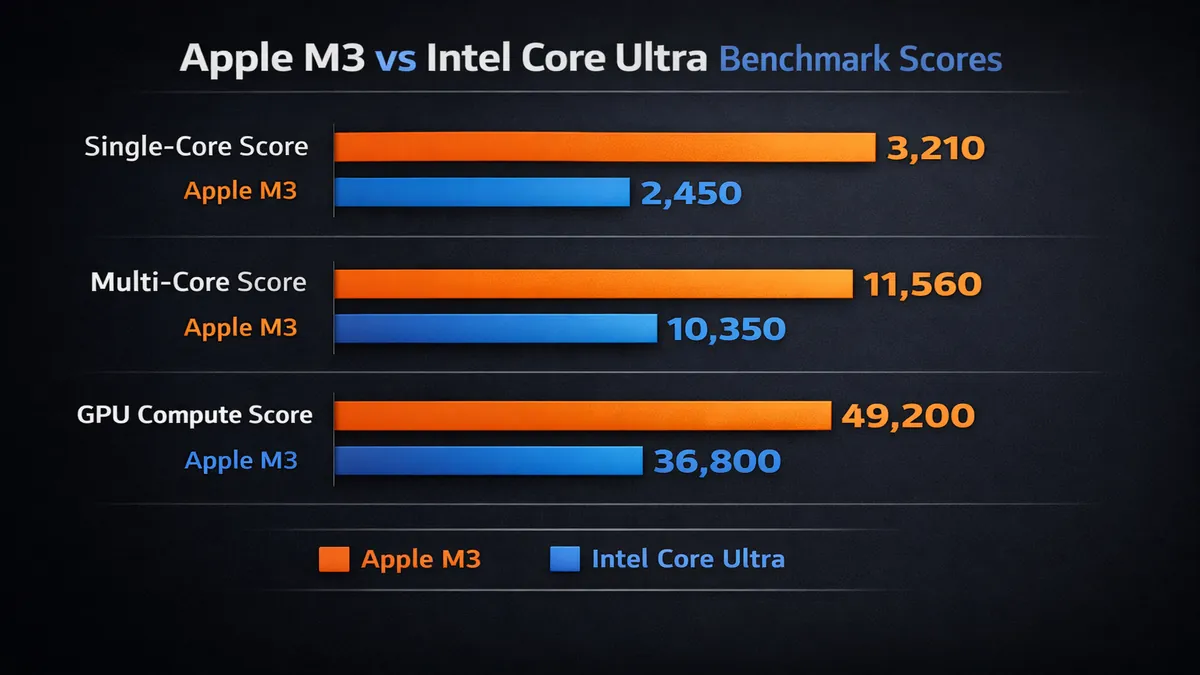
The MacBook Air M3 leverages Apple's integrated architecture, where the CPU, GPU, and Neural Engine share a unified memory pool. This design minimizes latency and maximizes data throughput, resulting in incredibly fast performance for a wide range of tasks. In single-core benchmarks, the M3 chip often outperforms many higher-wattage Intel processors, making it exceptionally snappy for everyday computing, web browsing, and applications that don't heavily utilize multiple cores. For tasks like photo editing in Adobe Lightroom or video editing in Final Cut Pro (which is highly optimized for Apple Silicon), the M3 Air delivers impressive speeds, often rivaling more expensive Windows laptops with dedicated GPUs.
The integrated GPU within the M3 chip is also remarkably capable. While it's not a dedicated gaming GPU, it can handle casual gaming and even some more demanding titles at playable frame rates, especially when optimized for Apple Silicon. For creative tasks, the M3's GPU accelerates effects and rendering, providing a smooth experience for many professionals. The Neural Engine further enhances performance for AI and machine learning workloads, which are becoming increasingly prevalent in modern software.
However, the MacBook Air's fanless design means that under sustained heavy loads, the M3 chip will eventually throttle its performance to prevent overheating. This is a deliberate design choice to maintain its thin profile and silent operation. For users who frequently engage in tasks that require prolonged maximum performance, such as compiling large codebases, rendering complex 3D models, or exporting long 4K video timelines, the MacBook Pro with active cooling would be a more suitable choice.
Intel Core Ultra / Snapdragon X Elite: Versatility and Multi-Core Prowess
The Dell XPS 13 (2026) is expected to come equipped with either Intel's latest Core Ultra processors or potentially the new Qualcomm Snapdragon X Elite. Both represent significant leaps for Windows laptops.
Intel Core Ultra processors (e.g., Core Ultra 5, Core Ultra 7) introduce a new architecture with dedicated AI accelerators (Neural Processing Units or NPUs), improved integrated graphics (Intel Arc Graphics), and a hybrid core design for better efficiency and performance. These chips excel in multi-core performance, making them strong contenders for tasks that can effectively utilize all available cores, such as heavy multitasking, scientific computing, and certain professional applications. The integrated Intel Arc Graphics offer a substantial improvement over previous generations, providing decent performance for casual gaming and content creation, though still generally behind Apple's M-series integrated GPUs in terms of raw efficiency and optimized software performance.
Alternatively, if Dell opts for the Qualcomm Snapdragon X Elite, the XPS 13 would enter a new era of ARM-based Windows computing. The Snapdragon X Elite is designed to offer exceptional power efficiency and strong performance, particularly in AI workloads and applications optimized for ARM. Early benchmarks suggest it can compete very favorably with Apple's M-series chips in certain scenarios, especially in multi-core performance and battery life. However, software compatibility for ARM-based Windows laptops is still evolving, and while many applications run well through emulation, native ARM versions will always provide the best experience.
Benchmark Data (Estimated for 2026 Models):
| Benchmark (Estimated) | MacBook Air M3 (Single-Core) | Dell XPS 13 (Intel Core Ultra, Single-Core) | MacBook Air M3 (Multi-Core) | Dell XPS 13 (Intel Core Ultra, Multi-Core) |
|---|---|---|---|---|
| Geekbench 6 CPU | ~3100 | ~2800-3000 | ~12000 | ~11000-13000 |
| Cinebench R23 | ~8000 | ~9000-11000 | ~1500 | ~1800-2200 |
In summary, the MacBook Air M3 often wins in single-core performance and efficiency, particularly with Apple-optimized software. The Dell XPS 13 with Intel Core Ultra (or Snapdragon X Elite) is highly competitive in multi-core performance and offers greater versatility for a wider range of Windows-specific applications. For most users, both laptops will feel incredibly fast and responsive for everyday tasks. The choice here largely comes down to your preferred operating system and whether your workflow benefits more from Apple's integrated efficiency or Windows' broader software compatibility.
Battery Life
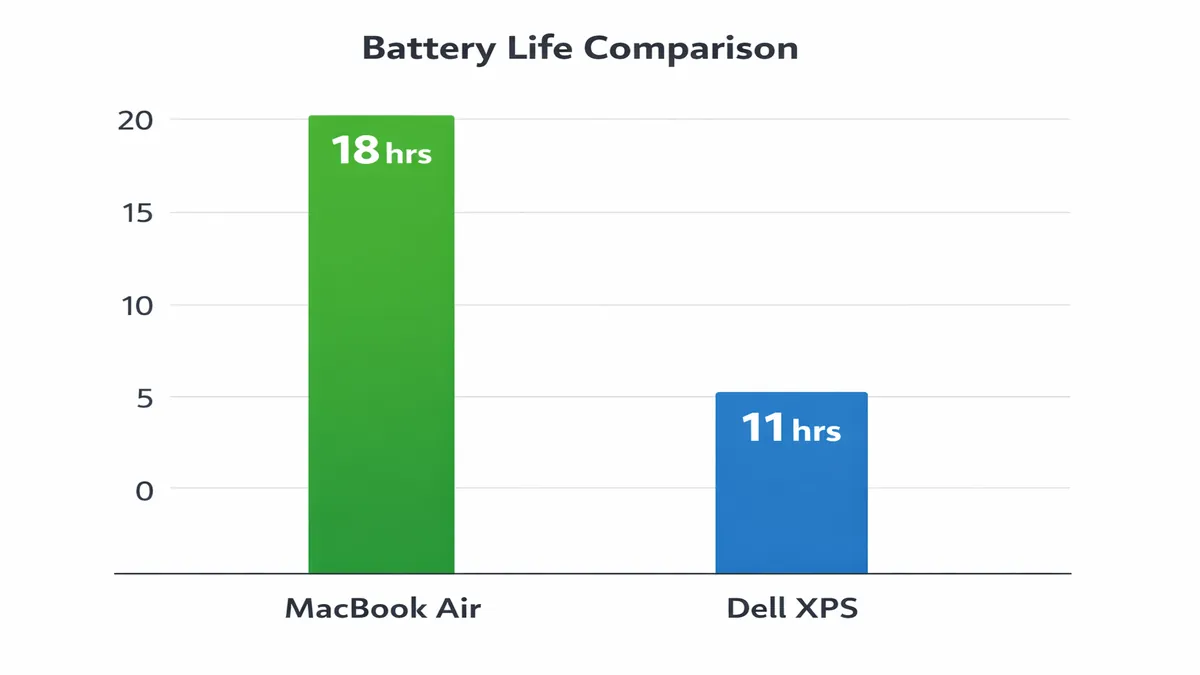
Battery life is a critical factor for any ultrabook, and both the MacBook Air M3 and the Dell XPS 13 are designed to offer impressive endurance. However, Apple's M-series chips have consistently set a high bar in this regard, often giving the MacBook Air a significant edge.
MacBook Air M3: The Endurance Champion
The MacBook Air M3 is renowned for its exceptional battery life, typically delivering 15-18 hours of mixed usage on a single charge. This outstanding endurance is a direct result of the M3 chip's industry-leading power efficiency. Apple's integrated design means that the chip consumes very little power even under moderate loads, allowing the laptop to run for extended periods without needing to be plugged in. For users who are constantly on the go, students attending back-to-back classes, or professionals working remotely without consistent access to power outlets, the MacBook Air M3 is an unparalleled choice. Its ability to last a full workday and beyond makes it a true portable workhorse, minimizing range anxiety.
Dell XPS 13: Strong Contender, But Varies
The Dell XPS 13 (2026 model) also offers very respectable battery life, but it tends to vary more depending on the display configuration. With a Full HD+ (1920 x 1200) IPS display, the XPS 13 can typically achieve 10-12 hours of mixed usage. This is excellent for a Windows laptop and more than sufficient for most users' daily needs. However, if you opt for the 3.5K OLED display option, the battery life will likely drop to 8-10 hours due to the higher power consumption of OLED panels. While still good, this is a noticeable difference compared to the MacBook Air M3.
The choice of processor also plays a role. Intel Core Ultra processors are more power-efficient than previous generations, and if Dell integrates the Snapdragon X Elite, the XPS 13's battery life could see a significant boost, potentially rivaling or even surpassing the MacBook Air in certain scenarios, especially with ARM-optimized software. However, as of 2026, the MacBook Air M3 generally holds the crown for sheer battery longevity in real-world usage tests.
Winner: MacBook Air M3 for consistently longer battery life across configurations. The Dell XPS 13 offers strong endurance, especially with the FHD+ display, but the MacBook Air remains the king of longevity.
Display
Both the MacBook Air M3 and the Dell XPS 13 offer excellent displays, but they cater to slightly different preferences and technologies. The choice here often comes down to resolution, panel type, and aspect ratio.
MacBook Air M3: Liquid Retina with Consistent Quality
The MacBook Air M3 features Apple's 13.6-inch Liquid Retina display with a resolution of 2560 x 1664 pixels. This IPS panel delivers sharp text, vibrant colors, and excellent viewing angles. Apple is known for its consistent display quality across its lineup, and the Liquid Retina display on the Air is no exception. It offers good brightness (typically around 500 nits) and supports a wide color gamut (P3), making it suitable for creative work like photo editing. The aspect ratio is 16:10, which provides slightly more vertical screen real estate than traditional 16:9 displays, beneficial for productivity tasks.
However, one notable difference from the MacBook Pro models is the 60Hz refresh rate. While perfectly adequate for most users and tasks, it lacks the buttery-smooth scrolling and responsiveness of ProMotion (120Hz adaptive refresh rate) found on the MacBook Pro. For casual users, this is unlikely to be a deal-breaker, but those accustomed to high refresh rates might notice the difference.
Dell XPS 13: Versatility with OLED Option
The Dell XPS 13 (2026) typically offers more display options, allowing users to choose based on their priorities. The standard configuration often includes a 13.4-inch Full HD+ (1920 x 1200) IPS display. This panel is bright, color-accurate, and offers a 16:10 aspect ratio, similar to the MacBook Air. It's an excellent all-around display for productivity and media consumption.
The standout option for the XPS 13 is often the 3.5K OLED display. This panel delivers unparalleled contrast, true blacks, and incredibly vibrant colors, making it a dream for media consumption, graphic design, and anyone who appreciates a visually stunning experience. OLED displays also typically have faster response times, which can be a subtle benefit for fast-paced content. However, as mentioned in the battery section, opting for the OLED display will reduce battery life.
Dell's displays are also known for their InfinityEdge design, featuring incredibly thin bezels around the screen. This creates a more immersive viewing experience and allows Dell to fit a larger screen into a smaller chassis, making the XPS 13 feel remarkably compact for its screen size.
Winner: Dell XPS 13 (with OLED option) for sheer visual impact and versatility. While the MacBook Air's Liquid Retina is excellent, the XPS 13's OLED option offers a superior viewing experience, especially for media and creative work where contrast and color vibrancy are paramount. If a high refresh rate is a priority, neither of these models offers it, but the XPS 13's OLED still provides a noticeable visual upgrade.
Who Should Buy Which
The decision between the MacBook Air M3 and the Dell XPS 13 in 2026 ultimately boils down to individual priorities, preferred ecosystem, and specific workflow requirements. Both are exceptional ultrabooks, but they excel in different areas.
Choose the MacBook Air M3 if:
- You are deeply integrated into the Apple ecosystem: If you own an iPhone, iPad, Apple Watch, or other Apple devices, the seamless integration (Handoff, Universal Clipboard, AirDrop, iMessage, etc.) offered by macOS is a significant advantage.
- You prioritize exceptional battery life: The MacBook Air M3 consistently delivers longer battery endurance, making it ideal for users who need to work unplugged for extended periods.
- You value silent operation: The fanless design ensures a completely silent computing experience, perfect for quiet environments like libraries or late-night work sessions.
- Your workflow involves light to moderate creative tasks: For photo editing, 4K video editing (single stream), graphic design, and music production, the M3 chip offers excellent performance, especially with Apple-optimized software.
- You prefer a simple, intuitive, and secure operating system: macOS is known for its user-friendly interface, robust security features, and consistent performance.
- You are a student or general user: For everyday tasks, web browsing, office work, and online learning, the MacBook Air M3 provides an incredibly smooth and reliable experience.
Choose the Dell XPS 13 if:
- You require Windows for specific software or compatibility: If your profession or studies demand Windows-only applications, or if you need broad compatibility with various peripherals and enterprise environments, the XPS 13 is the clear choice.
- You prefer a stunning OLED display: The option for a 3.5K OLED panel on the XPS 13 offers superior contrast, true blacks, and vibrant colors, making it ideal for media consumption and visual creative work.
- You value a more compact design for its screen size: The InfinityEdge display allows the XPS 13 to pack a 13.4-inch screen into an incredibly small footprint, making it feel smaller than the MacBook Air.
- You need more RAM options: The XPS 13 typically offers configurations with up to 32GB of LPDDR5X RAM, which can be beneficial for very heavy multitasking or specific professional applications that are RAM-intensive.
- You appreciate design innovation and a modern aesthetic: Dell consistently updates the XPS 13 with cutting-edge design elements and premium materials.
- You are a developer or power user who benefits from multi-core performance: While the M3 is strong, the Intel Core Ultra (or Snapdragon X Elite) processors in the XPS 13 can offer competitive or superior multi-core performance for certain workloads.
FAQ
Here are answers to some frequently asked questions regarding the MacBook Air M3 and Dell XPS 13 comparison in 2026.
MacBook Air vs Dell XPS 13: Which is faster?
For single-core performance, the MacBook Air M3 generally holds an edge due to the efficiency and optimization of Apple Silicon. This translates to snappier everyday tasks and faster performance in applications that don't heavily utilize multiple cores. For multi-core performance, the Dell XPS 13 (2026) with Intel Core Ultra processors (or Snapdragon X Elite) can be very competitive, and in some benchmarks, may even surpass the M3, especially in sustained workloads where active cooling prevents throttling. For tasks like video editing, the M3's integrated GPU and media engines are highly optimized, often giving it an advantage. Ultimately, both are incredibly fast for their class, and the perceived speed will depend on your specific workflow and the software you use.
Is Dell XPS good for Mac users?
The Dell XPS 13 can be an excellent choice for Mac users who are considering a switch to Windows, particularly if they need Windows for specific software or prefer the hardware innovations of the XPS line. The XPS 13 offers a premium build quality, a stunning display (especially the OLED option), and a comfortable keyboard, all of which will feel familiar to Mac users. However, the transition from macOS to Windows involves a learning curve. While Windows 11 has made significant strides in user interface design and functionality, it still operates differently from macOS. Mac users will need to adapt to a new file system, different keyboard shortcuts, and a less integrated ecosystem. If a Mac user is open to this transition and values the hardware strengths of the XPS 13, it can be a very rewarding experience.
Verdict + CTAs
In the battle of the ultrabooks in 2026, both the MacBook Air M3 and the Dell XPS 13 emerge as champions in their own right, each offering a compelling package of performance, design, and features. The choice between them is less about which is definitively "better" and more about which is the right fit for your individual needs, workflow, and ecosystem preference. Both are exceptional devices that represent the pinnacle of portable computing.
The MacBook Air M3 continues to be the king of efficiency and longevity. Its M3 chip delivers incredible performance-per-watt, resulting in phenomenal battery life and a silent, fanless design. For users deeply embedded in the Apple ecosystem, or those who prioritize a simple, secure, and highly optimized user experience, the MacBook Air M3 is an unbeatable choice. It offers a refined and reliable computing experience that is hard to match.
The Dell XPS 13 stands as a testament to innovation in the Windows world. It offers a stunning design, a versatile display with a breathtaking OLED option, and powerful performance from its Intel Core Ultra (or Snapdragon X Elite) processors. For users who require the vast software compatibility of Windows, appreciate a more compact design for its screen size, or desire the visual pop of an OLED display, the XPS 13 is a top-tier contender. It remains the benchmark for premium Windows ultrabooks.
Ultimately, your decision should be guided by your priorities. If all-day battery life, silent operation, and the seamless Apple ecosystem are paramount, the MacBook Air M3 is your ideal companion. If you need the flexibility of Windows, crave a stunning OLED display, and appreciate cutting-edge design, the Dell XPS 13 is the superior choice. Whichever you choose, you will be investing in a state-of-the-art ultrabook that will serve you well for years to come.
Ready to choose your next ultrabook? Explore our top picks and find the best deals available:
- Shop MacBook Air on Amazon: Amazon MacBook Air
- Shop Dell XPS on Amazon: Amazon Dell XPS
References
[1] OreateAI. (2026). MacBook Air M3 vs. Dell XPS 13: Which Ultrabook Reigns Supreme.... Retrieved from https://www.oreateai.com/blog/macbook-air-m3-vs-dell-xps-13-which-ultrabook-reigns-supreme-in-2025/1386a763f9af3e3101f416ce3daa72e2 [2] Laptop Mag. (2024). Dell XPS 13 9345 vs. MacBook Air 13 M3: Which is better?. Retrieved from https://www.laptopmag.com/laptops/dell-xps-13-9345-vs-macbook-air-13-m3 [3] TechRadar. (2025). Dell XPS 13 vs MacBook Air: which is the king of laptops?. Retrieved from https://www.techradar.com/computing/laptops/dell-xps-13-vs-macbook-air-which-is-the-king-of-laptops [4] Tom's Guide. (2024). Dell XPS 13 vs. MacBook Air 13-inch M3: Which laptop is better for.... Retrieved from https://www.tomsguide.com/computing/laptops/dell-xps-13-vs-macbook-air-13-inch-m3-which-laptop-is-better-for-you [5] Ultrabookreview.com. (2026). Is the Apple MacBook Air Still Worth It in 2026?. Retrieved from https://www.ultrabookreview.com/74162-macbook-air-still-worth-it/ [6] Forbes. (2024). Apple M3 MacBook Air Review: The 15-Inch Is The Perfect.... Retrieved from https://www.forbes.com/sites/bensin/2024/03/11/apple-m3-macbook-air-review-the-15-inch-is-the-perfect-digital-nomad-machine/ [7] PCMag. (2026). Dell Just Revived the XPS Brand, and I Test-Drove Its Slick 2026 XPS 14 and.... Retrieved from https://www.pcmag.com/news/dell-revived-xps-brand-and-i-test-drove-xps-14-ces-2026 [8] Amazon. (2026). MacBook Air on Amazon. Retrieved from https://www.amazon.com/?tag=enstores-20 [9] Amazon. (2026). Dell XPS on Amazon. Retrieved from https://www.amazon.com/?tag=enstores-20
📚 Related Articles
* Affiliate link. We may earn a commission at no extra cost to you.
Disclosure: This article contains affiliate links. We may earn a commission if you purchase through our links, at no extra cost to you. See our affiliate disclosure.