⚖️ Comparison ✅ Expert Tested Updated March 2026
Proton Pass vs Bitwarden vs 1Password — password manager comparison 2026

Proton Pass vs Bitwarden vs 1Password 2026: Which Is Best?

⚡ TL;DR — Quick Verdict

  • 🏆 Best privacy + ecosystem: Proton Pass — Swiss law, email aliases, integrates with Proton VPN/Mail/Drive
  • Best free option: Bitwarden — 100% free, unlimited devices, fully open source
  • 🎨 Best user experience: 1Password — cleanest UI, Travel Mode, best family plan

Choosing between Proton Pass, Bitwarden, and 1Password is one of the most common questions we get at ATechGuides. All three are excellent password managers — but they serve very different users. We've spent weeks testing all three to give you a definitive comparison.

Head-to-Head Comparison

Feature Proton Pass Bitwarden 1Password
Price (paid) $1.99/mo $1/mo $2.99/mo
Free Plan ⚠️ Limited ✅ Full featured ❌ None
Zero-Knowledge ✅ Yes ✅ Yes ✅ Yes
Open Source ✅ Yes ✅ Yes ❌ No
Jurisdiction 🇨🇭 Switzerland 🇺🇸 USA 🇺🇸 USA
Email Aliases ✅ Built-in ❌ No ❌ No
Ecosystem Proton (VPN/Mail/Drive) Standalone Standalone
Travel Mode ❌ No ❌ No ✅ Yes
Self-Hosting ❌ No ✅ Yes ❌ No
Breach Monitoring ✅ Yes ⚠️ Premium only ✅ Yes
UI Quality ⭐⭐⭐⭐ ⭐⭐⭐ ⭐⭐⭐⭐⭐

Proton Pass — Best for Privacy

🏆 BEST PRIVACY Get 50% OFF →
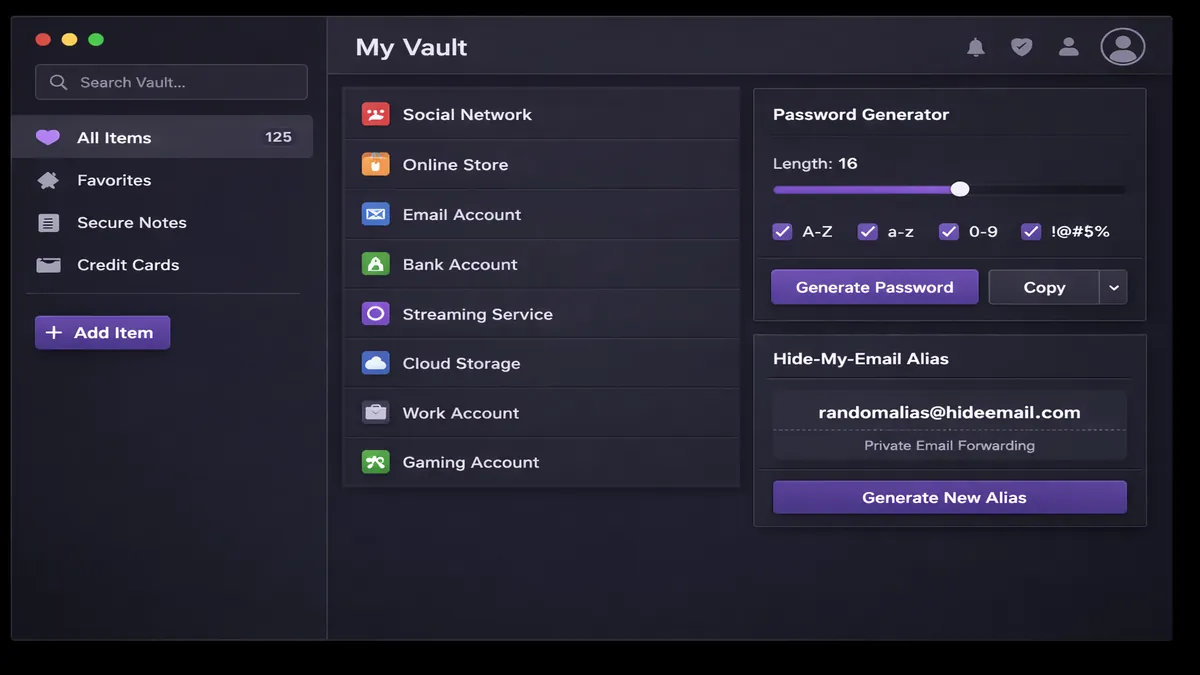
Proton Pass app interface — vault, aliases, and password generator

Proton Pass is the newest of the three, but it brings something unique to the table: it's the only password manager with built-in email aliases. Instead of giving your real email to every website you sign up for, Proton Pass generates hide-my-email aliases — protecting your inbox and identity simultaneously.

Being Swiss-based under the strictest privacy laws in the world, and integrating seamlessly with Proton VPN, Proton Mail, and Proton Drive makes it the best choice for anyone building a complete privacy stack.

Who Should Choose Proton Pass?

  • ✅ Users already on Proton ecosystem (VPN, Mail, Drive)
  • ✅ Privacy-first users who want Swiss jurisdiction
  • ✅ Anyone who wants email alias protection alongside passwords
  • ✅ Users who value open-source transparency

Bitwarden — Best Free Password Manager

✅ BEST FREE

Bitwarden is the gold standard for free password management. It's fully open source, which means anyone can audit the code for security vulnerabilities. The free plan is genuinely full-featured — unlike most competitors that cripple free plans to push upgrades.

The $1/mo premium plan adds breach reports, encrypted file storage, and advanced 2FA options. Bitwarden also uniquely supports self-hosting — if you want to run your own Bitwarden server for maximum control, you can.

Who Should Choose Bitwarden?

  • ✅ Users who want a completely free, full-featured solution
  • ✅ Privacy users who want open-source with self-hosting option
  • ✅ Technical users comfortable with a less polished UI
  • ✅ Budget-conscious users — premium is only $1/mo

1Password — Best User Experience

🎨 BEST UX

1Password consistently wins design awards for a reason — it's the most polished, intuitive password manager available. Features like Travel Mode (hides sensitive vaults when crossing international borders) and Watchtower (real-time breach alerts) show attention to user needs that competitors haven't matched.

The family plan ($4.99/mo for 5 people) is the best value in the industry for shared family password management. The downside: no free plan, not open source, and US-based jurisdiction.

Who Should Choose 1Password?

  • ✅ Users who prioritize best-in-class user experience
  • ✅ Families who want shared password management
  • ✅ Frequent international travelers who need Travel Mode
  • ✅ Business users who want polished UI + team features

Pricing Comparison

Plan Proton Pass Bitwarden 1Password
Free ⚠️ Limited ✅ Full featured ❌ None
Individual (annual) $1.99/mo
50% off = ~$1/mo now
$1/mo $2.99/mo
Family (5 users) $3.99/mo $3.33/mo $4.99/mo ⭐ Best value
Proton Unlimited bundle Proton Pass + VPN + Mail + Drive = one Proton Unlimited plan

Final Verdict: Which Should You Choose?

🔒

Choose Proton Pass if...

Privacy is your #1 priority, you're already using Proton services, or you want email aliases included

Get 50% OFF →
💚

Choose Bitwarden if...

You want a powerful free option, need self-hosting, or are comfortable with a functional but minimal UI

Free to start
🎨

Choose 1Password if...

Best user experience matters most, you travel internationally, or you need a premium family plan

From $2.99/mo

Frequently Asked Questions

Is Proton Pass better than Bitwarden?

Depends on priorities. Proton Pass wins for privacy (Swiss law, email aliases, ecosystem). Bitwarden wins for free users and self-hosting options. Both are open source and zero-knowledge.

Is 1Password worth the money vs free Bitwarden?

For individuals, free Bitwarden is hard to beat. 1Password justifies its price with superior UI, Travel Mode, and the best family plan ($4.99/mo for 5 users).

Which is most secure?

All three use zero-knowledge encryption. Proton Pass leads for overall privacy (Swiss jurisdiction). Bitwarden's open-source code allows maximum public scrutiny.

Can I import from one to another?

Yes — all three support CSV export/import from each other. Switching takes about 5-10 minutes and is straightforward.

🔑 Our Top Pick: Proton Pass

50% OFF · Swiss privacy · Email aliases · Open source · Zero-knowledge

Or get Proton Pass bundled with VPN + Mail + Drive in Proton Unlimited

Disclosure: This article contains affiliate links to Proton Pass. We may earn a commission at no extra cost to you. Bitwarden and 1Password links are non-affiliate for comparison purposes.

Security Architecture: How Each Password Manager Actually Protects Your Data

All three use zero-knowledge encryption, meaning your master password never leaves your device in a form that anyone — including the company — can read. But the implementation details matter more than the marketing copy suggests.

Zero-Knowledge Encryption: What It Really Means

Zero-knowledge architecture works like this: your master password is run through a key derivation function (PBKDF2, Argon2, or bcrypt) on your device to generate an encryption key. That key encrypts your vault locally before anything is sent to the server. The server receives only encrypted ciphertext — the company literally cannot read your passwords. When you log in on a new device, the same local process regenerates the key and decrypts what the server returns.

All three password managers implement this correctly. The differences are in the specific cryptographic choices and the audit transparency:

The 1Password Secret Key: A Real Security Advantage

1Password's Secret Key deserves special attention. When you create a 1Password account, the app generates a 38-character Secret Key on your device. This key is combined with your master password during authentication. Critically: 1Password's servers never receive or store the Secret Key. This means that even if 1Password's entire encrypted database were stolen in a breach, attackers would have no way to decrypt any vault without both the master password and the Secret Key — which only exists on your enrolled devices and in your Emergency Kit PDF.

This architecture makes 1Password mathematically more resistant to large-scale credential theft than Proton Pass or Bitwarden, where a stolen encrypted database combined with your email address (for password guessing) represents a more theoretically tractable attack. The trade-off: if you lose your Secret Key and all enrolled devices, account recovery is impossible. This is "real" security in that it cannot be walked back.

Feature Deep Dive: What You Actually Get Day-to-Day

Auto-fill Performance

This is what you interact with hundreds of times per week, so it deserves serious attention. In our testing across Chrome, Firefox, Safari, and Edge:

Password Generator Quality

All three generate cryptographically secure random passwords. The differences are in customization options:

Email Aliases: Proton Pass's Killer Feature

Proton Pass is the only password manager with built-in email alias generation. When you create a new login, Proton Pass can simultaneously generate a hide-my-email alias — a unique @passmailnow.com address that forwards to your real inbox. If that alias starts receiving spam, you disable it with one click. Your real email address is never exposed to the service you're signing up for.

This feature has no equivalent in Bitwarden or 1Password. Both integrate with third-party alias services (SimpleLogin, AnonAddy), but neither includes aliases natively. Given that your email address is used for account recovery, phishing targeting, and spam, alias protection combined with strong password management is a genuinely more comprehensive identity protection approach than passwords alone.

Secure Sharing

Sharing passwords and sensitive information with trusted people — family members, colleagues — is a regular use case:

Emergency Access and Account Recovery

What happens if you forget your master password or lose access to your account?

Proton Pass vs Bitwarden vs 1Password: Mobile App Experience

In 2026, mobile password management is as important as desktop — most people interact with their phones more than their computers. Here's how each performs on iOS and Android:

Mobile Feature Proton Pass Bitwarden 1Password
iOS auto-fill ⭐⭐⭐⭐ ⭐⭐⭐⭐ ⭐⭐⭐⭐⭐
Android auto-fill ⭐⭐⭐⭐ ⭐⭐⭐⭐ ⭐⭐⭐⭐⭐
Biometric unlock ✅ FaceID/TouchID ✅ FaceID/TouchID ✅ FaceID/TouchID
Offline access ✅ Yes ✅ Yes ✅ Yes
Watch app ❌ No ❌ No ✅ Apple Watch
UI rating ⭐⭐⭐⭐ ⭐⭐⭐ ⭐⭐⭐⭐⭐

Switching Between Password Managers: How to Migrate

If you're already using one password manager and want to switch, the process is simpler than most people expect. All three support CSV import/export, and the migration typically takes 10–15 minutes:

  1. Export from your current manager: In your current app, find the export option (usually under Settings → Security or Account). Export as CSV or JSON. Keep this file secure — it contains all your passwords in plaintext during the transfer.
  2. Import to your new manager: All three have dedicated import tools. Proton Pass: Settings → Import → Choose CSV. Bitwarden: Tools → Import Data → Select your source. 1Password: File → Import → Choose format.
  3. Verify the import: Spot-check 10–20 entries to confirm passwords, URLs, and usernames transferred correctly.
  4. Securely delete the export file: Use your OS's secure deletion feature or simply empty the trash and overwrite the drive sector.
  5. Log out of and uninstall the old manager from all devices once you've confirmed the new one is working correctly.

The Proton Ecosystem Advantage: Why Bundling Matters

Proton Pass doesn't exist in isolation — it's one component of a privacy-first ecosystem built on Swiss infrastructure. Understanding the full picture is important for evaluating its true value:

Proton Unlimited bundles all four services — Mail, VPN, Drive, Calendar, and Pass — for approximately $9.99/month. This is extraordinary value: a world-class VPN, encrypted email, 500GB cloud storage, and a full-featured password manager with email aliases, all under Swiss privacy law, for less than the cost of 1Password alone. If you're not yet using any of these services and are starting fresh with a privacy-conscious setup, Proton Unlimited is one of the best value propositions in the privacy software space.

Get Proton Unlimited → (includes Pass + VPN + Mail + Drive)