We may earn a commission if you buy through our links — at no extra cost to you.
Learn more →Razer vs Logitech Mouse 2026: Which Gaming Mouse Brand Wins?
Introduction
When it comes to gaming mice, two brands dominate every conversation: Razer and Logitech. Both have spent decades perfecting their hardware, investing in proprietary sensor technology, switch innovation, and wireless connectivity. Whether you're a competitive FPS player demanding pixel-perfect precision, an MMO gamer needing programmable buttons, or a casual user who just wants a reliable daily driver, both brands have a mouse for you.
But which brand is actually better in 2026? We tested over a dozen mice from both Razer and Logitech — putting their flagship models head-to-head across performance, comfort, durability, software, and value. Here's everything you need to know.
Sensor Performance: Pixel-Perfect on Both Sides
The sensor is the heart of any gaming mouse, and in 2026, both Razer and Logitech offer essentially flawless optical sensors that exceed any human capability.
Razer equips its top mice with the Focus Pro 30K Optical Sensor, featured in the DeathAdder V3 Pro and Basilisk V3 Pro. This sensor boasts a maximum DPI of 30,000, a tracking speed of 750 IPS, and 70G acceleration. Razer's sensors are known for their pixel-perfect tracking with zero smoothing, acceleration, or prediction — exactly what competitive FPS players demand. Smart features like Smart Tracking (automatic surface calibration) and Asymmetric Cut-off (custom lift-off distance) add extra precision control. Logitech counters with the HERO 25K Sensor, found in the G502 X Plus, G Pro X Superlight 2, and G403. Despite a slightly lower maximum DPI of 25,600, the HERO sensor delivers equally flawless real-world performance. Its standout feature is exceptional power efficiency — the HERO sensor consumes up to 10x less power than competing sensors, enabling Logitech's wireless mice to achieve battery life measured in hundreds of hours rather than days. Verdict: Tie. In real-world gaming, you will not feel a difference between these sensors. Both are overkill for human input. Choose based on other factors.Switch Technology: Razer's Innovation Edge
Mouse switches define the click feel, responsiveness, and longevity of a gaming mouse.
Razer Optical Mouse Switches (3rd Gen) use an infrared light beam instead of physical metal contacts to register clicks. This means:- Near-zero actuation delay (no debounce needed)
- No double-click issues (the plague of older mechanical switches)
- 90 million click durability — nearly double most competitors
- Crisp, satisfying click feel that has been refined over three generations
For gamers who haven't experienced optical switches: the difference is subtle but real. Razer's optical switches feel slightly crisper and more immediate. Logitech's LIGHTFORCE feels more satisfying and tactile.
Verdict: Razer wins for raw switch innovation and durability. Logitech's LIGHTFORCE is excellent but newer and less proven.Software: G HUB vs Razer Synapse
Both brands require their software to unlock full customization — DPI settings, RGB lighting, macro programming, and button remapping.
Razer Synapse 3 is feature-rich with deep Chroma RGB customization across Razer's entire ecosystem. However, it has a reputation for being resource-heavy, occasionally causing startup slowdowns, and requiring a Razer account. Recent versions have improved stability, but it's still not the lightest background application. Logitech G HUB is generally considered more stable and user-friendly. Its interface is clean, the driver footprint is lighter, and it integrates with a wider range of third-party games for automatic profile switching. It also supports profile syncing across devices without requiring an account. Verdict: Logitech G HUB wins for reliability and ease of use. Razer Synapse wins for RGB depth if you're all-in on the Chroma ecosystem.Build Quality & Durability
Both brands use high-quality plastics and materials, but there are notable differences:
- Razer mice often have a slightly more premium surface texture — rubberized grips and textured side panels are common on mid-to-high-end models. Some users report the rubber side grips peeling after 2-3 years of heavy use.
- Logitech mice tend to have more consistent long-term build quality. The G502 series is notably durable, and the G Pro line uses tighter tolerances with minimal wobble or creaking.
- Double-click issues: Historically, Logitech mice (especially the G Pro Wireless) were plagued by switch double-clicking after heavy use. LIGHTFORCE switches largely solve this problem. Razer's optical switches have never had this issue by design.
Who Should Buy Razer?
✅ You want the best optical switches (zero double-click risk, fastest actuation) ✅ You're invested in the Chroma RGB ecosystem (keyboard, headset, mousepad all synced) ✅ You prefer larger ergonomic right-handed shapes (DeathAdder remains iconic) ✅ You love the Razer aesthetic — green accents, matte black design ✅ You game competitively and want a battle-tested FPS mouse shape
Final Verdict
Both Razer and Logitech produce world-class gaming mice — and honestly, you cannot go wrong with either brand. The sensors are equally excellent, the wireless is lag-free, and build quality is top-tier on flagship models.
Logitech edges out Razer overall in 2026 thanks to superior battery life, the POWERPLAY charging ecosystem, more consistent long-term reliability, and better value at mid-range price points. G HUB is also simply a more pleasant software experience for most users. Razer wins if you prioritize optical switches, are deep in the Chroma ecosystem, or love the ergonomic DeathAdder shape that has become a gold standard in FPS gaming. Our Top Picks:- Best Overall Mouse (Any Brand): Logitech G Pro X Superlight 2 (~$159)
- Best Razer Mouse: Razer DeathAdder V3 Pro (~$159)
- Best Budget Wireless: Logitech G305 (~$45)
- Best for MMO/Extra Buttons: Logitech G502 X Plus (~$159)
- Best Budget Wired: Logitech G203 (~$29)
Complete Model-by-Model Breakdown: The Best Mice from Each Brand
Choosing a brand is only half the decision — the specific model matters enormously. Here's an in-depth look at the top mice from each brand across every major use case and price point:
Razer DeathAdder V3 Pro — Best Razer Mouse Overall
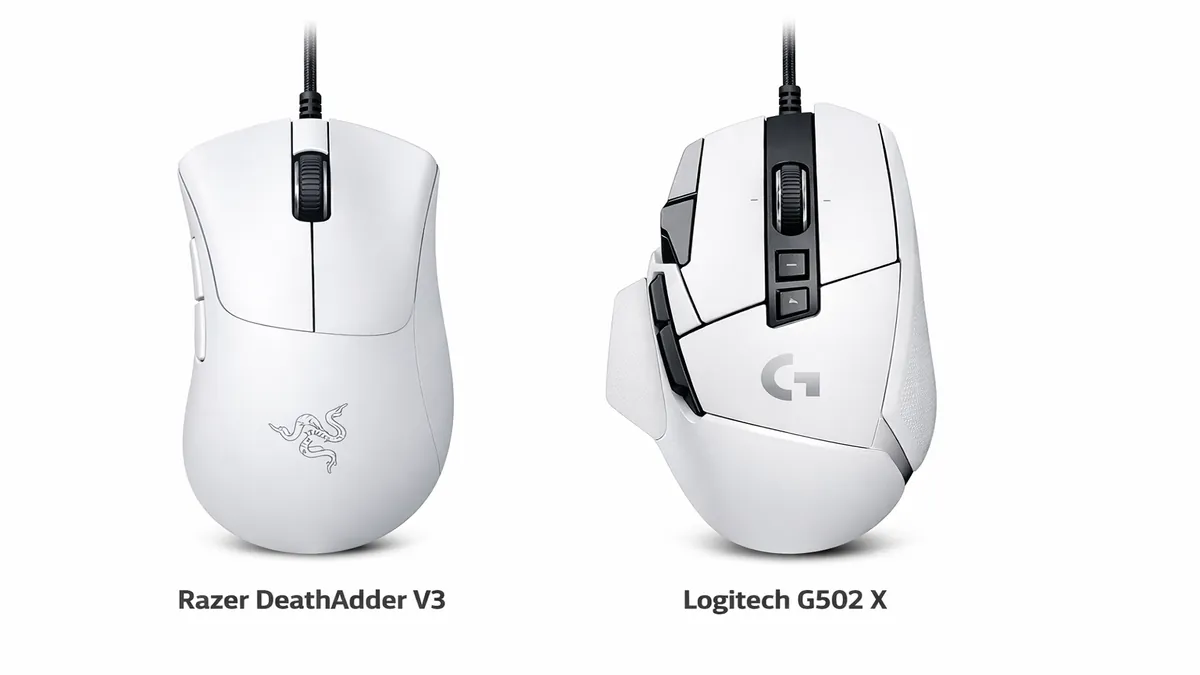
The DeathAdder V3 Pro is the pinnacle of Razer's ergonomic lineup and one of the most refined gaming mice ever made. The redesigned shape is slimmer and lighter than its predecessors (at just 64g), while retaining the iconic right-handed ergonomic profile that has made DeathAdder a gold standard for palm and claw grip players for over a decade. The Focus Pro 30K sensor delivers flawless tracking, and the 3rd Gen optical switches provide that crisp, instant actuation Razer is known for. Wireless via HyperSpeed, with battery life reaching 90 hours per charge. At around $159, it competes directly with Logitech's G Pro X Superlight 2 — and the choice genuinely comes down to shape preference.
Best for: FPS and battle royale players, palm/claw grip users, anyone who prefers a right-handed ergonomic shape over an ambidextrous design.
Razer Viper V3 Pro — Best Razer for Competitive FPS
The Viper V3 Pro replaced the legendary Viper V2 Pro with a new shape optimized for fingertip and claw grip players — slightly taller and with improved side buttons. At 54g, it's one of the lightest wireless mice ever made. Critically, Razer eliminated the honeycomb shell design entirely, opting for solid matte plastic that feels more premium and doesn't accumulate debris. The Focus Pro 30K sensor is the same class-leading optical as the DeathAdder V3 Pro. If you prefer a symmetrical, flatter profile over the DeathAdder's ergonomic hump, the Viper V3 Pro is arguably Razer's best technical achievement.
Best for: Claw and fingertip grip players, esports professionals, anyone transitioning from the Viper Ultimate.
Razer Basilisk V3 Pro — Best Razer for FPS + Versatility
The Basilisk V3 Pro is Razer's feature-king: 11 programmable buttons, a customizable scroll wheel with smart scroll modes (hyper-scroll and tactile click), tilt-click functionality, and the Focus Pro 30K sensor. It's heavier at 112g — the price of all those features — but for MMO players or users who want one mouse to handle everything from gaming to productivity, it's the most capable Razer has ever made. The HyperSpeed wireless and POWERPLAY charging compatibility (with the Razer POWERPLAY mousepad) make battery management a non-issue.
Best for: MMO players, users who want maximum programmability, those already in the Razer Chroma ecosystem.
Logitech G Pro X Superlight 2 — Best Mouse Period (Either Brand)
The G Pro X Superlight 2 is the closest thing to a consensus best gaming mouse in 2026. At 60g, it's featherlight without any honeycomb cutouts (Logitech achieved the weight reduction through precision material engineering). The HERO 25K sensor is flawless, and LIGHTFORCE switches provide a crisp, satisfying click with no debounce delay. The symmetrical ambidextrous shape works for most grip types. Battery life averages 95 hours — the HERO sensor's efficiency advantage is tangible. Used by more professional esports players than any other mouse in 2026. The only downsides: no on-board memory, no RGB (by design — this is a pure performance tool), and the single side button on each side isn't ideal for MMO use.
Best for: Competitive FPS and esports players, anyone who wants the objectively lightest high-performance wireless mouse.
Logitech G502 X Plus — Best for Versatility and Extra Buttons
The G502 X Plus is Logitech's answer to the "I want everything" crowd. It packs LIGHTFORCE hybrid switches, the HERO 25K sensor, and 13 programmable buttons — including a hyper-scroll wheel, sniper button, and side buttons galore. At 114g it's heavy compared to modern ultralight mice, but that weight provides a sense of solidity and control that many users prefer for strategy games and productivity. POWERPLAY charging compatibility means you can set it on the Logitech POWERPLAY charging mat and never think about battery again. The right-handed ergonomic shape has been refined over 15 years of G502 evolution.
Best for: MMO and MOBA players, strategy gamers, productivity users who want a feature-complete desktop driver, POWERPLAY ecosystem users.
Logitech G305 — Best Budget Wireless Mouse (Either Brand)
At around $45, the G305 remains one of the best value gaming mice ever made. HERO sensor, 250-hour battery life on a single AA battery, and solid build quality at a budget price point. It's not as light as modern ultralight mice and uses optical wireless at a lower polling rate than premium options, but for casual gaming or anyone new to wireless gaming mice, it's an exceptional starting point.
Wireless Technology Deep Dive: HyperSpeed vs LIGHTSPEED
Both brands offer premium wireless technology that eliminates any meaningful input lag — but the implementations differ in important ways that affect battery life and ecosystem integration.
Razer HyperSpeed Wireless
Razer's HyperSpeed operates at 2.4GHz with a claimed latency of under 1ms, comparable to wired connections. HyperSpeed Pro, introduced with the Viper V3 Pro, achieves 25% faster response than the original HyperSpeed. One major advantage: HyperSpeed uses a USB-A dongle that can be plugged into Razer's keyboard dongle port — letting one USB slot handle both mouse and keyboard wireless simultaneously. Battery life on HyperSpeed mice ranges from 90 hours (DeathAdder V3 Pro) to 100+ hours (Viper V3 Pro). Charging is via USB-C on all current models.
Logitech LIGHTSPEED
LIGHTSPEED is Logitech's wireless protocol, also operating at 2.4GHz with sub-1ms latency. The key differentiator is POWERPLAY: Logitech's POWERPLAY mousepads continuously charge LIGHTSPEED-compatible mice while in use, effectively giving infinite battery life as long as the mouse stays on the pad. This ecosystem feature has no Razer equivalent. Battery life on LIGHTSPEED mice ranges from 70 hours (G502 X Plus) to 95+ hours (G Pro X Superlight 2).
| Feature | Razer HyperSpeed | Logitech LIGHTSPEED |
|---|---|---|
| Latency | <1ms | <1ms |
| Battery life (flagship) | 90–100 hrs | 70–95 hrs + POWERPLAY ∞ |
| Charging while gaming | ❌ No | ✅ POWERPLAY mat |
| Keyboard dongle sharing | ✅ Yes (most models) | ❌ No |
| Wired alternative available | ✅ SpeedFlex cable | ✅ USB cable |
Ergonomics and Grip Styles: Which Brand Fits Your Hand?
Sensor specs and switch technology matter — but if the mouse doesn't fit your hand and grip style comfortably, nothing else matters. This is arguably the most important factor in any mouse purchase.
Understanding Grip Styles
- Palm grip: Full hand rests on the mouse, fingers lie flat on buttons. Needs a mouse with a tall hump that supports the arch of your palm. Best Razer shape: DeathAdder V3 Pro. Best Logitech: G502 X Plus.
- Claw grip: Palm rests on the back, fingers arch over buttons. Works with taller or flatter mice. Best Razer: Viper V3 Pro or DeathAdder V3 Pro. Best Logitech: G Pro X Superlight 2.
- Fingertip grip: Only fingertips contact the mouse, palm doesn't touch. Needs a flatter, smaller, lighter mouse. Best Razer: Viper V3 Pro (60g). Best Logitech: G Pro X Superlight 2 (60g).
Right-Handed vs Ambidextrous Shapes
Razer offers both: the DeathAdder and Basilisk lines are right-handed ergonomic shapes, while the Viper line is ambidextrous. Logitech's gaming mice are almost exclusively either ambidextrous (G Pro line) or right-handed ergonomic (G502). Left-handed gamers have notably limited options from both brands — Razer's Viper V3 Pro is the best choice for left-handed competitive gaming.
RGB Ecosystems: Chroma vs Lightsync
If RGB integration matters to your setup, both brands offer mature software-driven ecosystems — but they're not compatible with each other, so your existing peripherals may influence your decision.
Razer Chroma has the edge for sheer depth and third-party integration. Chroma RGB syncs natively with over 150 games, reacting in real-time to in-game events (health bars, abilities, kills). It integrates with Philips Hue, Nanoleaf, and other smart lighting systems. If you want your entire room to react to your game, Chroma is the most capable ecosystem. The Chroma Studio app allows fine-grained control over every individual LED zone.
Logitech LIGHTSYNC is cleaner and less resource-intensive. It integrates well with Logitech keyboards, headsets, and mousepads through G HUB and supports the same game-reactive lighting in over 100 supported titles. Many Logitech gaming mice intentionally omit RGB entirely (G Pro X Superlight 2, G305) to save weight and battery — a design philosophy that puts performance over aesthetics.
Price-by-Price Comparison: Best Mouse at Every Budget
| Budget | Best Razer | Best Logitech | Winner |
|---|---|---|---|
| Under $30 (wired) | Razer DeathAdder Essential (~$25) | Logitech G203 (~$29) | Logitech G203 |
| $40–$60 (wireless) | Razer Orochi V2 (~$50) | Logitech G305 (~$45) | Logitech G305 |
| $80–$120 (mid-range) | Razer DeathAdder V3 (~$99) | Logitech G Pro (~$99) | Tie |
| $150–$170 (flagship) | Razer DeathAdder V3 Pro (~$159) | Logitech G Pro X Superlight 2 (~$159) | Logitech (Pro players) |
| $150+ (feature-rich) | Razer Basilisk V3 Pro (~$159) | Logitech G502 X Plus (~$159) | Tie (use case dependent) |
Frequently Asked Questions
Is Razer or Logitech better for competitive gaming?
Both are used at the highest levels of esports. Logitech's G Pro X Superlight 2 is used by more professional players than any other mouse in 2026. Razer's Viper V3 Pro and DeathAdder V3 Pro are widely used in FPS esports. The sensor difference is imperceptible in competition — shape and fit are the deciding factors at the pro level.
Do Razer mice have double-click issues?
No — Razer's optical switches are architecturally immune to double-clicking because there are no physical metal contacts to degrade. This has historically been Logitech's weakness, though LIGHTFORCE switches have largely solved this problem for Logitech's newer mice.
Is Razer Synapse better than Logitech G HUB?
G HUB wins for most users — it's lighter, more stable, and doesn't require an account for basic functionality. Razer Synapse has deeper RGB customization through Chroma Studio, making it better if you're building an integrated RGB ecosystem with Razer peripherals. For pure functionality, G HUB is the more reliable daily driver.
Can I use a gaming mouse for office work?
Absolutely — gaming mice typically have better sensors and build quality than office-grade mice. The G502 X Plus in particular is excellent for productivity with its extra programmable buttons. You can configure DPI stages for detailed design work and daily browsing. The main consideration is whether you want the aesthetic — gaming mice often have RGB that might not suit a professional environment.
Which brand has better customer support and warranty?
Both offer 2-year limited warranties. Logitech's customer support is generally rated higher in user surveys, with faster resolution times and more flexibility in warranty claims. Razer's support has improved significantly in recent years but still receives mixed reviews for edge cases. Either way, buying from Amazon provides an additional layer of return protection beyond the manufacturer warranty.