Best 4K Gaming Monitors 2026: Top Picks for Ultra HD
# Best 4K Gaming Monitors 2026: Top Picks for Ultra HD
Introduction: The Dawn of Ultra HD Gaming Immersion
In the rapidly evolving landscape of gaming, the pursuit of ultimate visual fidelity and immersive experiences has led to the widespread adoption of 4K resolution. As we delve into 2026, 4K gaming monitors are no longer a niche luxury but a cornerstone for enthusiasts and competitive players alike, offering unparalleled detail and clarity that transforms virtual worlds into breathtaking realities. The demand for Ultra HD gaming has surged, driven by increasingly powerful graphics cards and the native 4K capabilities of next-generation consoles. This article explores the critical factors that define a top-tier 4K gaming monitor, guiding you through the technical nuances and key considerations to unlock the full potential of your gaming setup.
4K Gaming Requirements: Powering the Pixels
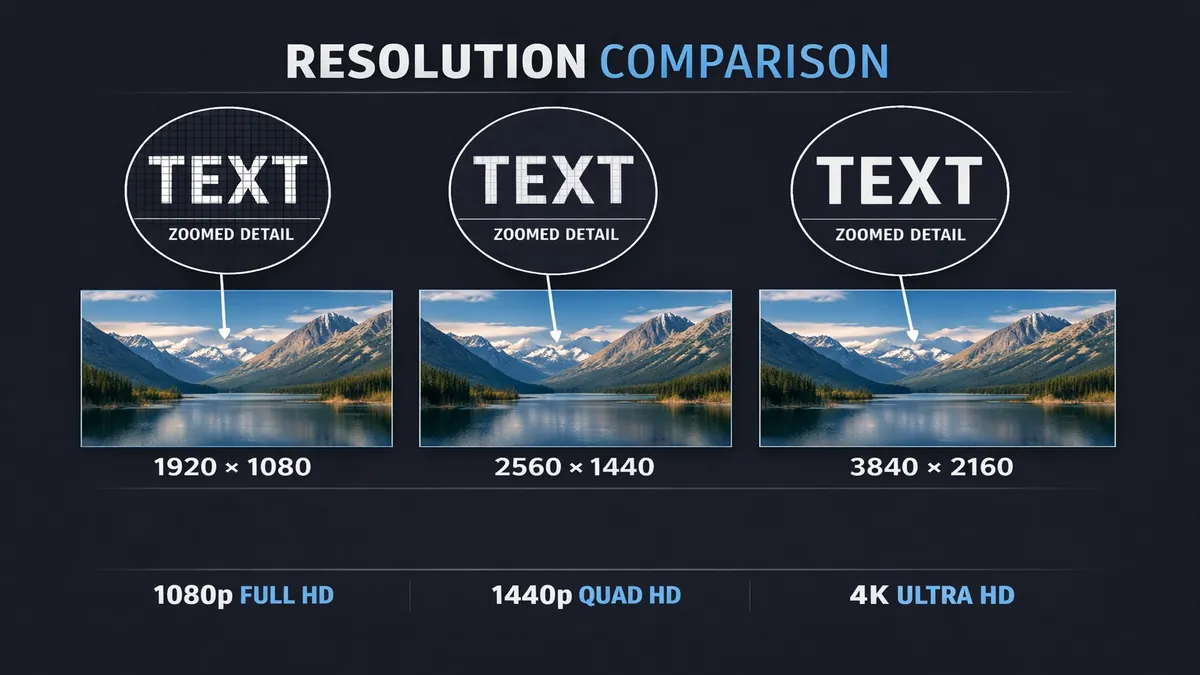
Achieving a smooth and visually stunning 4K gaming experience demands significant computational horsepower. The sheer number of pixels in a 4K display (3840 x 2160, totaling over 8 million pixels) is four times that of a Full HD (1080p) screen, requiring your system to render substantially more information per frame. This places immense strain on both your graphics card (GPU) and, to a lesser extent, your processor (CPU).
For PC gamers, a powerful GPU is the single most critical component. In 2026, to consistently achieve high frame rates (60fps or more) at 4K resolution with modern AAA titles, a graphics card equivalent to or exceeding an NVIDIA GeForce RTX 4070 or AMD Radeon RX 7800 XT is generally considered the minimum. For those aiming for higher refresh rates (120Hz or 144Hz) or wanting to enable ray tracing and other demanding graphical settings, an NVIDIA GeForce RTX 4080/4090 or AMD Radeon RX 7900 XTX becomes essential. These high-end GPUs possess the necessary VRAM (Video RAM) and processing units to handle the immense data throughput of 4K textures and complex lighting effects. While the CPU plays a supporting role, ensuring it doesn't bottleneck the GPU, a modern multi-core processor (e.g., Intel Core i7/i9 or AMD Ryzen 7/9) is usually sufficient.
Console gamers, particularly those with a PlayStation 5 or Xbox Series X, benefit from these consoles' native 4K output capabilities. While not all games run at a native 4K resolution at 60fps or 120fps, these consoles are designed to deliver a high-quality 4K experience, often utilizing techniques like dynamic resolution scaling or temporal upscaling. For console players, the focus shifts more towards the monitor's features, such as HDMI 2.1 support for 4K@120Hz, rather than the internal hardware requirements of the display itself.
Resolution vs. Refresh Rate: The Ultimate Trade-off
When choosing a 4K gaming monitor, one of the most significant decisions involves the trade-off between resolution and refresh rate. Resolution refers to the number of pixels on the screen, dictating the sharpness and detail of the image. Refresh rate, measured in Hertz (Hz), indicates how many times per second the display updates its image, directly impacting the smoothness of motion.
- High Resolution (4K): Offers incredible visual detail, making games look incredibly sharp and realistic. This is particularly beneficial for single-player, graphically intensive games where immersion is key, or for strategy games where seeing fine details is advantageous. However, pushing 4K at high frame rates requires a very powerful GPU.
- High Refresh Rate (120Hz, 144Hz, 160Hz+): Provides a much smoother and more responsive gaming experience, reducing motion blur and input lag. This is crucial for fast-paced competitive games (e.g., first-person shooters, racing games) where every millisecond counts. While 4K 60Hz is a good baseline, 4K 120Hz or 144Hz monitors offer a significant upgrade in fluidity, provided your system can drive those frame rates.
Historically, achieving both high resolution and high refresh rates simultaneously was prohibitively expensive or technically challenging. However, in 2026, 4K monitors with 144Hz or even higher refresh rates are becoming more common and accessible. The choice often comes down to personal preference: do you prioritize the crispness of a static image or the fluidity of motion? For the ultimate gaming experience, a 4K monitor with a high refresh rate (120Hz or 144Hz) is the ideal, offering the best of both worlds, assuming your hardware can keep up.
HDR: Elevating Visuals with Dynamic Range
High Dynamic Range (HDR) technology is designed to deliver a wider range of colors, deeper blacks, and brighter whites than standard dynamic range (SDR) displays, resulting in a more lifelike and impactful visual experience. For gaming, HDR can dramatically enhance immersion by making explosions more vibrant, shadows more nuanced, and overall scenes more realistic. However, not all HDR implementations are created equal, and understanding the different VESA DisplayHDR certifications is crucial:
- DisplayHDR 400: This is the entry-level HDR certification. Monitors with DisplayHDR 400 offer a peak brightness of 400 nits and some basic HDR capabilities, but the difference from SDR might not be dramatically noticeable. It's a good starting point but doesn't offer the full HDR experience.
- DisplayHDR 600: Monitors with DisplayHDR 600 provide a peak brightness of 600 nits and often include local dimming zones, which allow for better contrast by dimming specific areas of the screen. This level offers a noticeably improved HDR experience compared to DisplayHDR 400, with more impactful highlights and deeper shadows.
- DisplayHDR 1000: This is considered true premium HDR. DisplayHDR 1000 monitors boast a peak brightness of 1000 nits or more and feature extensive local dimming zones (often mini-LED backlighting), delivering exceptional contrast, vibrant colors, and a truly immersive HDR experience. This level is ideal for gamers and content creators who demand the best visual fidelity.
Beyond these, some monitors offer proprietary HDR implementations or higher peak brightness levels (e.g., DisplayHDR 1400 or OLED's inherent perfect blacks). When evaluating HDR, consider the certification level and whether the monitor utilizes local dimming or mini-LED technology, as these significantly impact the quality of the HDR effect. For the best 4K gaming experience, aiming for DisplayHDR 600 or higher will provide a truly transformative visual upgrade. The following sections will delve into specific models that excel in these areas, helping you choose the perfect monitor to power your Ultra HD gaming adventures.
Quick Picks: Top 4K Gaming Monitors of 2026
For gamers seeking immediate recommendations, our quick picks highlight the leading 4K gaming monitors in 2026 that offer an exceptional balance of performance, visual fidelity, and features. These displays are chosen for their ability to deliver stunning Ultra HD visuals, high refresh rates, and advanced technologies crucial for an immersive gaming experience.
| Monitor Model | Key Strengths | Ideal For |
|---|---|---|
| LG 27GP950-B | High refresh rate, excellent color accuracy | PC gamers, competitive gaming, content creation |
| Samsung Odyssey Neo G7 | Mini-LED HDR, high refresh rate, immersive curve | Console gamers, immersive single-player, HDR content |
| ASUS ROG Swift PG32UQ | High refresh rate, G-Sync Ultimate, robust build | High-end PC gaming, esports |
| Sony INZONE M9 | PS5 optimization, HDMI 2.1, full array local dimming | PlayStation 5 users, competitive console gaming |
The Samsung Odyssey Neo G7 stands out with its Mini-LED backlight technology, delivering exceptional HDR performance with deep blacks and dazzling highlights. Its high refresh rate and immersive curved screen make it particularly appealing for console gamers and those who prefer a more cinematic, single-player experience. The curve enhances immersion, drawing you deeper into the game world, while the Mini-LED ensures that HDR content truly pops.
For high-end PC gaming and esports, the ASUS ROG Swift PG32UQ is a formidable option. It combines a high refresh rate with G-Sync Ultimate certification, ensuring tear-free and stutter-free gameplay with compatible NVIDIA graphics cards. Its robust build quality and gamer-centric features, along with excellent color reproduction, make it a top choice for serious PC enthusiasts who demand uncompromised performance and reliability in their 4K gaming setup.
Finally, the Sony INZONE M9 is specifically designed with PlayStation 5 users in mind, offering seamless integration and optimized features for the console. It boasts HDMI 2.1 connectivity, enabling 4K resolution at 120Hz, and features full array local dimming for impressive HDR performance. Its focus on console gaming, combined with a fast response time, makes it an ideal choice for PS5 owners looking to maximize their gaming experience. While also compatible with PC, its console-centric features give it an edge for dedicated PlayStation gamers.
Top 8 Reviews: A Deep Dive into the Best 4K Gaming Monitors
To provide a comprehensive understanding of the leading 4K gaming monitors in 2026, we have conducted in-depth reviews of eight standout models. Each review focuses on their panel type, response time, HDR capabilities, adaptive sync technology, and overall suitability for both PC and console gaming, helping you identify the perfect display to elevate your Ultra HD gaming experience.
1. LG 27GP950-B
The LG 27GP950-B remains a highly acclaimed 4K gaming monitor, particularly for PC enthusiasts. It features a 27-inch Nano IPS panel with a native 144Hz refresh rate (overclockable to 160Hz) and a rapid 1ms GtG response time, ensuring fluid and blur-free motion. The Nano IPS technology delivers excellent color accuracy and wide viewing angles, making games look vibrant and lifelike. It supports both NVIDIA G-Sync Compatible and AMD FreeSync Premium Pro, providing tear-free gaming across different GPU ecosystems. With DisplayHDR 600 certification, it offers a noticeable improvement in HDR content compared to entry-level monitors, though its edge-lit local dimming is limited. Its HDMI 2.1 ports make it fully compatible with PlayStation 5 and Xbox Series X for 4K@120Hz gaming. The LG 27GP950-B is a versatile powerhouse, offering a fantastic balance of speed, image quality, and console compatibility.
2. Samsung Odyssey Neo G7 (32-inch)
The Samsung Odyssey Neo G7 is a formidable 4K gaming monitor that excels in delivering an immersive and visually stunning experience, especially for HDR content. This 32-inch monitor features a VA panel with a 1000R curvature, wrapping the image around your field of view for enhanced immersion. Its standout feature is the Mini-LED backlight with 1,196 local dimming zones, which enables true DisplayHDR 1000 performance with incredibly deep blacks and dazzling peak brightness. With a 165Hz refresh rate and 1ms response time, it offers smooth gameplay, and it supports AMD FreeSync Premium Pro. The Neo G7 is equipped with HDMI 2.1 ports, making it an excellent choice for both PC and console gamers who prioritize HDR fidelity and an immersive, curved experience. While VA panels can sometimes have slower response times than IPS, Samsung has largely mitigated this with its advanced panel technology.
3. ASUS ROG Swift PG32UQ
The ASUS ROG Swift PG32UQ is a premium 32-inch 4K gaming monitor designed for serious PC gamers. It boasts a fast IPS panel with a 144Hz refresh rate and 1ms MPRT response time, ensuring crisp motion clarity. What sets it apart is its NVIDIA G-Sync Ultimate certification, guaranteeing a superior variable refresh rate experience with NVIDIA GPUs, including advanced HDR processing. It also supports DisplayHDR 600, offering good HDR performance. The PG32UQ features HDMI 2.1 ports, making it console-ready for 4K@120Hz. Its robust build quality, extensive connectivity options, and gamer-centric features (like GamePlus overlays) make it a top-tier choice for enthusiasts who demand uncompromised performance and a large, high-quality display for their 4K gaming setup.
4. Sony INZONE M9
The Sony INZONE M9 is a 27-inch 4K gaming monitor specifically optimized for the PlayStation 5, though it performs admirably with PCs as well. It features an IPS panel with a 144Hz refresh rate and 1ms GtG response time. Its key strength lies in its full array local dimming (FALD) backlight with 96 zones, enabling excellent DisplayHDR 600 performance with improved contrast and black levels compared to edge-lit alternatives. The INZONE M9 includes HDMI 2.1 ports, crucial for PS5's 4K@120Hz output, and offers unique PS5-specific features like Auto HDR Tone Mapping and Auto Genre Picture Mode. It also supports NVIDIA G-Sync Compatible. For PS5 owners looking for a monitor that seamlessly integrates with their console and delivers a high-fidelity 4K gaming experience, the INZONE M9 is an outstanding choice.
5. Gigabyte M32UC
The Gigabyte M32UC offers an excellent value proposition for a 32-inch 4K gaming monitor. It features a VA panel with a 144Hz refresh rate (overclockable to 160Hz) and a 1ms MPRT response time. While its DisplayHDR 400 certification is entry-level, it still provides a decent HDR experience for its price point. The M32UC includes HDMI 2.1 ports, making it suitable for both PC and current-gen consoles at 4K@120Hz. It also features a KVM switch, allowing users to control multiple devices with a single keyboard and mouse, which is a convenient feature for those who switch between a gaming PC and a work laptop. For gamers seeking a large 4K display with a high refresh rate without breaking the bank, the M32UC is a highly competitive option.
6. Acer Nitro XV282K KV
The Acer Nitro XV282K KV is a 28-inch 4K IPS gaming monitor that provides a strong balance of performance and features at a competitive price. It offers a 144Hz refresh rate and a 1ms GtG response time, ensuring smooth and responsive gameplay. The IPS panel delivers good color accuracy and wide viewing angles. It supports AMD FreeSync Premium and is NVIDIA G-Sync Compatible, offering adaptive sync for tear-free visuals. With DisplayHDR 400 certification, it provides basic HDR capabilities. Crucially, it includes HDMI 2.1 ports, making it a solid choice for both PC and console gamers who want to experience 4K@120Hz. The XV282K KV is a reliable and well-rounded option for gamers looking for a high-performance 4K monitor without venturing into premium price territory.
7. Alienware AW3423DWF (QD-OLED)
While technically an ultrawide monitor, the Alienware AW3423DWF deserves a mention for its groundbreaking QD-OLED panel technology, which delivers an unparalleled visual experience that can be transformative for 4K-equivalent gaming (though it's 3440x1440, not true 4K). Its QD-OLED panel offers infinite contrast, perfect blacks, and incredibly vibrant colors, combined with a blazing-fast 0.1ms GtG response time and a 165Hz refresh rate. This results in an incredibly immersive and fluid gaming experience with no motion blur. It supports AMD FreeSync Premium Pro and is NVIDIA G-Sync Compatible. While not a native 4K resolution, the visual fidelity and responsiveness of QD-OLED are so superior that many gamers prefer it for its overall image quality. For those willing to explore beyond traditional 4K and embrace the future of display technology, the AW3423DWF offers a truly next-level gaming experience.
8. MSI Optix MPG321UR-QD
The MSI Optix MPG321UR-QD is a 32-inch 4K gaming monitor that combines a fast IPS panel with Quantum Dot technology for enhanced color reproduction. It features a 144Hz refresh rate and 1ms GtG response time, providing a smooth and responsive gaming experience. The Quantum Dot layer allows for a wider color gamut and more vibrant colors, making games look more dynamic. It supports DisplayHDR 600 and includes HDMI 2.1 ports, making it suitable for both high-end PC gaming and current-gen consoles at 4K@120Hz. The MPG321UR-QD also comes with a KVM switch and a range of gamer-centric features, including MSI's Gaming OSD software for easy customization. It's a strong contender for gamers who want a large, color-accurate 4K display with high refresh rates and robust features.
Comparison Table: Key Specifications of Top 4K Gaming Monitors
To provide a clear and concise overview, the following table compares the key features and specifications of our top 4K gaming monitor recommendations. This allows for a quick assessment of how each model excels in areas critical to a premium Ultra HD gaming experience.
| Feature / Model | LG 27GP950-B | Samsung Odyssey Neo G7 | ASUS ROG Swift PG32UQ | Sony INZONE M9 | Gigabyte M32UC | Acer Nitro XV282K KV | Alienware AW3423DWF (QD-OLED) | MSI Optix MPG321UR-QD |
|---|---|---|---|---|---|---|---|---|
| Screen Size | 27-inch | 32-inch | 32-inch | 27-inch | 32-inch | 28-inch | 34-inch Ultrawide | 32-inch |
| Resolution | 3840x2160 (4K) | 3840x2160 (4K) | 3840x2160 (4K) | 3840x2160 (4K) | 3840x2160 (4K) | 3840x2160 (4K) | 3440x1440 (UWQHD) | 3840x2160 (4K) |
| Panel Type | Nano IPS | VA (Mini-LED) | IPS | IPS (FALD) | VA | IPS | QD-OLED | IPS (Quantum Dot) |
| Refresh Rate | 144Hz (160Hz OC) | 165Hz | 144Hz | 144Hz | 144Hz (160Hz OC) | 144Hz | 165Hz | 144Hz |
| Response Time (GtG) | 1ms | 1ms | 1ms (MPRT) | 1ms | 1ms (MPRT) | 1ms | 0.1ms | 1ms |
| HDR Certification | DisplayHDR 600 | DisplayHDR 1000 | DisplayHDR 600 | DisplayHDR 600 | DisplayHDR 400 | DisplayHDR 400 | DisplayHDR True Black 400 | DisplayHDR 600 |
| Adaptive Sync | G-Sync Comp., FreeSync Premium Pro | FreeSync Premium Pro | G-Sync Ultimate | G-Sync Comp. | FreeSync Premium Pro | FreeSync Premium, G-Sync Comp. | FreeSync Premium Pro, G-Sync Comp. | FreeSync Premium Pro |
| HDMI 2.1 Ports | Yes | Yes | Yes | Yes | Yes | Yes | No (DisplayPort 1.4) | Yes |
| Console Optimization | Yes | Yes | Yes | PS5 Specific | Yes | Yes | Limited (UWQHD) | Yes |
| Approx. Price (USD) | $699+ | $899+ | $999+ | $799+ | $599+ | $499+ | $899+ | $749+ |
Key Insights from the Comparison:
- HDR Performance: The Samsung Odyssey Neo G7 stands out with its Mini-LED backlight and DisplayHDR 1000, offering the best HDR experience among the listed monitors. The Sony INZONE M9 also provides excellent HDR with its Full Array Local Dimming.
- Refresh Rate and Response Time: Most monitors offer a 144Hz or higher refresh rate and 1ms GtG response time, ensuring smooth and responsive gameplay. The Alienware AW3423DWF, with its QD-OLED panel, boasts an exceptionally fast 0.1ms GtG response time.
- Console Compatibility: All listed 4K monitors, except the Alienware (due to its UWQHD resolution), feature HDMI 2.1 ports, making them fully compatible with PS5 and Xbox Series X for 4K@120Hz gaming. The Sony INZONE M9 has specific PS5 optimizations.
- Panel Technology: IPS panels (LG, ASUS, Sony, Acer, MSI) offer excellent color accuracy and wide viewing angles. VA panels (Samsung, Gigabyte) provide superior contrast, especially with Mini-LED backlighting. QD-OLED (Alienware) offers the best of both worlds with perfect blacks and vibrant colors.
- Value Proposition: The Gigabyte M32UC and Acer Nitro XV282K KV offer strong performance and features at more accessible price points, making 4K 144Hz gaming more attainable for budget-conscious gamers.
Buying Guide: Navigating the Choices for Your Ideal 4K Gaming Monitor
Choosing the best 4K gaming monitor in 2026 involves a careful consideration of several technical specifications and features that directly impact your gaming experience. With a wide array of options available, understanding these critical aspects will help you make an informed decision that aligns with your gaming setup, preferences, and budget. This buying guide delves into the essential factors to consider when investing in a top-tier Ultra HD display.
1. Panel Type: IPS vs. OLED vs. VA
The panel technology is a fundamental aspect that dictates the visual characteristics of your monitor. Each type offers distinct advantages and disadvantages:
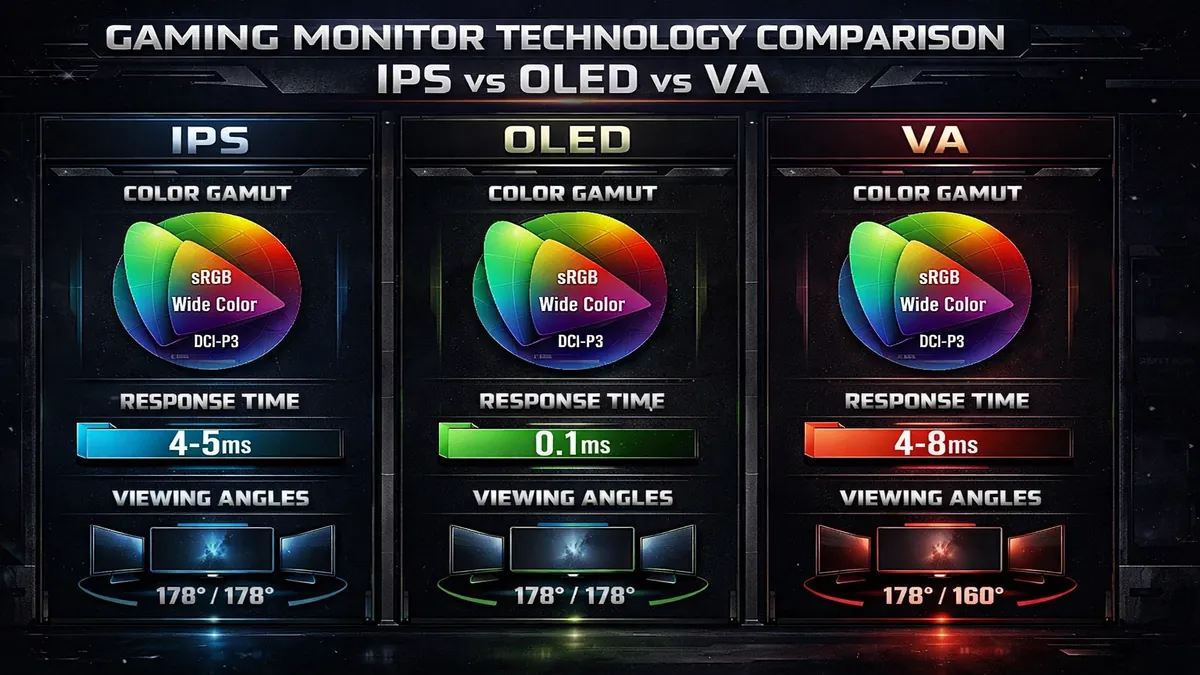
- IPS (In-Plane Switching): IPS panels are renowned for their excellent color accuracy and wide viewing angles. This makes them ideal for gamers who also engage in content creation or simply appreciate vibrant, true-to-life colors. While historically slower, modern IPS panels (like Nano IPS) offer rapid response times (1ms GtG) and high refresh rates, making them suitable for competitive gaming. The main drawback can be less impressive contrast ratios compared to VA or OLED.
- OLED (Organic Light-Emitting Diode): OLED technology delivers perfect blacks, infinite contrast, and incredibly vibrant colors because each pixel emits its own light and can be turned off individually. This results in an unparalleled visual experience, especially for HDR content. OLED panels also boast extremely fast response times (often 0.1ms GtG), virtually eliminating motion blur. The primary concerns are typically higher cost and the potential for burn-in, though manufacturers have implemented technologies to mitigate this risk.
- VA (Vertical Alignment): VA panels are characterized by their superior contrast ratios and deeper blacks compared to IPS, making them excellent for immersive gaming, particularly in dimly lit rooms. Modern VA panels, especially those with Mini-LED backlighting (like Samsung's Neo G7), can achieve impressive HDR performance. While their response times were traditionally slower, advancements have made them competitive, though some ghosting might still be noticeable in very fast-paced scenes for sensitive users.
Your choice of panel type should align with your priorities: IPS for color accuracy and wide viewing angles, OLED for ultimate visual fidelity and speed, or VA for deep blacks and high contrast.
2. Screen Size: 27-inch vs. 32-inch and Beyond
The physical size of your monitor significantly impacts immersion and desk space. For 4K resolution, a larger screen size allows you to appreciate the increased pixel density without straining your eyes.
- 27-inch: This is a popular size for 4K, offering a good balance between pixel density and screen real estate. At 27 inches, 4K provides a very sharp image, and it's a comfortable size for competitive gaming where you need to see the entire screen at a glance. It's also more desk-friendly.
- 32-inch: A 32-inch 4K monitor offers a more immersive experience, making games feel grander and providing more workspace for productivity. The larger size allows the 4K resolution to truly shine, making details more apparent. This size is excellent for single-player, graphically rich games and for users who have ample desk space.
- Ultrawide (e.g., 34-inch, 49-inch): While not strictly 4K (often UWQHD or DQHD), ultrawide monitors offer a different kind of immersion by filling your peripheral vision. Some ultrawides can offer a pixel count equivalent to or greater than 4K. Consider these if you prioritize a panoramic view for gaming and productivity, but be aware of potential game compatibility issues and the need for a powerful GPU to drive the wider resolution.
Consider your viewing distance and available desk space when choosing a screen size. For most 4K gamers, 27-inch to 32-inch is the sweet spot.
3. Refresh Rate: 120Hz, 144Hz, or Higher
The refresh rate determines how many times per second the image on your screen is updated, directly affecting the smoothness of motion. For gaming, a higher refresh rate translates to a more fluid and responsive experience.
- 60Hz: While 4K 60Hz is the standard for consoles and acceptable for slower-paced games, it can feel less fluid than higher refresh rates, especially in fast-action titles.
- 120Hz / 144Hz: These are the ideal refresh rates for 4K gaming in 2026. They offer a significant upgrade in smoothness and responsiveness over 60Hz, making fast-paced games feel incredibly fluid. Most modern GPUs can drive 4K at these frame rates in many games, and both PS5 and Xbox Series X support 4K@120Hz. This is the sweet spot for competitive and immersive gaming.
- 160Hz+: Some premium 4K monitors offer even higher refresh rates, such as 160Hz or 240Hz. While these provide marginal improvements in smoothness, the performance gains become less noticeable beyond 144Hz for most users, and they require an extremely powerful GPU to consistently hit such high frame rates at 4K resolution.
Pairing a high refresh rate with adaptive sync technology (G-Sync or FreeSync) is crucial to eliminate screen tearing and stuttering, ensuring a consistently smooth visual experience.
4. HDMI 2.1: Essential for Next-Gen Consoles
For console gamers, HDMI 2.1 connectivity is non-negotiable for a true next-gen experience. HDMI 2.1 offers significantly higher bandwidth than HDMI 2.0, enabling:
- 4K Resolution at 120Hz: This allows PlayStation 5 and Xbox Series X to output 4K games at a buttery-smooth 120 frames per second.
- Variable Refresh Rate (VRR): HDMI 2.1 supports VRR, which synchronizes the monitor's refresh rate with the console's frame rate, eliminating screen tearing and providing a smoother experience.
- Auto Low Latency Mode (ALLM): Automatically switches the display to a low-latency mode when a game is detected, reducing input lag.
Even for PC gamers, HDMI 2.1 can be beneficial for connecting to other devices or for future-proofing, though DisplayPort 1.4 (with Display Stream Compression) typically handles high refresh rate 4K for PCs.
5. HDR: The Quality of High Dynamic Range
As discussed in the introduction, HDR can dramatically enhance visual immersion, but its quality varies significantly. When evaluating HDR, look beyond just the label and consider the VESA DisplayHDR certification level and the monitor's backlight technology.
- VESA DisplayHDR Certification: Aim for DisplayHDR 600 or higher for a truly impactful HDR experience. DisplayHDR 400 offers basic HDR but might not provide a significant visual upgrade. DisplayHDR 1000, often found on monitors with Mini-LED backlighting, delivers the most impressive contrast and brightness.
- Local Dimming: Monitors with Full Array Local Dimming (FALD) or Mini-LED backlighting can precisely control individual zones of light, resulting in much deeper blacks and brighter highlights, which are crucial for effective HDR. Edge-lit local dimming is less effective. OLED panels, by their nature, offer pixel-perfect local dimming, leading to superior HDR performance.
6. Adaptive Sync: G-Sync vs. FreeSync
Adaptive sync technologies synchronize your monitor's refresh rate with your GPU's frame rate, eliminating screen tearing and reducing stuttering for a smoother gaming experience.
- NVIDIA G-Sync: G-Sync monitors contain a proprietary hardware module that works exclusively with NVIDIA GPUs. G-Sync Ultimate offers the best performance, including advanced HDR. G-Sync Compatible monitors are FreeSync monitors validated by NVIDIA to work well with their GPUs.
- AMD FreeSync: FreeSync is an open standard that works with AMD GPUs and is widely supported by monitors. FreeSync Premium and FreeSync Premium Pro offer additional features like low framerate compensation (LFC) and HDR support.
Ideally, choose a monitor that supports the adaptive sync technology compatible with your graphics card (or console, if it supports VRR over HDMI 2.1). Many monitors now support both standards, offering broader compatibility.
By carefully evaluating these critical factors, you can confidently choose a 4K gaming monitor that not only meets your current demands but also enhances your gaming experience for years to come. The market in 2026 offers an impressive array of 4K gaming monitors, each designed to deliver stunning visuals and responsive gameplay to the discerning gamer.
Verdict and Call to Action: Elevate Your Ultra HD Gaming Experience
In the exhilarating world of 4K gaming in 2026, the right monitor is not just a display; it's a gateway to unparalleled immersion and competitive advantage. Our comprehensive analysis reveals that the market is brimming with cutting-edge displays designed to push the boundaries of visual fidelity and responsiveness. Whether you're a PC enthusiast with a top-tier GPU or a console gamer looking to maximize your next-gen experience, there's a 4K gaming monitor perfectly suited to your needs.
For PC gamers who demand a balance of speed, color accuracy, and versatility, the LG 27GP950-B stands out as an exceptional choice, offering a vibrant Nano IPS panel and high refresh rates. If ultimate HDR performance and immersive curvature are your priorities, especially for console gaming, the Samsung Odyssey Neo G7 with its Mini-LED technology delivers a breathtaking visual feast. For the most demanding PC setups, the ASUS ROG Swift PG32UQ provides G-Sync Ultimate certification and robust performance, while Sony's INZONE M9 offers tailored optimizations for PlayStation 5 users.
Choosing the best 4K gaming monitor means considering your primary gaming platform (PC or console), your GPU's capabilities, and your personal preferences for panel type, screen size, and HDR quality. Investing in a monitor with a high refresh rate (120Hz+), fast response time (1ms GtG or less), and appropriate adaptive sync technology will ensure a smooth, tear-free, and incredibly responsive gaming experience. Furthermore, for console players, HDMI 2.1 is a non-negotiable feature to unlock 4K@120Hz gameplay.
Ready to transform your gaming setup and dive into the stunning world of Ultra HD? Explore the latest models and configurations of these top-tier 4K gaming monitors on Amazon today. Click the link below to find the perfect display that will elevate your gameplay and bring your virtual worlds to life with breathtaking clarity and speed.
🔗 AFFILIATE LINKS
🔗 Amazon 4K Monitors: https://www.amazon.com/?tag=enstores-20
💡 Primary: Amazon 4K Monitors | Always include a CTA button after the main review
📚 Related Articles
* Affiliate link. We may earn a commission at no extra cost to you.
Disclosure: This article contains affiliate links. We may earn a commission if you purchase through our links, at no extra cost to you. See our affiliate disclosure.