title: "Best Gaming Mice in 2026: Tested for Precision and Speed"
description: "Find the perfect gaming mouse to elevate your gameplay. We test and rank the best gaming mice of 2026 for sensor accuracy, ergonomics, and wireless performance."
author: "Alex Carter"
date: "March 10, 2026"
category: "Gaming Gear"
A high-quality gaming mouse is one of the most critical components of any serious PC gaming setup. It is your direct connection to the game, translating your physical movements into digital actions with precision and speed. In 2026, the market for gaming mice is more advanced than ever, featuring ultra-lightweight designs, flawless wireless connectivity, and sensors with mind-boggling DPI ratings. Choosing the right mouse can genuinely impact your performance, whether you're lining up a headshot in a competitive FPS or managing complex unit groups in an RTS.
This guide cuts through the complex technical jargon and marketing hype to help you find the best gaming mouse for your grip style, game genre, and budget. We have rigorously tested the latest offerings from top brands like Logitech, Razer, and SteelSeries, evaluating them on sensor accuracy, click latency, ergonomic comfort, and wireless reliability. We've spent hundreds of hours in-game to determine which mice truly deliver a competitive edge.
Quick Picks: The Top 3 Gaming Mice
For gamers looking for the best performance, here are our top three recommendations:
| Category | Product | Key Strength |
|---|---|---|
| Best Overall | Logitech G Pro X Superlight 2 | The ultimate lightweight, wireless mouse for competitive gaming. |
| Best for MMO/MOBA | Razer Naga V2 Pro | Unmatched versatility with swappable side plates for any genre. |
| Best Ergonomic | Razer DeathAdder V3 Pro | Legendary ergonomic shape, now lighter and more responsive than ever. |
Comparison Table: Top Gaming Mice at a Glance
| Product | Score | Weight | Sensor | Best For |
|---|---|---|---|---|
| Logitech G Pro X Superlight 2 | 9.9/10 | 60g | HERO 2 (32,000 DPI) | Competitive FPS & All-Round Use |
| Razer Naga V2 Pro | 9.7/10 | 134g | Focus Pro (30,000 DPI) | MMO, MOBA, & Productivity |
| Razer DeathAdder V3 Pro | 9.8/10 | 63g | Focus Pro (30,000 DPI) | Ergonomics & Claw/Palm Grip |
| SteelSeries Aerox 5 Wireless | 9.5/10 | 74g | TrueMove Air (18,000 DPI) | Lightweight Versatility & RGB |
| Finalmouse UltralightX | 9.6/10 | 38g | (Proprietary) | Ultralight Enthusiasts & Collectors |
Detailed Reviews: The Best Gaming Mice of 2026
1. Logitech G Pro X Superlight 2: The Competitive Standard
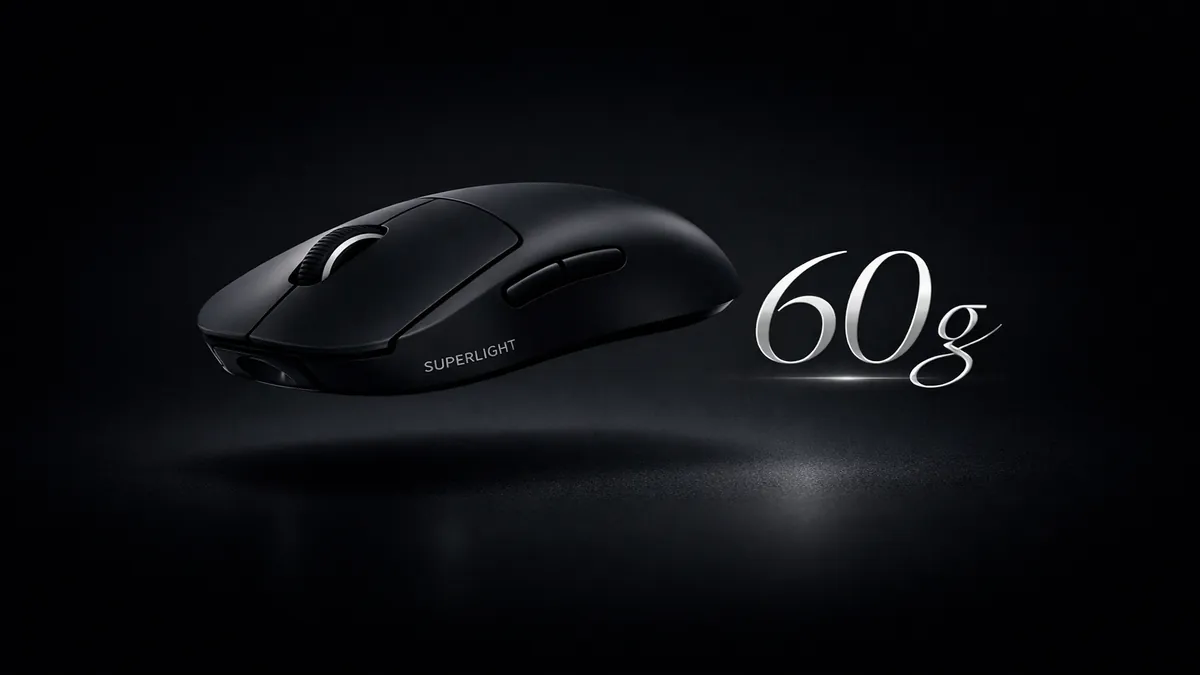
The Logitech G Pro X Superlight 2 has solidified its status as the go-to mouse for esports professionals and serious competitive gamers. Building on the legendary shape of its predecessor, the Superlight 2 sheds even more weight, coming in at an astonishing 60 grams, while maintaining a solid, creak-free construction. This featherlight design allows for incredibly fast and effortless flicks and tracking.
At its core is the new HERO 2 sensor, which boasts up to 32,000 DPI and flawless tracking with no smoothing or acceleration. Logitech's LIGHTSPEED wireless technology remains the industry benchmark, providing a connection that is as fast and reliable as a wired mouse. The new LIGHTFORCE hybrid optical-mechanical switches offer a crisp, tactile click with the speed and durability of optical actuation. For gamers who demand the best in lightweight, wireless performance, the Superlight 2 is the undisputed champion.
Specifications:
- Weight: 60g
- Sensor: HERO 2 (32,000 DPI)
- Switches: LIGHTFORCE Hybrid Optical-Mechanical
- Connectivity: LIGHTSPEED Wireless
- Battery Life: Up to 95 hours
Pros:
- Incredibly lightweight and well-balanced.
- Flawless wireless performance.
- Exceptional sensor accuracy.
- Safe, ambidextrous shape fits most grip styles.
Cons:
- High price point.
- Lacks features like RGB or a DPI button (by design).
- Uses USB-C for charging, but the port is recessed.
Verdict: The G Pro X Superlight 2 is the pinnacle of competitive gaming mice. If you want a no-compromise, lightweight wireless mouse that is trusted by the pros, this is the one to get.
2. Razer Naga V2 Pro: The Master of Versatility
The Razer Naga V2 Pro is the ultimate multi-genre gaming mouse, designed for players who jump between MMOs, MOBAs, FPS, and productivity tasks. Its standout feature is the set of three interchangeable magnetic side plates, allowing you to switch between a 12-button layout, a 6-button layout, and a standard 2-button layout. This modularity makes the Naga V2 Pro feel like three mice in one.
Razer has packed this mouse with its best technology, including the Focus Pro 30K optical sensor for pixel-perfect tracking and Gen-3 optical mouse switches for instant actuation. The new HyperScroll Pro wheel is also highly customizable, allowing you to adjust its tension and number of steps. While it is a heavier mouse, its ergonomic design makes it comfortable for long gaming sessions. For gamers who play a wide variety of genres, the Naga V2 Pro's versatility is unmatched.
Specifications:
- Weight: 134g
- Sensor: Focus Pro 30K Optical Sensor
- Switches: Gen-3 Optical Mouse Switches
- Connectivity: HyperSpeed Wireless, Bluetooth
- Side Plates: 3 swappable (12, 6, and 2-button)
Pros:
- Incredible versatility with swappable side plates.
- Top-tier sensor and switch performance.
- Highly customizable scroll wheel.
- Comfortable ergonomic shape.
Cons:
- Very heavy compared to FPS-focused mice.
- Can be overwhelming for users who don't need the extra buttons.
- Premium price.
Verdict: The Razer Naga V2 Pro is the perfect mouse for the MMO/MOBA player or the gamer who wants a single device that can adapt to any game they throw at it.
3. Razer DeathAdder V3 Pro: The Ergonomic Icon, Perfected
The Razer DeathAdder is one of the most iconic and beloved mouse shapes of all time, and the V3 Pro refines this legendary ergonomic design to near perfection. It's designed for palm and claw grippers, providing exceptional comfort and support for long gaming sessions. Razer has managed to reduce the weight to just 63 grams without resorting to a honeycomb shell, making it feel both lightweight and incredibly solid.
Like its Razer siblings, the DeathAdder V3 Pro is equipped with the flagship Focus Pro 30K sensor and Gen-3 optical switches, ensuring flawless tracking and instantaneous clicks. The HyperSpeed wireless technology provides a lag-free connection, and the battery life is excellent. For gamers who prioritize ergonomic comfort above all else but still demand elite performance, the DeathAdder V3 Pro is the top choice.
Specifications:
- Weight: 63g
- Sensor: Focus Pro 30K Optical Sensor
- Switches: Gen-3 Optical Mouse Switches
- Connectivity: HyperSpeed Wireless
- Battery Life: Up to 90 hours
Pros:
- Supremely comfortable ergonomic shape.
- Very lightweight for an ergonomic mouse.
- Flawless sensor and wireless performance.
- Great for palm and claw grip styles.
Cons:
- Shape is not suitable for left-handed users.
- Minimalist design lacks extra features.
- High price.
Verdict: The DeathAdder V3 Pro is the pinnacle of ergonomic gaming mice. If comfort during long gaming sessions is your priority, this is the mouse to beat.
4. SteelSeries Aerox 5 Wireless: The Lightweight All-Rounder
The SteelSeries Aerox 5 Wireless is designed to be a lightweight, multi-genre mouse that can handle a bit of everything. It features a perforated honeycomb shell to reduce weight, coming in at a nimble 74 grams. Despite its open-shell design, it's treated with AquaBarrier technology to protect the internal circuitry from dust and spills.
What sets the Aerox 5 apart is its button layout. It includes a standard set of main and side buttons, plus a unique "sniper" button and an up/down flick switch, giving you a total of 9 programmable buttons. This makes it more versatile than a standard FPS mouse without being as complex as an MMO mouse. The TrueMove Air sensor provides reliable tracking, and the Quantum 2.0 wireless offers a stable connection. For gamers who want a lightweight mouse with a few extra buttons for versatility, the Aerox 5 Wireless is a great option.
Specifications:
- Weight: 74g
- Sensor: TrueMove Air (18,000 DPI)
- Switches: Golden Micro IP54 Switches
- Connectivity: Quantum 2.0 Wireless, Bluetooth
- Buttons: 9 programmable buttons
Pros:
- Lightweight design with a comfortable shape.
- Versatile button layout for multiple genres.
- Water and dust resistant.
- Vibrant RGB lighting.
Cons:
- Sensor is not as high-spec as top-tier rivals.
- Honeycomb design can be difficult to clean.
- Side button placement can take some getting used to.
Verdict: The Aerox 5 Wireless is an excellent lightweight mouse for gamers who play a variety of games and want more than the standard two side buttons.
5. Finalmouse UltralightX: The Enthusiast's Dream
Finalmouse has a cult following in the gaming community, known for its exclusive drops and its relentless pursuit of the lightest possible mouse. The UltralightX is their latest creation, and it pushes the boundaries of weight reduction by using a carbon fiber composite shell. The medium-sized version (Lion) weighs an unbelievable 38 grams, making other "lightweight" mice feel heavy in comparison.
This extreme weight reduction provides a unique feeling of control, as if the mouse is merely an extension of your hand. The performance is also top-notch, with a high-end sensor and a reliable wireless connection. However, Finalmouse products are produced in limited batches and can be very difficult to purchase at retail price, often commanding high prices on the resale market. They are a status symbol as much as a gaming peripheral.
Specifications:
- Weight: 38g (Lion size)
- Material: Carbon fiber composite
- Sensor: High-performance proprietary sensor
- Connectivity: Wireless
- Availability: Limited drops
Pros:
- The lightest high-performance gaming mouse on the market.
- Exceptional feeling of control and agility.
- Premium carbon fiber construction.
- High-end performance for competitive play.
Cons:
- Extremely difficult to purchase.
- Very high price, especially on the resale market.
- Open-shell design is prone to dust and debris.
- Software is minimal compared to mainstream brands.
Verdict: The Finalmouse UltralightX is for the hardcore enthusiast or collector who wants the absolute lightest mouse possible and is willing to go to great lengths (and expense) to acquire it.
How We Test Gaming Mice at ATechGuides
Our testing process for gaming mice is both technical and practical, designed to push each device to its limits.
- Sensor Performance Test: We use mouse testing software to check for sensor accuracy, jitter, angle snapping, and polling rate stability. We test on a variety of mousepad surfaces (cloth, hard, hybrid).
- In-Game Testing: We spend at least 20 hours gaming with each mouse, focusing on genres that test specific attributes. This includes fast-paced FPS games like Apex Legends for tracking and flick shots, and MMOs like World of Warcraft for button accessibility and comfort.
- Ergonomic Assessment: We have testers with different hand sizes and grip styles (palm, claw, fingertip) use each mouse for extended periods to evaluate its comfort and ergonomic design.
- Wireless Latency & Stability: For wireless mice, we use specialized equipment to measure click and motion latency, and we test the connection in an environment with significant wireless interference to check for stability.
Frequently Asked Questions (FAQ)
1. Is a lighter mouse always better?
Not necessarily. While the trend is towards lighter mice, especially for FPS games, it comes down to personal preference. Some players prefer the stability and control of a slightly heavier mouse. For FPS, a weight between 55g and 75g is often considered the sweet spot. For MMOs, where button accessibility is more important, mice are often heavier.
2. What is DPI, and how much do I need?
DPI (Dots Per Inch) is a measure of how sensitive a mouse is. While manufacturers advertise very high DPI numbers (over 30,000), most professional players use a DPI setting between 400 and 1600. A high maximum DPI is an indicator of a high-quality sensor, but you will likely never use it at its maximum setting. Focus on a mouse with a "flawless" sensor that has no built-in acceleration or smoothing.
3. Is wireless as good as wired for gaming?
Yes. In 2026, the wireless technology from major brands like Logitech (LIGHTSPEED) and Razer (HyperSpeed) is indistinguishable from a wired connection in terms of latency and reliability. The freedom of movement without cable drag is a significant advantage.
4. What are optical switches, and are they better?
Optical switches use a beam of light to register a click instead of a traditional metal contact. This has two main advantages: they are much faster because they don't have to account for "debounce delay," and they are more durable because there are no metal contacts to wear out. They also prevent the "double-clicking" issue that can affect older mechanical switches. For competitive gaming, optical switches are a clear advantage.
Affiliate Disclosure: ATechGuides is supported by its audience. When you purchase through links on our site, we may earn an affiliate commission. All products are independently selected and tested by our editorial team.