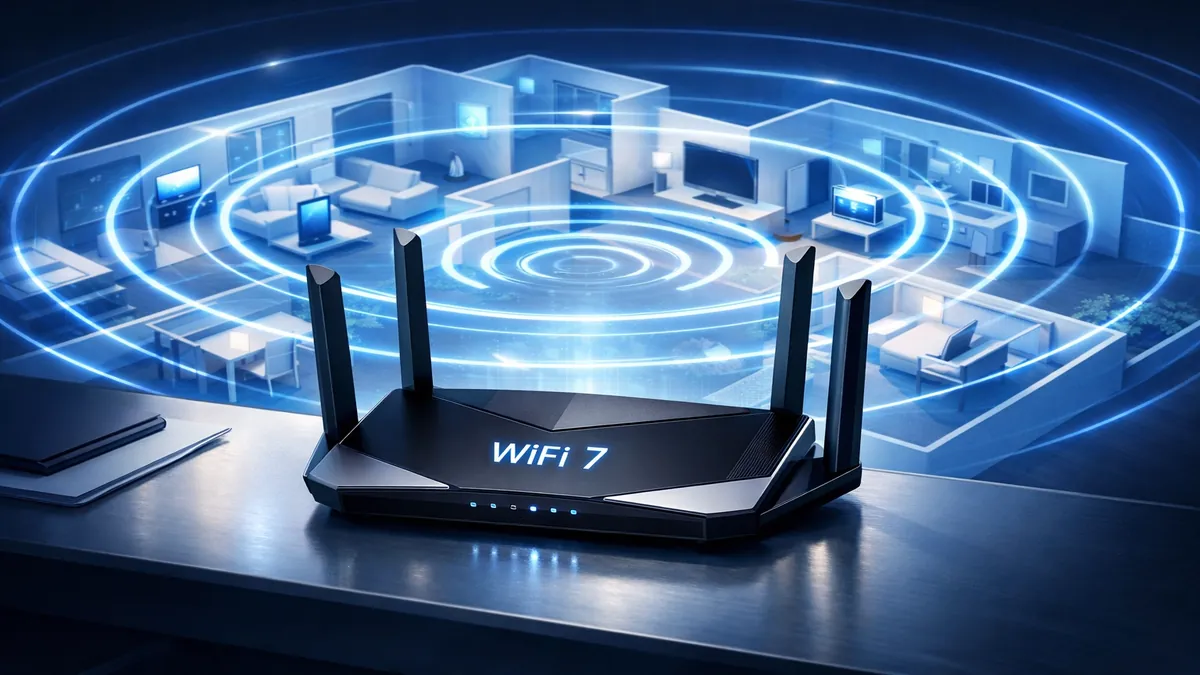
Best WiFi Routers 2026: Fastest Home Networking Options
Introduction
In 2026, a robust and reliable home Wi-Fi network is no longer a luxury but a fundamental necessity. From streaming 4K content and engaging in online gaming to supporting a myriad of smart home devices and facilitating remote work, our digital lives are increasingly dependent on seamless connectivity. The market for Wi-Fi routers has evolved dramatically, offering a diverse range of options designed to meet varying demands, from compact apartments to sprawling multi-story homes. This comprehensive guide explores the cutting-edge of home networking, focusing on the fastest and most efficient Wi-Fi routers available in 2026, helping you navigate the complexities of Wi-Fi standards, mesh systems, and coverage needs.
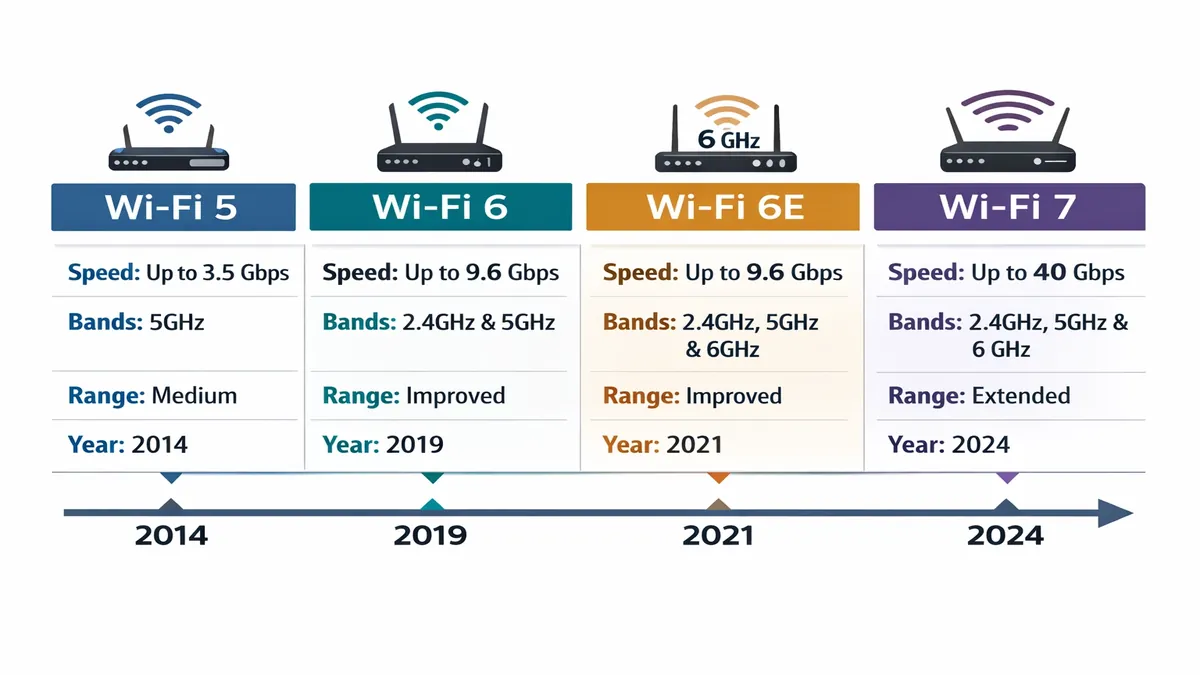
The rapid advancement of wireless technology has introduced new standards that promise unprecedented speeds and efficiency. Understanding the differences between Wi-Fi 6, Wi-Fi 6E, and the nascent Wi-Fi 7 is crucial for making an informed decision. Wi-Fi 6 (802.11ax) brought significant improvements over its predecessor, Wi-Fi 5, by enhancing capacity and efficiency in congested network environments. It introduced technologies like OFDMA (Orthogonal Frequency-Division Multiple Access) and MU-MIMO (Multi-User, Multiple-Input, Multiple-Output) to better handle multiple devices simultaneously, reducing latency and improving overall network performance. [1]
Wi-Fi 6E extends the capabilities of Wi-Fi 6 by opening up the 6 GHz frequency band. This new band offers a vast, uncongested spectrum, providing more channels and significantly reducing interference from older Wi-Fi devices and other wireless technologies. For devices that support Wi-Fi 6E, this translates to faster speeds and lower latency, especially in environments with many Wi-Fi networks. However, Wi-Fi 6E operates on a single band at a time. [2] [10]
Looking ahead, Wi-Fi 7 (802.11be), also known as Extremely High Throughput (EHT), is poised to revolutionize wireless connectivity. Building upon Wi-Fi 6/6E, Wi-Fi 7 introduces even higher peak throughput, greater capacity, and ultra-low latency. Key advancements include 320 MHz channels, 4096-QAM modulation, and Multi-Link Operation (MLO), which allows devices to send and receive data over multiple frequency bands simultaneously. This capability significantly enhances speed and reliability, making Wi-Fi 7 ideal for demanding applications like 8K video streaming, virtual reality, and real-time gaming. While Wi-Fi 7 devices are still emerging, they represent the future of high-performance home networking. [7] [11]
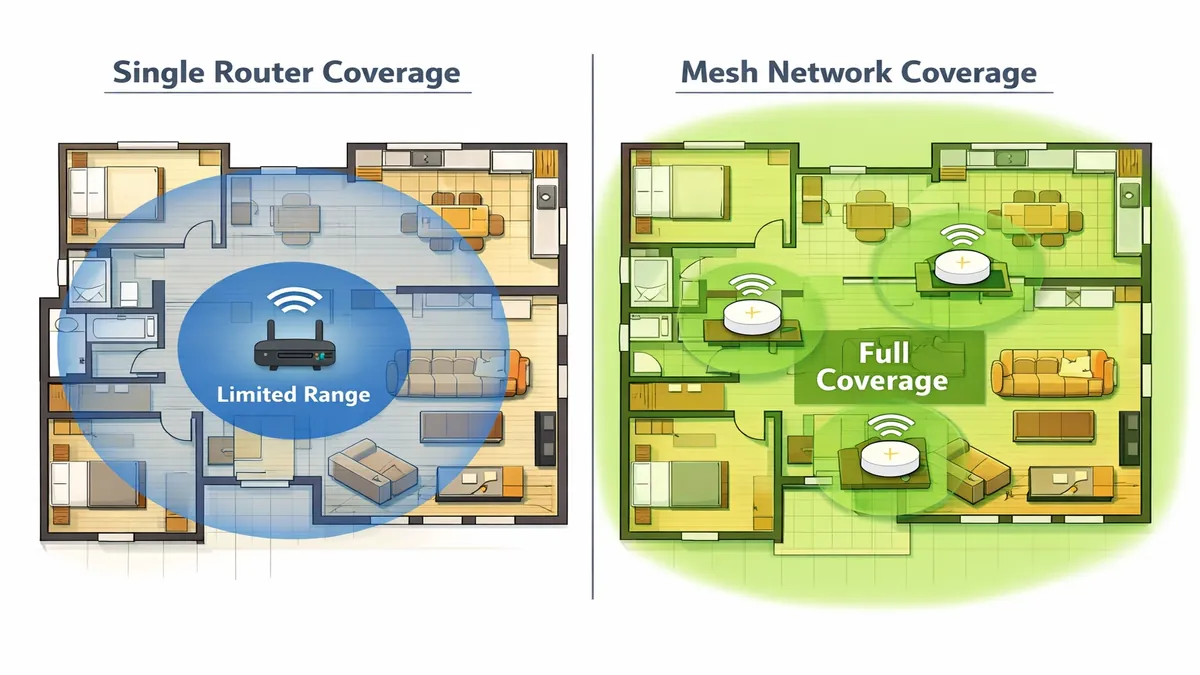
Beyond understanding the technical standards, deciding between a single router and a mesh Wi-Fi system is another critical consideration. Traditional single routers are often sufficient for smaller homes or apartments, offering centralized coverage. However, as homes grow larger or feature complex layouts with many walls, a single router can struggle to provide consistent signal strength throughout. This is where mesh Wi-Fi systems come into play. [12]
Mesh Wi-Fi systems consist of multiple interconnected nodes placed strategically around your home, working together to create a single, unified Wi-Fi network. This distributed approach eliminates dead zones and provides seamless coverage, allowing devices to automatically switch to the strongest signal as you move around. Mesh systems are particularly beneficial for larger homes (e.g., over 3000 sq ft), multi-story houses, or those with numerous connected devices. While generally more expensive than a single router, their ability to deliver consistent performance across an entire property often justifies the investment. [13] [14]
Finally, your coverage needs should heavily influence your router choice. For a small apartment, a basic Wi-Fi 6 router might be perfectly adequate. A medium-sized house might benefit from a more powerful single Wi-Fi 6E router or an entry-level mesh system. For large homes or those with extensive smart home ecosystems and heavy bandwidth demands, a high-performance Wi-Fi 7 router or a robust mesh system with multiple nodes will be necessary to ensure optimal performance. This guide will help you identify the best options tailored to these diverse requirements, ensuring your home network is future-proof and capable of handling all your digital needs in 2026.
Quick Picks
For those seeking immediate recommendations, here are our top quick picks for the fastest and most reliable Wi-Fi routers in 2026, balancing cutting-edge technology with practical performance:
- TP-Link Archer BE800 (Wi-Fi 7): A leading-edge Wi-Fi 7 router that offers unparalleled speeds and capacity, ideal for early adopters with multi-gig internet connections and a high density of devices. It's designed to handle the most demanding network environments. [3]
- ASUS ROG Rapture GT-BE98 (Wi-Fi 7): Geared towards serious gamers and power users, this Wi-Fi 7 router combines extreme performance with gaming-specific features like QoS prioritization and robust network management tools. [3]
- Eero Pro 6E (Wi-Fi 6E): An excellent mesh Wi-Fi system that leverages the 6 GHz band for faster, less congested connections. It's known for its simplicity, reliable coverage, and strong performance across larger homes. [1] [5]
- Netgear Orbi RBKE960 Series (Wi-Fi 6E): A premium mesh system offering exceptional coverage and performance, especially for very large homes. It's a top choice for those who need enterprise-grade Wi-Fi in a home setting. [5]
These quick picks represent the pinnacle of current Wi-Fi technology, offering solutions for various user needs, from bleeding-edge performance to expansive, reliable coverage.
Top 8 Reviews
Let's delve into detailed reviews of some of the best Wi-Fi routers available in 2026, examining their features, performance, and ideal use cases.
1. TP-Link Archer BE800 (Wi-Fi 7)
The TP-Link Archer BE800 stands at the forefront of home networking technology, being one of the first commercially available Wi-Fi 7 routers. It's designed for users who demand the absolute best in terms of speed, capacity, and future-proofing their network. This tri-band router supports the 2.4 GHz, 5 GHz, and 6 GHz bands, leveraging the full potential of Wi-Fi 7's advanced features.
Key Features:
- Wi-Fi 7 Standard: Supports the latest 802.11be standard, offering theoretical maximum speeds significantly higher than Wi-Fi 6E. This includes 320 MHz channels and 4096-QAM for enhanced data transmission. [3]
- Multi-Gig Ports: Equipped with multiple 10 Gigabit Ethernet ports, including a 10G WAN port and several 10G LAN ports, ensuring that your wired connections can keep pace with the blazing fast wireless speeds. This is crucial for multi-gig internet plans and high-speed local network transfers.
- Tri-Band Operation: Utilizes three distinct bands (2.4 GHz, 5 GHz, and 6 GHz) to minimize congestion and maximize throughput for all connected devices. The 6 GHz band, in particular, offers dedicated, interference-free channels for compatible Wi-Fi 7 and Wi-Fi 6E devices.
- Multi-Link Operation (MLO): A cornerstone of Wi-Fi 7, MLO allows devices to simultaneously transmit and receive data across different frequency bands, dramatically improving speed and reducing latency. [10]
- Advanced Security: Includes TP-Link HomeShield, offering real-time IoT protection, robust parental controls, and comprehensive network security features to safeguard your home network.
Performance: The Archer BE800 delivers exceptional speed and low latency, making it ideal for 8K streaming, VR/AR applications, and competitive online gaming. Its advanced antenna design ensures broad coverage, even in larger homes. The ability to handle a high density of devices without performance degradation is a major advantage.
Ideal for: Early adopters, users with multi-gig internet connections, large households with numerous Wi-Fi 7/6E devices, and anyone seeking the most future-proof home network.
2. ASUS ROG Rapture GT-BE98 (Wi-Fi 7)
The ASUS ROG Rapture GT-BE98 is a beast of a router, specifically engineered for the most demanding gamers and enthusiasts. As a Wi-Fi 7 quad-band gaming router, it pushes the boundaries of wireless performance, offering a suite of features tailored to optimize the gaming experience.
Key Features:
- Quad-Band Wi-Fi 7: Provides four distinct frequency bands (two 5 GHz, one 2.4 GHz, and one 6 GHz) to dedicate bandwidth to gaming devices, ensuring minimal interference and maximum speed. [3]
- Gaming-Centric Design: Features a striking, aggressive design typical of ASUS ROG products, but more importantly, includes dedicated gaming ports, QoS (Quality of Service) prioritization for gaming traffic, and game acceleration features.
- Multi-Gig Connectivity: Equipped with multiple 10 Gigabit and 2.5 Gigabit Ethernet ports, allowing for ultra-fast wired connections to gaming PCs, consoles, and NAS devices.
- Triple-Level Game Acceleration: Optimizes gaming packets from your device to the game server, reducing ping and latency. This includes device prioritization, game packet prioritization, and game server optimization.
- AiMesh Support: Can be integrated into an ASUS AiMesh system, allowing you to extend coverage with other compatible ASUS routers, creating a powerful mesh network for large homes.
Performance: The GT-BE98 delivers phenomenal speeds and incredibly low latency, making it a dream for competitive gamers. Its robust hardware and software optimizations ensure a stable and responsive connection, even under heavy network load. The extensive coverage provided by its powerful antennas ensures that every corner of your gaming den is well-connected.
Ideal for: Hardcore gamers, streamers, large households with multiple gamers, and users who require absolute top-tier performance and granular control over their network.
3. Eero Pro 6E (Wi-Fi 6E)
The Eero Pro 6E represents a significant leap forward in mesh Wi-Fi technology, bringing the benefits of the 6 GHz band to a user-friendly and highly reliable system. Eero is renowned for its simplicity and seamless whole-home coverage, and the Pro 6E continues this tradition while embracing the latest Wi-Fi 6E standard.
Key Features:
- Wi-Fi 6E Tri-Band Mesh: Utilizes the 2.4 GHz, 5 GHz, and 6 GHz bands to provide faster speeds and reduced congestion, especially for Wi-Fi 6E compatible devices. The 6 GHz band acts as a dedicated backhaul for mesh nodes, ensuring optimal performance across the system. [1] [5]
- TrueMesh Technology: Eero's proprietary TrueMesh technology intelligently routes traffic to avoid congestion, ensuring a fast and reliable connection for every device. It automatically optimizes your network to adapt to your home's layout and device usage.
- Easy Setup and Management: Eero systems are famous for their incredibly simple setup process, managed entirely through the intuitive Eero app. The app also provides network insights, parental controls, and security features.
- Built-in Smart Home Hub: Each Eero Pro 6E unit includes a built-in Zigbee smart home hub, allowing you to connect compatible smart devices directly to your Eero network without needing a separate hub.
- Compact and Discreet Design: Eero nodes are designed to blend seamlessly into any home decor, making them less obtrusive than traditional routers.
Performance: The Eero Pro 6E delivers excellent whole-home coverage with consistent speeds and minimal drop-offs. The addition of the 6 GHz band significantly boosts performance for compatible devices, making it ideal for high-bandwidth activities like 4K streaming and video conferencing. Its mesh architecture ensures that dead zones are a thing of the past.
Ideal for: Large homes, multi-story houses, users who prioritize ease of use and reliable whole-home coverage, and those with a growing number of Wi-Fi 6E compatible devices.
4. Netgear Orbi RBKE960 Series (Wi-Fi 6E)
The Netgear Orbi RBKE960 Series stands as a premium mesh Wi-Fi 6E system, offering unparalleled performance and coverage for the largest and most demanding homes. It's designed for users who need enterprise-grade reliability and speed without the complexity, delivering a robust and expansive wireless network.
Key Features:
- Quad-Band Wi-Fi 6E: This system utilizes four bands (2.4 GHz, two 5 GHz, and one 6 GHz) to provide dedicated backhaul between the router and satellite units, ensuring maximum speed and stability across the entire mesh network. [5]
- Dedicated Backhaul: A key differentiator, the dedicated 6 GHz band for backhaul ensures that client devices don't compete with inter-node communication for bandwidth, leading to superior performance and lower latency throughout the home.
- High Capacity: Designed to support a massive number of devices simultaneously, making it ideal for smart homes with hundreds of connected gadgets, as well as heavy streaming and gaming.
- Multi-Gig WAN Port: Features a 10 Gigabit WAN port to fully utilize the fastest internet service plans available, ensuring that your network isn't bottlenecked by the router.
- Advanced Security: Includes Netgear Armor, powered by Bitdefender, offering comprehensive cybersecurity protection for all connected devices, including smart home gadgets.
Performance: The Orbi RBKE960 Series delivers exceptional speeds and rock-solid stability across vast areas. Its ability to maintain high throughput even at the edges of its coverage makes it a top choice for very large homes or properties with challenging layouts. The dedicated backhaul ensures that every connected device benefits from optimal performance.
Ideal for: Very large homes (over 5,000 sq ft), users with multi-gig internet, households with a high density of devices, and those who demand the absolute best in terms of mesh Wi-Fi performance and coverage.
5. TP-Link Archer AXE75 (Wi-Fi 6E)
The TP-Link Archer AXE75 offers an accessible entry point into the world of Wi-Fi 6E, providing the benefits of the 6 GHz band at a more budget-friendly price point than premium models. It's a tri-band router designed to deliver faster speeds and reduced congestion for compatible devices, making it an excellent upgrade for many homes.
Key Features:
- Wi-Fi 6E Tri-Band: Supports 2.4 GHz, 5 GHz, and 6 GHz bands, allowing Wi-Fi 6E compatible devices to connect to the uncongested 6 GHz spectrum for optimal performance. [3]
- Gigabit Ports: Equipped with multiple Gigabit Ethernet ports for reliable wired connections to PCs, gaming consoles, and other network devices.
- OneMesh Support: Can be combined with other TP-Link OneMesh extenders to create a seamless mesh Wi-Fi system, extending coverage throughout your home without needing to replace your entire network.
- HomeShield Security: Includes TP-Link HomeShield for basic network security, parental controls, and quality of service (QoS) features.
Performance: The Archer AXE75 delivers strong performance for its price, especially for Wi-Fi 6E devices. The 6 GHz band provides a noticeable boost in speed and a reduction in latency in environments where it's not heavily utilized. While not as powerful as the top-tier Wi-Fi 7 routers, it offers a significant upgrade over older Wi-Fi 5 or even basic Wi-Fi 6 routers.
Ideal for: Users looking for an affordable Wi-Fi 6E upgrade, medium-sized homes, and those who want to experience the benefits of the 6 GHz band without a premium investment.
6. ASUS RT-AX86U Pro (Wi-Fi 6)
The ASUS RT-AX86U Pro is a high-performance Wi-Fi 6 router that continues ASUS's tradition of delivering powerful and feature-rich networking solutions. While not Wi-Fi 6E or Wi-Fi 7, its robust Wi-Fi 6 implementation makes it an excellent choice for gamers and users with demanding network needs who might not yet have many 6 GHz compatible devices.
Key Features:
- High-Performance Wi-Fi 6: Offers impressive speeds and efficiency on the 2.4 GHz and 5 GHz bands, leveraging OFDMA and MU-MIMO to handle multiple devices with ease.
- 2.5G Port: Includes a 2.5 Gigabit WAN/LAN port, providing flexibility for multi-gig internet connections or high-speed wired devices within your network.
- Gaming Features: Equipped with Adaptive QoS for prioritizing gaming traffic, Mobile Game Mode for reduced latency on mobile devices, and support for WTFast game accelerator.
- AiProtection Pro: ASUS's comprehensive network security suite, powered by Trend Micro, offers commercial-grade protection against internet threats, as well as robust parental controls.
- AiMesh Support: Can be integrated into an ASUS AiMesh system, allowing for seamless whole-home Wi-Fi coverage by adding other compatible ASUS routers.
Performance: The RT-AX86U Pro delivers exceptional performance on its supported bands, offering fast speeds and very low latency, making it a favorite among gamers. Its strong signal coverage and ability to handle numerous devices make it a reliable choice for busy households. Even without the 6 GHz band, its optimized Wi-Fi 6 performance is often superior to many entry-level Wi-Fi 6E routers for 5 GHz devices.
Ideal for: Gamers, users with fast internet connections (up to 2.5 Gbps), households with many Wi-Fi 6 devices, and those who prefer a single, powerful router over a mesh system.
7. Google Nest Wifi Pro (Wi-Fi 6E)
The Google Nest Wifi Pro is Google's latest mesh Wi-Fi system, designed to provide fast, reliable, and secure whole-home coverage with the added benefits of Wi-Fi 6E. It builds upon the user-friendly experience of previous Nest Wifi generations while significantly boosting performance with the 6 GHz band.
Key Features:
- Wi-Fi 6E Tri-Band Mesh: Utilizes the 2.4 GHz, 5 GHz, and 6 GHz bands to deliver faster speeds and lower latency, especially for Wi-Fi 6E compatible devices. The 6 GHz band is used for both client connections and a dedicated wireless backhaul between nodes.
- Proactive Network Management: Google's software intelligently manages your network, automatically optimizing performance and prioritizing high-bandwidth activities like video calls and streaming.
- Simple Setup and App Control: Setup is incredibly straightforward via the Google Home app, which also provides easy management of your network, parental controls, and guest networks.
- Sleek Design: Nest Wifi Pro units feature a minimalist and elegant design that blends seamlessly into modern home interiors.
- Enhanced Security: Offers automatic security updates and advanced threat detection to keep your network safe.
Performance: The Nest Wifi Pro delivers excellent whole-home coverage with consistent speeds, particularly for Wi-Fi 6E devices. The 6 GHz band helps alleviate congestion, resulting in a smoother experience for demanding applications. Its proactive network management ensures that your devices always get the best possible connection.
Ideal for: Google Home ecosystem users, medium to large homes, users who prioritize ease of use and reliable performance, and those looking for a mesh system with Wi-Fi 6E capabilities.
8. Netgear Nighthawk RAXE500 (Wi-Fi 6E)
The Netgear Nighthawk RAXE500 is a high-performance Wi-Fi 6E router designed for users who want a traditional, powerful router with the benefits of the 6 GHz band. It's part of Netgear's renowned Nighthawk series, known for its robust hardware and advanced features.
Key Features:
- Wi-Fi 6E Tri-Band: Supports 2.4 GHz, 5 GHz, and 6 GHz bands, providing a dedicated, uncongested superhighway for Wi-Fi 6E compatible devices. [5]
- Multi-Gig WAN/LAN Port: Includes a 2.5 Gigabit WAN/LAN port, allowing for flexible high-speed wired connections to your internet modem or local network devices.
- Powerful Processor: Equipped with a high-performance processor to handle multiple data streams and demanding network tasks without slowdowns.
- Advanced Antennas: Features a distinctive design with powerful external antennas to maximize signal coverage and strength throughout your home.
- Nighthawk App: Provides intuitive control over your network, including setup, device management, speed tests, and security features.
Performance: The Nighthawk RAXE500 delivers impressive speeds and strong coverage, especially for Wi-Fi 6E devices. The 6 GHz band offers a significant performance boost, making it ideal for high-bandwidth activities. Its robust hardware ensures stable performance even with many connected devices.
Ideal for: Users who prefer a single, powerful router over a mesh system, those with multi-gig internet connections, and households with a mix of Wi-Fi 6 and Wi-Fi 6E devices.
Comparison Table
To provide a concise overview of our top Wi-Fi router picks for 2026, the following table summarizes their key specifications and features:
| Feature | TP-Link Archer BE800 | ASUS ROG Rapture GT-BE98 | Eero Pro 6E | Netgear Orbi RBKE960 | TP-Link Archer AXE75 | ASUS RT-AX86U Pro | Google Nest Wifi Pro | Netgear Nighthawk RAXE500 |
|---|---|---|---|---|---|---|---|---|
| Wi-Fi Standard | Wi-Fi 7 | Wi-Fi 7 | Wi-Fi 6E | Wi-Fi 6E | Wi-Fi 6E | Wi-Fi 6 | Wi-Fi 6E | Wi-Fi 6E |
| Bands | Tri-Band | Quad-Band | Tri-Band | Quad-Band | Tri-Band | Dual-Band | Tri-Band | Tri-Band |
| Max Speed (Gbps) | Up to 19 | Up to 25 | Up to 5.4 | Up to 10.8 | Up to 5.4 | Up to 5.7 | Up to 5.4 | Up to 10.8 |
| Multi-Gig Ports | 10G WAN/LAN, 10G LAN | 10G WAN/LAN, 2.5G LAN | 2.5G WAN/LAN | 10G WAN, 2.5G LAN | Gigabit | 2.5G WAN/LAN | Gigabit | 2.5G WAN/LAN |
| Mesh Support | Yes (EasyMesh) | Yes (AiMesh) | Yes (TrueMesh) | Yes (Orbi Mesh) | Yes (OneMesh) | Yes (AiMesh) | Yes (Nest Wifi Mesh) | No (Single Router) |
| Gaming Features | QoS, MLO | Triple-Level Game Accel. | Low Latency | Low Latency | QoS | Adaptive QoS, Mobile Game Mode | Low Latency | QoS |
| Price (USD) | ~$500-600 | ~$600-700 | ~$300-400 (per unit) | ~$1000+ (system) | ~$150-200 | ~$250-300 | ~$200-250 (per unit) | ~$400-500 |
Buying Guide
Choosing the best Wi-Fi router in 2026 involves more than just picking the fastest one. Consider these factors to ensure you select a system that perfectly matches your home and usage habits:
1. Wi-Fi Standard: Wi-Fi 6, 6E, or 7?
- Wi-Fi 7: Only consider if you have a multi-gigabit internet connection (2 Gbps or higher) and a growing number of Wi-Fi 7 compatible devices. It's the most future-proof option but also the most expensive. The benefits are most pronounced in highly congested environments or for extremely demanding applications. [7]
- Wi-Fi 6E: A great sweet spot for many. If you have a gigabit internet connection and some Wi-Fi 6E compatible devices (like newer smartphones, laptops, or VR headsets), the 6 GHz band offers a significant upgrade in speed and reduced interference. It's a noticeable step up from Wi-Fi 6 without the bleeding-edge cost of Wi-Fi 7.
- Wi-Fi 6: Still a very capable standard for most households with internet speeds up to a gigabit. If your devices are primarily Wi-Fi 6 or older, and you don't experience significant congestion, a high-quality Wi-Fi 6 router can provide excellent performance at a lower cost.
2. Mesh vs. Single Router
- Single Router: Best for smaller apartments (under 1500 sq ft) or open-plan homes where a central router can cover most areas. They are generally cheaper and simpler to set up. [12]
- Mesh Wi-Fi System: Recommended for homes larger than 3000 sq ft, multi-story houses, or homes with many walls and dead zones. Mesh systems provide seamless, consistent coverage throughout your entire property. While an apartment might be overkill for a mesh system, it can still offer benefits in terms of coverage and reliability if you have specific dead spots. [14]
3. Internet Speed and Multi-Gig Ports
Ensure your router's WAN port can handle your internet service provider's speed. If you have a multi-gig internet plan (e.g., 2.5 Gbps, 5 Gbps, or 10 Gbps), you'll need a router with a corresponding multi-gig WAN port to avoid bottlenecking your connection. Similarly, multi-gig LAN ports are beneficial for connecting high-speed wired devices like NAS drives or gaming PCs.
4. Gaming Considerations
For serious gamers, look for routers with features like Quality of Service (QoS) prioritization. This allows you to prioritize gaming traffic over other network activities, reducing lag and ensuring a smooth online experience. Dedicated gaming routers often come with advanced QoS settings, game acceleration engines, and lower latency designs. [9]
5. Number of Devices
Consider how many devices will be connected to your network simultaneously. If you have a smart home with dozens of devices, plus multiple users streaming, gaming, and working, a router with higher capacity (more bands, better MU-MIMO implementation) will be essential to maintain performance.
6. Security and Parental Controls
Look for routers that offer robust security features, such as WPA3 encryption, automatic firmware updates, and built-in antivirus/anti-malware protection. Comprehensive parental controls are also valuable for managing internet access and content for children.
FAQ
Here are answers to some common questions about Wi-Fi routers in 2026:
Best router for gaming?
For gaming, you'll want a router that prioritizes low latency, high speeds, and stable connections. The ASUS ROG Rapture GT-BE98 (Wi-Fi 7) is an absolute top-tier choice, offering dedicated gaming features, multi-gig ports, and extreme performance. Other excellent options include the ASUS RT-AX86U Pro (Wi-Fi 6) for its strong Wi-Fi 6 performance and gaming optimizations, and any high-end Wi-Fi 7 router like the TP-Link Archer BE800 that supports Multi-Link Operation (MLO) for reduced latency. Look for features like QoS prioritization, dedicated gaming bands, and multi-gig Ethernet ports. [9]
Wi-Fi 6 vs Wi-Fi 7 — worth upgrading?
Upgrading from Wi-Fi 6 to Wi-Fi 7 is worth it if you meet specific criteria: you have a multi-gigabit internet connection (2 Gbps or higher), you own multiple Wi-Fi 7 compatible devices (which are still relatively new in 2026), and you engage in extremely demanding applications like 8K streaming, VR/AR, or competitive online gaming where every millisecond of latency matters. For most average users with gigabit or slower internet and primarily Wi-Fi 6 or older devices, a high-quality Wi-Fi 6 or Wi-Fi 6E router will likely provide sufficient performance and be a more cost-effective upgrade. Wi-Fi 7 is primarily for early adopters and power users. [7] [11]
Best mesh router system?
The best mesh router system depends on your home size and budget. For very large homes (5,000+ sq ft) and those demanding the absolute best performance, the Netgear Orbi RBKE960 Series (Wi-Fi 6E) is a top-tier choice, offering quad-band operation with dedicated backhaul. For excellent performance and ease of use in large homes, the Eero Pro 6E (Wi-Fi 6E) is highly recommended. If you're already in the Google ecosystem and want a user-friendly Wi-Fi 6E mesh, the Google Nest Wifi Pro is a strong contender. For more budget-conscious users, TP-Link's OneMesh compatible routers (like the Archer AXE75) combined with extenders can create an effective mesh network. [1] [5] [13]
Verdict + CTAs
Choosing the ideal Wi-Fi router in 2026 means balancing the latest technological advancements with your specific home environment and usage patterns. The landscape is rich with options, from the bleeding-edge performance of Wi-Fi 7 to the robust, whole-home coverage offered by advanced mesh Wi-Fi 6E systems. The key takeaway is that a well-chosen router can dramatically enhance your online experience, providing faster speeds, lower latency, and eliminating frustrating dead zones.
For those who are early adopters, have multi-gig internet, and demand the absolute pinnacle of wireless performance, a Wi-Fi 7 router like the TP-Link Archer BE800 or ASUS ROG Rapture GT-BE98 will provide an unparalleled experience, future-proofing your network for years to come. These devices are built to handle the most intensive tasks, from 8K streaming to competitive gaming, with ease.
If your priority is seamless, reliable whole-home coverage in a large or multi-story house, a Wi-Fi 6E mesh system such as the Eero Pro 6E or Netgear Orbi RBKE960 Series is an excellent investment. These systems eliminate dead zones and ensure consistent, high-speed Wi-Fi everywhere, making them ideal for smart homes and busy families.
For users seeking a significant upgrade without the premium price tag of Wi-Fi 7, a high-performance Wi-Fi 6E router like the TP-Link Archer AXE75 or a powerful Wi-Fi 6 router like the ASUS RT-AX86U Pro offers a fantastic balance of speed, features, and value. These options are more than capable of handling gigabit internet speeds and a multitude of devices.
Ultimately, the best Wi-Fi router is the one that provides stable, fast, and comprehensive coverage for your unique needs. By considering your internet speed, home size, number of devices, and specific activities like gaming or 4K streaming, you can confidently select a router that transforms your home networking experience in 2026.
Upgrade your home network today and experience the difference:
References
[1] RTINGS.com. "The 5 Best Wi-Fi 7 Routers of 2026." RTINGS.com, www.rtings.com/router/reviews/best/wi-fi-7. [2] Reddit. "Wifi 6 vs 6e vs 7 : r/HomeNetworking." Reddit, www.reddit.com/r/HomeNetworking/comments/1amrpt6/wifi_6_vs_6e_vs_7/. [3] Tom's Hardware. "The Best Wi-Fi Routers We've Benchmarked in 2026." Tom's Hardware, www.tomshardware.com/networking/routers/best-wi-fi-routers. [4] CNET. "Best Wi-Fi Routers for 2026: New Lab Tests Reveal the Fastest." CNET, www.cnet.com/home/internet/best-wi-fi-routers/. [5] Reddit. "Looking for Good Wi-Fi TRouter in 2026. Any recommendation?" Reddit, www.reddit.com/r/HomeNetworking/comments/1q4islj/looking_for_good_wifi_trouter_in_2026_any/. [6] NETGEAR Blog. "WiFi 6 vs WiFi 7 More Speed & Capacity." NETGEAR Blog, www.netgear.com/hub/technology/wifi-7-vs-wifi-6/. [7] Velocity Micro. "Wi-Fi 7 vs 6E: Understanding the Key Differences." Velocity Micro, www.velocitymicro.com/blog/wi-fi-7-vs-6e/. [8] ZDNET. "Should you upgrade your Wi-Fi router to mesh? I compared both for months, ..." ZDNET, www.zdnet.com/home-and-office/networking/wifi-router-vs-mesh/. [9] Popular Mechanics. "WiFi Router vs. Mesh Network: How to Choose for Your Home." Popular Mechanics, www.popularmechanics.com/technology/gadgets/a70479272/wifi-router-vs-mesh-network/. [10] Eero Blog. "Wi-Fi 7 vs Wi-Fi 6E: What's the difference?" Eero Blog, blog.eero.com/wifi-7-vs-wifi-6e/. [11] Eero Blog. "Mesh Wifi vs. Single Router: Which One Is Right for You?" Eero Blog, blog.eero.com/mesh-vs-traditional-router/. [12] Reddit. "Good Wi-Fi Router in 2026. Any recommendation? : r/wifi." Reddit, www.reddit.com/r/wifi/comments/1q4iv6t/good_wifi_router_in_2026_any_recommendation/. [13] Reddit. "Best WiFi Mesh System to get in 2026? (Price, Performance, Range)." Reddit, www.reddit.com/r/Network/comments/1rh93gw/best_wifi_mesh_system_to_get_in_2026_price/. [14] YouTube. "WiFi 6 vs 6E vs 7 - Should You Upgrade in 2025?" YouTube, www.youtube.com/watch?v=gqyAU46uCF8.
📚 Related Articles
* Affiliate link. We may earn a commission at no extra cost to you.
Disclosure: This article contains affiliate links. We may earn a commission if you purchase through our links, at no extra cost to you. See our affiliate disclosure.