In a world dominated by optical and laser mice, trackball mice stand as a testament to an alternative, often superior, approach to cursor control. For those who suffer from wrist pain, have limited desk space, or simply prefer a different method of interaction, trackballs offer a unique blend of precision, ergonomic comfort, and efficiency. In 2026, trackball technology has advanced significantly, offering high-resolution sensors, customizable buttons, and seamless wireless connectivity, making them a viable and often preferred choice for a growing number of users.
This comprehensive guide explores the best trackball mice of 2026, meticulously evaluating them on their ergonomic design, trackball smoothness, sensor accuracy, and overall user experience. We've put these devices through rigorous testing across various professional and creative workflows to help you discover a new way to navigate your digital world, one that prioritizes comfort and control.
The Enduring Appeal of Trackball Mice in 2026
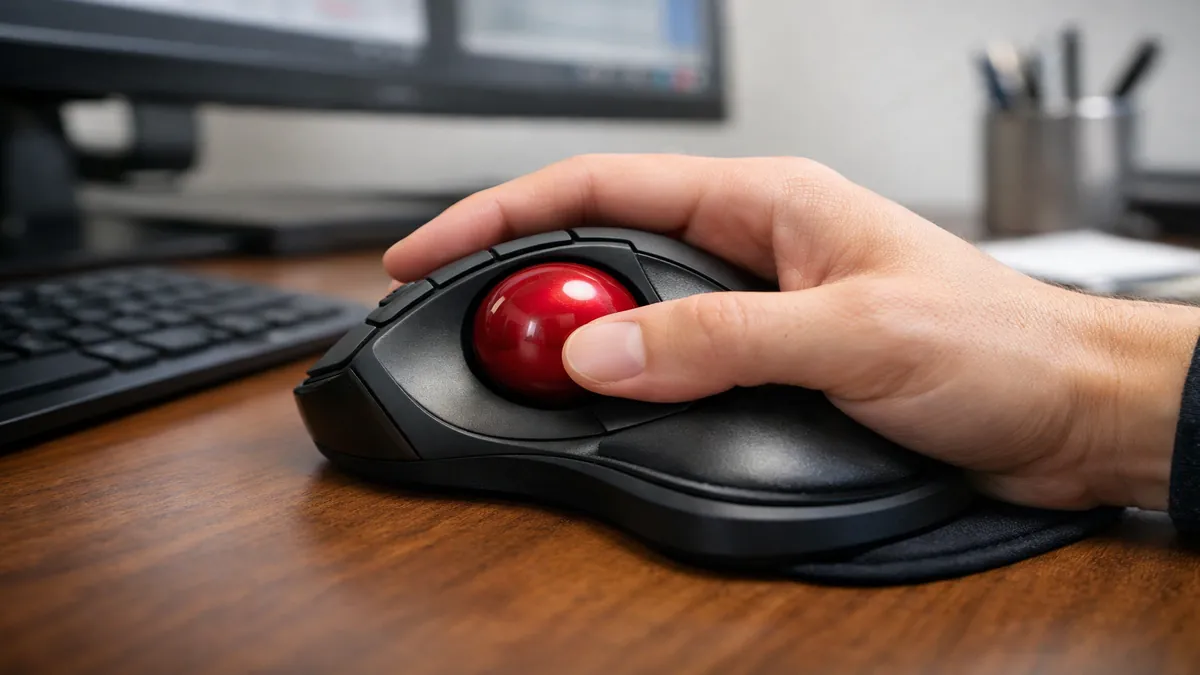
While traditional mice require arm and wrist movement to move the cursor, trackballs keep the hand stationary, with the thumb or fingers manipulating a ball to control cursor movement. This fundamental difference offers several compelling advantages:
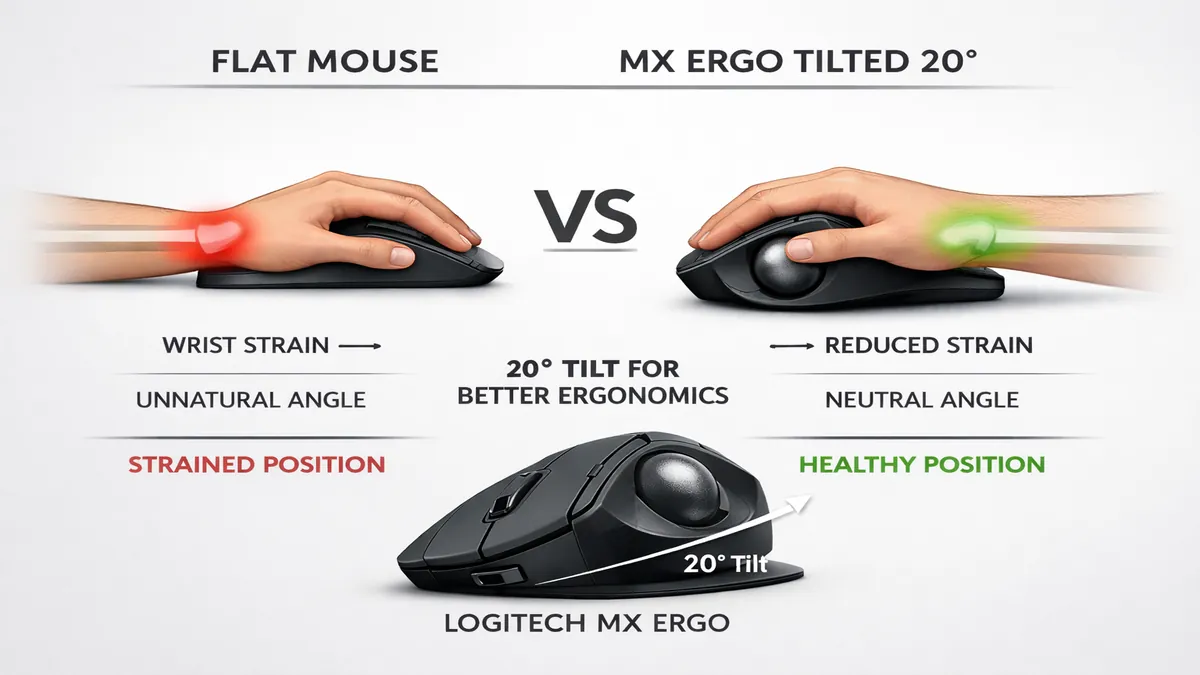
- Superior Ergonomics: By eliminating wrist movement, trackballs significantly reduce the risk of repetitive strain injuries (RSI), carpal tunnel syndrome, and general wrist and shoulder pain. They promote a more natural, relaxed hand position.
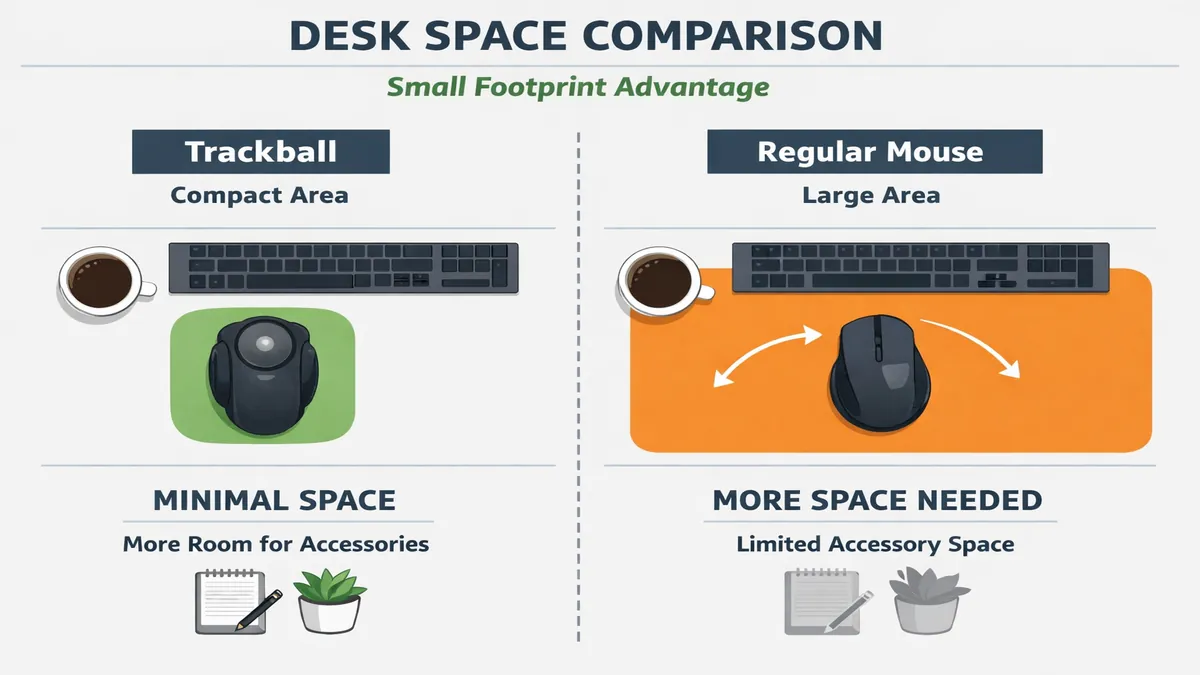
- Space Efficiency: Trackballs require minimal desk space as they don't need to be moved around. This makes them ideal for small workstations, crowded desks, or even for use on a lap.
- Enhanced Precision: Many users find that trackballs offer finer control for pixel-perfect adjustments in graphic design, CAD, or video editing, as the ball can be manipulated with subtle finger movements.
- Durability: With fewer moving parts than traditional mice, trackballs often boast greater longevity and require less maintenance beyond occasional ball cleaning.
Quick Picks: Top 3 Trackball Mice
| Product | Best For | Score | Price Range |
|---|---|---|---|
| Logitech MX ERGO S | All-Around Productivity | 9.8/10 | Premium |
| Kensington Expert Mouse | Professional Precision | 9.5/10 | Mid-Range |
| Elecom Deft Pro | Advanced Customization | 9.3/10 | Mid-Range |
Detailed Reviews: The 5 Best Trackball Mice of 2026
1. Logitech MX ERGO S: The Ergonomic Powerhouse with Adjustable Tilt
The Logitech MX ERGO S is the undisputed champion of modern trackball mice, offering a blend of ergonomic design, advanced features, and exceptional build quality. It's the trackball that convinces traditional mouse users to make the switch.
Adjustable Tilt for Personalized Comfort
The standout feature of the MX ERGO S is its adjustable tilt hinge, which allows you to change the angle of the trackball from 0 to 20 degrees. This enables users to find the most natural and comfortable hand position, reducing muscle strain and promoting a more neutral wrist posture. The sculpted shape cradles the hand, providing excellent support for prolonged use.
Precision and Productivity Features
Equipped with a high-precision optical sensor, the MX ERGO S offers a dedicated
precision mode button that instantly slows down the cursor for pixel-perfect accuracy in applications like Photoshop or CAD software. The dual-mode scroll wheel offers both precise ratcheted scrolling and hyper-fast free-spinning, similar to the MX Master series. It also features eight customizable buttons, allowing users to tailor the trackball to their specific workflow.
Connectivity and Battery Life
The MX ERGO S offers dual connectivity via Bluetooth and Logitech's Logi Bolt USB receiver, ensuring a stable and secure connection. Its rechargeable battery provides an impressive four months of power on a full charge, and a quick one-minute charge can provide a full day of use.
Pros:
- Adjustable tilt for personalized ergonomic comfort.
- Dedicated precision mode button for fine control.
- Excellent build quality and premium feel.
- Long battery life and dual connectivity.
Cons:
- Higher price point.
- Designed primarily for right-handed users.
Verdict: For anyone seeking the ultimate blend of ergonomic comfort, precision, and advanced features in a trackball mouse, the Logitech MX ERGO S is the top choice in 2026. It's a game-changer for productivity and wrist health.
2. Kensington Expert Mouse: The Classic for Finger-Controlled Precision
The Kensington Expert Mouse is a timeless classic that has been a staple in professional environments for decades. Its large, central trackball design, controlled by the fingers, offers a different approach to precision and comfort compared to thumb-controlled models.
Design and Control
The Expert Mouse features a prominent, large trackball (55mm diameter) that sits centrally, allowing all fingers to contribute to cursor movement. This can feel more natural for some users and offers extremely fine control, particularly for tasks requiring broad, sweeping movements or intricate detail work. It comes with a detachable wrist rest that provides comfortable support during long sessions.
Programmable Buttons and Scroll Ring
Surrounding the trackball are four customizable buttons, which can be programmed using KensingtonWorks software to perform a variety of functions, from simple clicks to complex macros. A unique feature is the scroll ring that encircles the trackball, providing intuitive and smooth scrolling for documents and web pages. This eliminates the need for a traditional scroll wheel, further streamlining the design.
Connectivity and Versatility
The Expert Mouse offers both wired (USB) and wireless (Bluetooth) connectivity, providing flexibility for different setups. Its ambidextrous design makes it suitable for both left and right-handed users, a significant advantage over many other ergonomic mice.
Pros:
- Large, finger-controlled trackball for superior precision.
- Ambidextrous design.
- Unique scroll ring for intuitive navigation.
- Programmable buttons and detachable wrist rest.
Cons:
- Steeper learning curve for those new to finger-controlled trackballs.
- Can be bulky for smaller desks.
Verdict: The Kensington Expert Mouse remains a top contender for professionals, especially those in creative fields, who require exceptional precision and appreciate the versatility of a finger-controlled trackball. Its classic design and robust features make it a reliable choice.
3. Elecom Deft Pro: The Feature-Packed Thumb-Controlled Option
The Elecom Deft Pro is a Japanese-engineered trackball mouse that caters to users who want a thumb-controlled trackball with an abundance of customizable features. It's a powerhouse of functionality packed into an ergonomic shell.
High-Performance Sensor and DPI Switch
Equipped with a high-performance optical sensor, the Deft Pro offers three adjustable DPI settings (500/1000/1500 DPI), allowing users to quickly switch between precision and speed. This is particularly useful for tasks that require both fine detail work and rapid cursor movement. The trackball itself is smooth and responsive, providing excellent control.
Extensive Customization
The Deft Pro boasts an impressive array of eight programmable buttons, including a dedicated
"function" button that can be assigned to launch applications or perform complex macros. The Elecom Mouse Assistant software is robust, allowing for deep customization of button assignments and gesture controls. It also features a unique "tilt wheel" for horizontal scrolling.
Triple Connectivity
One of the most versatile aspects of the Deft Pro is its triple connectivity options: wired USB, 2.4GHz wireless (with a dongle), and Bluetooth. This makes it incredibly adaptable to various setups, from desktop workstations to laptops and even tablets. The ability to switch seamlessly between devices is a significant advantage for multi-taskers.
Pros:
- Triple connectivity (wired, 2.4GHz, Bluetooth).
- Eight programmable buttons for extensive customization.
- Adjustable DPI settings for precision and speed.
- Ergonomic design for thumb-controlled trackball users.
Cons:
- The software can be a bit complex for beginners.
- The trackball might require more frequent cleaning than some other models.
Verdict: For users who prefer a thumb-controlled trackball and demand a high level of customization and connectivity options, the Elecom Deft Pro is an excellent choice. It's a powerful tool for productivity and creative work.
4. Logitech M575: The Reliable and Affordable Wireless Trackball
The Logitech M575 is the spiritual successor to the wildly popular M570, offering a modern, comfortable, and reliable wireless trackball experience at an accessible price point. It's an ideal choice for those looking to try a trackball without a significant investment.
Comfort-Focused Design
The M575 retains the familiar, sculpted shape of its predecessor, designed to fit naturally in the palm of your hand. The large, smooth thumb-controlled trackball is easy to manipulate, and the gentle curve of the mouse provides a comfortable resting position for your fingers. It's a design that prioritizes long-term comfort, making it suitable for all-day use.
Wireless Simplicity and Battery Life
This trackball connects wirelessly via Bluetooth or Logitech's USB receiver, offering a stable and lag-free experience. It's powered by a single AA battery, which can last for up to 24 months, virtually eliminating concerns about frequent recharging. The simplicity of its setup and maintenance is a major draw.
Precision and Control
While not as feature-rich as the MX ERGO S or Deft Pro, the M575 still offers precise cursor control. The optical sensor is accurate enough for general productivity tasks, web browsing, and even light creative work. The scroll wheel is tactile and responsive, providing reliable vertical scrolling.
Pros:
- Affordable and excellent value for money.
- Comfortable, sculpted ergonomic design.
- Long battery life (up to 24 months).
- Reliable wireless connectivity.
Cons:
- Limited customization options (no programmable buttons).
- No adjustable tilt.
- Not ideal for high-precision graphic design or gaming.
Verdict: The Logitech M575 is the perfect entry-level trackball mouse. It offers reliable performance, excellent comfort, and a budget-friendly price, making it an ideal choice for anyone curious about trackballs or seeking a simple, ergonomic solution for everyday tasks.
5. Ploopy Classic: The Open-Source, Finger-Controlled Enthusiast Trackball
The Ploopy Classic is a unique offering in the trackball market, catering to enthusiasts who appreciate open-source hardware and the ability to customize every aspect of their input device. It's a finger-controlled trackball that offers a truly bespoke experience.
Open-Source and Customizable
What sets the Ploopy Classic apart is its open-source nature. Users can 3D print their own cases, choose their preferred switches, and even modify the firmware (QMK/VIA compatible) to create a truly personalized trackball. This level of customization is unmatched by any other trackball on the market.
Finger-Controlled Precision
The Classic features a large, centrally located trackball that is manipulated by the fingers, similar to the Kensington Expert Mouse. This design allows for very fine motor control and can be particularly effective for tasks requiring intricate cursor movements. It uses high-quality mechanical switches for its buttons, providing satisfying tactile feedback.
Build Quality and Materials
While often assembled by the user, the components of the Ploopy Classic are of high quality, including a custom PCB, high-resolution optical sensor, and durable 3D-printed parts. The design is robust and built to last, with the added benefit of being easily repairable or upgradeable due to its open-source nature.
Pros:
- Fully open-source and highly customizable (hardware and firmware).
- Finger-controlled design for precise movements.
- Uses high-quality mechanical switches.
- Community support and active development.
Cons:
- Requires assembly (or purchase of a pre-assembled kit).
- Not for beginners; requires some technical knowledge.
- Aesthetics are utilitarian, not sleek.
Verdict: The Ploopy Classic is the ultimate trackball for the tinkerer, the enthusiast, and anyone who wants complete control over their input device. It's a niche product, but for those it serves, it offers an unparalleled level of personalization and performance.
How We Test Trackball Mice
Our testing methodology for trackball mice focuses on the unique aspects of these devices, emphasizing ergonomic benefits, precision, and long-term usability.
1. Ergonomic Assessment and Comfort
We evaluate how each trackball positions the hand, wrist, and forearm. Testers with varying hand sizes and pre-existing conditions (like mild wrist pain) use each trackball for extended periods (minimum two weeks) to assess comfort, reduction in strain, and overall ergonomic improvement. We pay attention to the placement of buttons and the ease of reaching the trackball.
2. Trackball Performance and Precision
We test the smoothness and responsiveness of the trackball itself, evaluating friction, consistency, and the ease of making both large sweeping movements and pixel-perfect micro-adjustments. We use precision testing software and perform tasks in graphic design, CAD, and video editing applications.
3. Sensor Accuracy and Tracking
While trackballs don't move across a surface, their internal sensors are crucial. We test the accuracy and consistency of the optical sensor, looking for any jitter, skipping, or acceleration issues. We also assess how well the trackball maintains tracking at different speeds.
4. Button Customization and Software
We delve into the companion software (if available) to evaluate the ease and depth of button remapping, macro creation, and profile management. We test the functionality of all programmable buttons and unique features like scroll rings or tilt wheels.
5. Build Quality and Durability
We examine the materials used, the quality of the ball bearings, and the overall construction. We assess how easy it is to clean the trackball and its housing, as dust and debris can affect performance.
Trackball Mouse Buying Guide: What to Look For in 2026
Choosing the right trackball mouse involves considering your personal preferences and workflow needs:
Thumb-Controlled vs. Finger-Controlled
- Thumb-Controlled: (e.g., Logitech MX ERGO S, M575, Elecom Deft Pro) These are often easier for traditional mouse users to adapt to, as the thumb is already used for scrolling. They are generally more compact.
- Finger-Controlled: (e.g., Kensington Expert Mouse, Ploopy Classic) These offer finer motor control for precise tasks and can feel more natural for some. They often require a longer adjustment period.
Connectivity
- Wireless (Bluetooth/2.4GHz): Offers freedom from cables and is ideal for portability or clean desk setups. Look for models with both options for maximum versatility.
- Wired: Provides a reliable, lag-free connection without battery concerns. Often preferred by professionals who need absolute stability.
Programmable Buttons
Consider how many customizable buttons you need for your workflow. More buttons mean more shortcuts and macros, which can significantly boost productivity.
Adjustable Ergonomics
Features like adjustable tilt (MX ERGO S) or a detachable wrist rest (Kensington Expert Mouse) can make a significant difference in long-term comfort.
Frequently Asked Questions (FAQ)
Q: Are trackball mice better for carpal tunnel syndrome?
A: Many users with carpal tunnel syndrome or RSI find significant relief with trackball mice because they eliminate wrist movement. However, individual results may vary, and consulting a medical professional is always recommended.
Q: How do I clean a trackball mouse?
A: Most trackball mice allow you to easily pop out the trackball for cleaning. Use a soft, lint-free cloth to wipe the ball and a cotton swab to clean the optical sensor and ball bearings inside the housing. Regular cleaning prevents debris buildup that can affect smoothness.
Q: Can I game with a trackball mouse?
A: While not designed for competitive esports, some gamers successfully use trackballs, especially for strategy games or slower-paced titles where precision is more important than rapid flick shots. However, most trackballs lack the high polling rates and lightweight design of dedicated gaming mice.
Q: Is there a learning curve for trackball mice?
A: Yes, there is definitely a learning curve, especially if you're transitioning from a traditional mouse. It can take anywhere from a few days to a few weeks to regain your speed and accuracy, but the ergonomic benefits often make it worthwhile.
Final Thoughts
In 2026, trackball mice are no longer relics of the past but sophisticated input devices that offer a compelling alternative to traditional mice. For those seeking to alleviate wrist pain, optimize desk space, or simply explore a more ergonomic and precise way to interact with their computer, the options are better than ever. The Logitech MX ERGO S stands out as the most refined and feature-rich choice, while the Kensington Expert Mouse offers classic finger-controlled precision. Whether you're a professional, a creative, or someone looking for a healthier computing experience, there's a trackball mouse out there that can transform your workflow and comfort. Embrace the ball, and you might just find your new favorite peripheral.
Affiliate Disclosure: ATechGuides is supported by its audience. When you purchase through links on our site, we may earn an affiliate commission. All products are independently selected and tested by our editors.