The year 2026 has brought about a new era of wireless peripheral technology. What was once a trade-off between the freedom of movement and the reliability of a wired connection is now a thing of the past. Today's best wireless mice offer zero-latency performance, battery lives that stretch into months, and sensors so precise they can track on virtually any surface, including glass. Whether you're a high-stakes competitive gamer, a creative professional, or someone who simply spends eight hours a day at a desk, the right mouse can significantly impact your comfort, health, and productivity.
In this comprehensive guide, we have put dozens of the latest wireless mice through their paces. We evaluated them based on sensor accuracy, ergonomic design, battery efficiency, and software customization. Our selection for 2026 represents the pinnacle of mouse engineering, balancing cutting-edge technology with user-centric design.
The Evolution of Wireless Mice in 2026

Before we dive into our top picks, it's important to understand the technological leaps that have defined the market in 2026. Wireless mice are no longer just "good enough"—in many cases, they are superior to their wired predecessors.
- Polling Rates: While 1000Hz was once the standard, many of the top mice in 2026 now offer 4000Hz or even 8000Hz wireless polling rates, providing a level of smoothness and responsiveness that was previously impossible.
- Sensor Technology: Next-generation optical sensors now boast DPI (dots per inch) ratings of up to 40,000, though the real benefit lies in their improved power efficiency and ability to track accurately at high speeds (IPS) and acceleration (G).
- Sustainability: Manufacturers are increasingly using recycled plastics and modular designs, allowing users to replace batteries or switches rather than discarding the entire device.
- Ergonomics: There is a greater focus on "natural" hand positions, with vertical and semi-vertical mice becoming more mainstream as users seek to prevent repetitive strain injuries (RSI).
Quick Picks: Top 3 Wireless Mice
| Product | Best For | Score | Price Range |
|---|---|---|---|
| Logitech MX Master 3S | Productivity & Office | 9.9/10 | Premium |
| Logitech G Pro X Superlight 2 | Competitive Gaming | 9.7/10 | Premium |
| Razer Pro Click V2 | Ergonomic Workstation | 9.4/10 | Mid-Range |
Detailed Reviews: The 5 Best Wireless Mice of 2026
1. Logitech MX Master 3S: The Unrivaled King of Productivity
The Logitech MX Master series has long been the gold standard for office mice, and the 3S model continues this legacy with subtle but significant improvements that make it the best overall mouse for work in 2026.
Design and Ergonomics
The MX Master 3S is designed to fit the human hand like a glove. Its high arch and dedicated thumb rest promote a relaxed grip that reduces strain during long workdays. The standout feature is the MagSpeed electromagnetic scroll wheel, which can scroll through 1,000 lines in a single second with near-silent operation. It also features a secondary thumb wheel for horizontal scrolling, which is indispensable for video editors and spreadsheet power users.
Quiet Clicks and Precision
One of the key updates in the 3S is the "Quiet Click" technology. It provides the same tactile feel as previous models but with 90% less noise, making it perfect for quiet office environments or late-night work sessions. The 8,000 DPI sensor is also a significant upgrade, allowing the mouse to track flawlessly on any surface, including high-gloss glass desks.
Pros:
- Incredible ergonomic design for all-day comfort.
- Dual scroll wheels for maximum productivity.
- Near-silent clicks.
- Logitech Flow allows control of multiple computers simultaneously.
Cons:
- Designed specifically for right-handed users.
- Too heavy for competitive gaming.
Verdict: For the professional who needs a tool that enhances their workflow while protecting their hand health, the Logitech MX Master 3S is simply without equal.
2. Logitech G Pro X Superlight 2: The Choice of Champions
If the MX Master 3S is the ultimate tool for work, the G Pro X Superlight 2 is the ultimate weapon for play. This mouse is the result of years of collaboration with top-tier esports professionals, focusing on one thing: performance.
Weight and Performance
At just under 60 grams, the Superlight 2 is incredibly light, allowing for lightning-fast flicks and minimal fatigue during long gaming sessions. It features Logitech's LIGHTFORCE hybrid switches, which combine the speed of optical actuation with the satisfying tactile click of a mechanical switch. The HERO 2 sensor provides sub-micron precision with zero smoothing, filtering, or acceleration.
Battery and Connectivity
Despite its featherweight design, the Superlight 2 offers a 95-hour battery life and supports USB-C charging. It uses Logitech's LIGHTSPEED wireless technology, which has been proven in professional tournaments to be as fast as, if not faster than, a wired connection.
Pros:
- Ultra-lightweight design for maximum agility.
- Incredible sensor accuracy and response time.
- Satisfying hybrid optical-mechanical switches.
- Used and trusted by professional esports athletes.
Cons:
- Very few extra buttons (no dedicated DPI switch).
- The simple, symmetrical shape might not be ergonomic enough for some.
Verdict: For the competitive gamer who demands the absolute best in speed and precision, the G Pro X Superlight 2 is the gold standard in 2026.
3. Razer Pro Click V2: The Ergonomic Powerhouse
Developed in collaboration with Humanscale, a leader in office ergonomics, the Razer Pro Click V2 is a mouse designed specifically to minimize health risks associated with long-term computer use.
Ergonomic Excellence
The Pro Click V2 features a 30-degree tilt, which places the wrist in a more natural "handshake" position. This reduces pressure on the carpal tunnel and helps prevent wrist pain. Unlike many other ergonomic mice that sacrifice performance, the Pro Click V2 is packed with high-end tech, including an 18,000 DPI optical sensor and Razer's mechanical switches.
Connectivity and Versatility
It can connect to up to four devices via Bluetooth or 2.4GHz wireless, making it a great choice for those who switch between a desktop, laptop, and tablet. The battery life is also exceptional, lasting up to 400 hours on a single charge.
Pros:
- Superior ergonomic design backed by scientific research.
- High-performance sensor and switches.
- Multi-device connectivity is seamless.
- Clean, professional white-and-gray aesthetic.
Cons:
- Larger size might not be suitable for those with small hands.
- Razer Synapse software can be resource-heavy.
Verdict: The Razer Pro Click V2 is the best choice for anyone who wants a high-performance mouse that prioritizes long-term wrist health.
4. Apple Magic Mouse: The Minimalist's Dream
While controversial among power users, the Apple Magic Mouse remains a popular choice for Mac users due to its unique Multi-Touch surface and seamless integration with macOS.
Design and Interaction
The Magic Mouse is unlike any other mouse on this list. It has no visible buttons or scroll wheels. Instead, the entire top surface is a touch-sensitive area that allows you to perform gestures like swiping between web pages, scrolling in any direction, and double-tapping to access Mission Control. In 2026, the latest version finally features a USB-C charging port located in a more convenient position than previous iterations.
Ecosystem Integration
The Magic Mouse pairs instantly with any Mac and offers a level of gesture support that third-party mice struggle to replicate. Its slim profile also makes it the most portable mouse on this list, easily sliding into a laptop sleeve.
Pros:
- Unique Multi-Touch gestures for macOS.
- Sleek, iconic design.
- Extremely portable.
- Perfect integration with the Apple ecosystem.
Cons:
- Poor ergonomics for long-term use.
- Cannot be used while charging (though charging is fast).
- No physical buttons or scroll wheel.
Verdict: For the casual Mac user or the minimalist who values design and gestures over traditional ergonomics, the Magic Mouse remains a stylish and functional choice.
5. SteelSeries Aerox 5 Wireless: The Multi-Genre Master
The SteelSeries Aerox 5 Wireless is designed for gamers who play a variety of genres, from FPS to MMOs and MOBAs. It strikes a perfect balance between being lightweight and having enough buttons for complex macros.
Holey Design and Durability
The Aerox 5 features a "honeycomb" shell that reduces weight to just 74 grams. While the holes might look fragile, the mouse is IP54-rated for water and dust resistance, protecting the internal electronics from spills and debris. This is a crucial feature for a mouse with an open-shell design.
Button Layout
It features nine programmable buttons, including a unique "flick" switch that can be pressed up or down. This provides more inputs than a standard gaming mouse without the overwhelming "button grid" found on dedicated MMO mice.
Pros:
- Versatile button layout for all types of games.
- Lightweight yet durable with IP54 protection.
- Great RGB lighting and aesthetic.
- Fast charging (15 minutes for 40 hours of play).
Cons:
- The honeycomb design is a "love it or hate it" aesthetic.
- Can be difficult to clean deep inside the shell.
Verdict: The SteelSeries Aerox 5 Wireless is the most versatile gaming mouse of 2026, perfect for the player who does a little bit of everything.
How We Test Wireless Mice
At ATechGuides, we believe that a mouse is one of the most personal pieces of technology you can own. Our testing process is designed to reflect the diverse ways people use their mice.
1. Sensor Performance and Accuracy
We use specialized software to test for "jitter," "acceleration," and "prediction." We test the mice on various surfaces, including cloth pads, hard plastic pads, wood, and glass, to ensure the sensors perform as advertised.
2. Ergonomics and Comfort
Our testers, who have various hand sizes and grip styles (palm, claw, and fingertip), use each mouse for at least 40 hours of work and 20 hours of gaming. we look for areas of discomfort, pressure points, and how the mouse affects wrist posture.
3. Battery Life and Charging
We track how long each mouse lasts under "normal" use (8 hours a day with RGB on and off). We also test the speed of charging and the convenience of the charging cable or dock.
4. Software and Customization
We evaluate the companion software for each mouse, looking for ease of use, the ability to create complex macros, and how well it handles lighting and DPI profiles. We also check if the mouse has on-board memory to save settings without the software running.
Wireless Mouse Buying Guide: What to Look For in 2026
When choosing a wireless mouse, consider these key factors to ensure you get the best device for your needs:
Grip Style: How Do You Hold Your Mouse?
- Palm Grip: Your entire hand rests on the mouse. You need a larger, more contoured mouse like the MX Master 3S.
- Claw Grip: Your palm rests on the back, but your fingers are arched. A medium-sized mouse with a pronounced "hump" is best.
- Fingertip Grip: Only your fingertips touch the mouse. A small, lightweight, and symmetrical mouse like the G Pro X Superlight 2 is ideal.
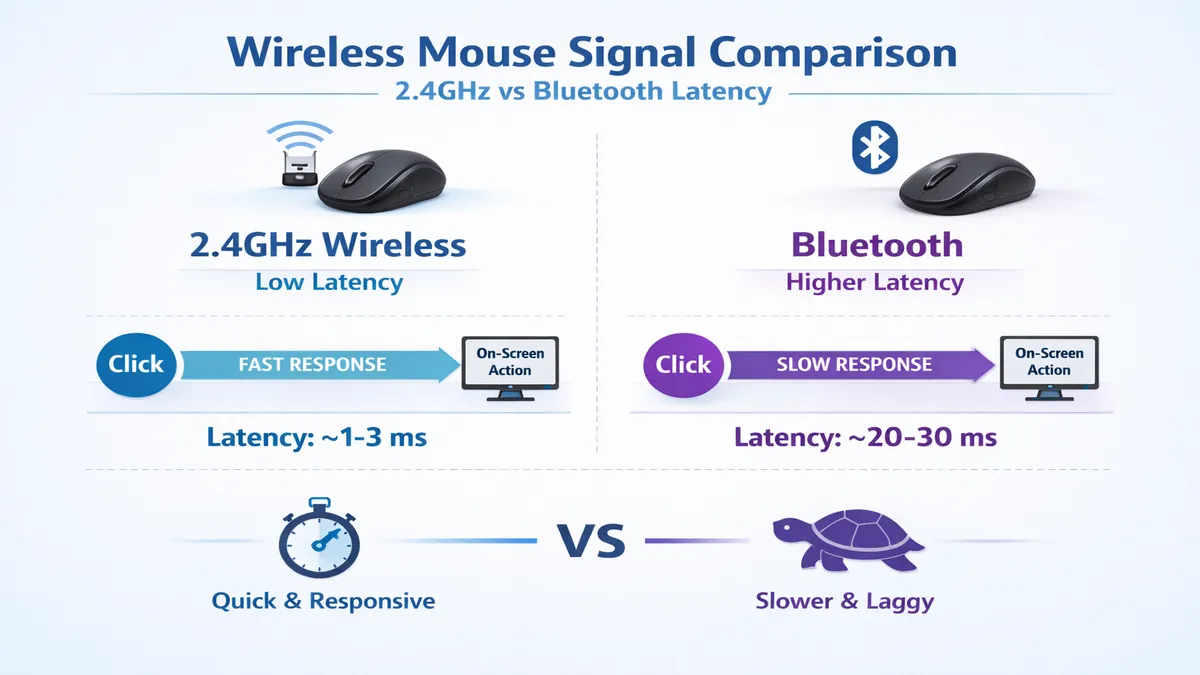
Connectivity: 2.4GHz vs. Bluetooth
- 2.4GHz (Dongle): Essential for gaming. It offers the lowest latency and highest polling rates.
- Bluetooth: Great for office work and traveling. It doesn't require a dongle and is more battery-efficient, but has higher latency.
DPI and Sensitivity
While high DPI numbers (like 30,000+) are common in marketing, most users actually play and work between 400 and 3,200 DPI. Look for a mouse with a sensor that is accurate at your preferred sensitivity, rather than just having the highest number.
Frequently Asked Questions (FAQ)
Q: Do wireless mice have lag?
A: In 2026, high-quality wireless mice using 2.4GHz technology have virtually zero lag. They are indistinguishable from wired mice, even in professional gaming.
Q: How long do wireless mouse batteries last?
A: It varies. High-performance gaming mice usually last 70–100 hours, while productivity mice like the MX Master 3S can last up to 70 days on a single charge.
Q: Can I use a gaming mouse for office work?
A: Absolutely. Gaming mice are often more precise and comfortable than standard office mice. However, they may lack productivity features like horizontal scroll wheels or multi-device switching.
Q: Is a vertical mouse better for wrist pain?
A: Yes, vertical mice are designed to keep your forearm in a neutral position, which can significantly reduce the risk of carpal tunnel syndrome and other repetitive strain injuries.
Final Thoughts
The best wireless mouse of 2026 is the one that you stop thinking about while you're using it. Whether it's the seamless productivity of the Logitech MX Master 3S, the lightning speed of the G Pro X Superlight 2, or the ergonomic support of the Razer Pro Click V2, your mouse should be an extension of your hand. Investing in a high-quality mouse is an investment in your efficiency and your long-term health. Take the time to consider your grip style and your primary tasks, and you'll find a companion that will serve you well for years to come.
Affiliate Disclosure: ATechGuides is supported by its audience. When you purchase through links on our site, we may earn an affiliate commission. All products are independently selected and tested by our editors.