
In the realm of productivity peripherals, few names command as much respect and recognition as the Logitech MX Master series. For years, these mice have been the undisputed champions for professionals, creatives, and anyone who demands precision, comfort, and advanced functionality from their input device. The Logitech MX Master 3S, released as an iterative but significant upgrade, promised to refine an already near-perfect formula. In 2026, with a host of new competitors vying for the top spot, the question remains: does the MX Master 3S still hold its crown as the best work mouse?
This in-depth review will dissect every aspect of the MX Master 3S, from its ergonomic design and revolutionary MagSpeed scroll wheel to its updated sensor and software capabilities. We've put this mouse through weeks of rigorous testing across various professional workflows—from extensive document editing and complex spreadsheet navigation to graphic design and video production—to determine if its subtle enhancements are enough to keep it ahead of the curve.
The Evolution of a Legend: What Makes the MX Master 3S Special?
The MX Master lineage is built on a foundation of ergonomic excellence and innovative features. The 3S builds upon the highly acclaimed MX Master 3, focusing on two key areas for improvement:
- Quiet Click Technology: Addressing a common feedback point, the 3S introduces significantly quieter clicks, making it more suitable for open-plan offices and shared workspaces without sacrificing tactile feedback.
- Enhanced Sensor Resolution: The optical sensor has been upgraded from 4000 DPI to 8000 DPI, allowing for even finer precision and the ability to track flawlessly on virtually any surface, including glass, with greater accuracy.
These refinements, while seemingly minor, contribute to a more polished and versatile user experience, cementing its position as a top-tier productivity tool.
Quick Overview: MX Master 3S vs. MX Anywhere 3S
| Feature | MX Master 3S | MX Anywhere 3S |
|---|---|---|
| Form Factor | Full-sized, ergonomic | Compact, portable |
| Scroll Wheel | MagSpeed (vertical & horizontal) | MagSpeed (vertical only) |
| Sensor DPI | 8000 DPI | 4000 DPI |
| Click Noise | Ultra-quiet | Ultra-quiet |
| Connectivity | Bluetooth, Logi Bolt USB | Bluetooth, Logi Bolt USB |
| Battery Life | Up to 70 days | Up to 70 days |
| Weight | 141g | 99g |
Design and Ergonomics: Sculpted for Comfort
The most striking aspect of the MX Master 3S, inherited from its predecessors, is its distinctive, sculpted ergonomic design. It's a mouse that doesn't just sit in your hand; it feels like it was custom-molded for it. The high arch and prominent thumb rest cradle the hand in a natural, relaxed position, significantly reducing the strain associated with prolonged mouse use. This design philosophy is crucial for preventing conditions like RSI and carpal tunnel syndrome, making it an indispensable tool for anyone spending hours at their desk.
Logitech has maintained the signature thumb-wing, which provides a comfortable resting place for the thumb and houses the secondary scroll wheel and two customizable buttons. The main left and right click buttons are perfectly positioned, and the overall weight of the mouse (141g) feels substantial and premium, contributing to a sense of control and stability without being overly cumbersome.
The MagSpeed Scroll Wheel: A Revolution in Navigation
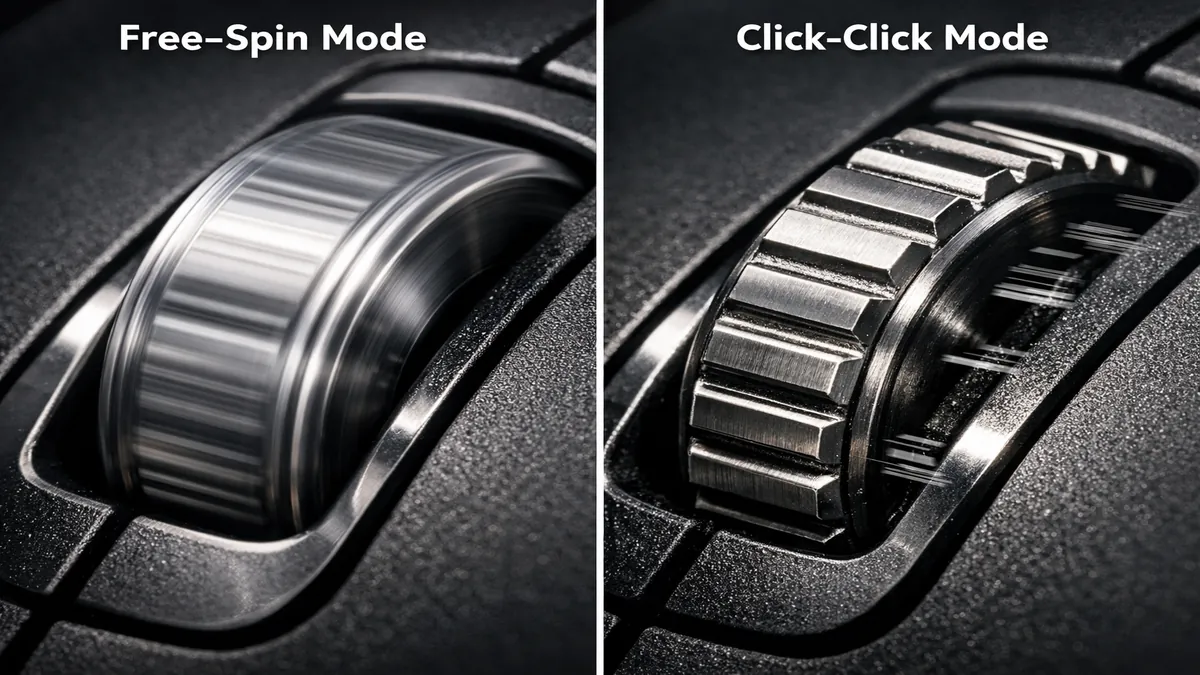
At the heart of the MX Master 3S's productivity prowess is the MagSpeed Electromagnetic scroll wheel. This isn't just any scroll wheel; it's a marvel of engineering that offers two distinct modes:
- Ratcheted Mode: Provides precise, tactile clicks for line-by-line scrolling, perfect for navigating code, documents, or settings menus.
- Free-Spin Mode: With a flick, the wheel disengages its magnetic resistance and spins freely, allowing you to scroll through up to 1,000 lines in a single second. This is incredibly useful for large spreadsheets, long web pages, or extensive timelines in creative applications.
The transition between these modes is seamless and can be activated either manually by pressing a button behind the wheel or automatically, based on the speed of your scroll. The secondary thumb wheel, often overlooked, is equally transformative for horizontal navigation, making tasks like scrubbing through video timelines or navigating wide spreadsheets a breeze.
Performance and Precision: 8000 DPI on Any Surface
The MX Master 3S features Logitech's Darkfield sensor technology, now boosted to 8000 DPI. This high resolution means the mouse can track with exceptional accuracy on virtually any surface, including glass desks as thin as 4mm. For professionals working across multiple monitors, especially high-resolution 4K or ultrawide displays, the increased DPI allows for faster cursor movement with minimal physical effort, reducing fatigue.
The tracking is consistently smooth and precise, with no noticeable acceleration or jitter. Whether you're making pixel-perfect selections in Photoshop or navigating complex CAD drawings, the MX Master 3S delivers reliable performance. The low-latency Logi Bolt USB receiver (included) provides a robust and secure connection, while Bluetooth connectivity offers flexibility for devices without available USB ports.
Quiet Clicks: A Welcome Refinement
One of the most significant, albeit subtle, upgrades in the MX Master 3S is the introduction of Quiet Click technology. Previous MX Master models, while excellent, had audible clicks that could be distracting in quiet environments. The 3S addresses this directly, reducing click noise by 90% compared to its predecessor. This makes a substantial difference in shared offices, libraries, or late-night work sessions, allowing for a more focused and less disruptive experience for both the user and those around them. Crucially, this reduction in noise does not come at the expense of tactile feedback; the clicks still feel crisp and responsive.
Software and Customization: Logi Options+ and Flow
The true power of the MX Master 3S is unlocked through Logitech's Logi Options+ software. This intuitive application allows for extensive customization, transforming the mouse into a highly personalized productivity tool.
Key Features of Logi Options+:
- Button Customization: Every button, including the main clicks, thumb buttons, and even the gesture button (located on the thumb rest), can be remapped to perform specific actions. These actions can be application-specific, meaning your thumb buttons might control brush size in Photoshop but switch tabs in your web browser.
- Gesture Controls: The gesture button, when held down and combined with mouse movements (up, down, left, right), can perform predefined actions like switching desktops, opening Mission Control, or controlling media playback.
- Logitech Flow: This groundbreaking feature allows you to seamlessly control multiple computers (up to three) with a single MX Master 3S. You can move your cursor between screens on different computers as if they were a single setup, and even copy and paste text, images, and files between them. This is a game-changer for users with multi-computer setups.
- Smart Actions: Introduced in Logi Options+, Smart Actions allow you to automate repetitive tasks with a single click. For example, you could create a Smart Action that opens your email client, launches your calendar, and sets your status to
"working" – all with one button press. This level of automation significantly boosts productivity.
Battery Life and Connectivity
The MX Master 3S boasts an impressive battery life of up to 70 days on a full charge, with a quick charge feature that provides three hours of use from a one-minute charge. It charges via USB-C, a welcome modern convenience. Connectivity options include Bluetooth Low Energy and the Logi Bolt USB receiver, offering flexibility and robust connections. The Logi Bolt receiver is particularly useful in environments with high wireless interference, providing a more stable and secure connection than standard Bluetooth.
Who is the MX Master 3S For?
The Logitech MX Master 3S is undeniably a premium productivity mouse, and its feature set caters to a specific audience:
- Professionals and Creatives: Graphic designers, video editors, programmers, data analysts, and anyone who spends hours manipulating digital content will benefit immensely from its precision, customizable buttons, and advanced scrolling capabilities.
- Multi-Device Users: With Logitech Flow, individuals who frequently switch between a desktop, laptop, or even a tablet will find the seamless transition invaluable.
- Ergonomics-Conscious Users: Its sculpted design is a boon for those looking to prevent or alleviate wrist and hand strain.
- Quiet Office Environments: The quiet clicks make it an ideal choice for shared workspaces where noise can be a distraction.
Comparison with MX Master 3: Is the Upgrade Worth It?
For owners of the previous MX Master 3, the decision to upgrade to the 3S might hinge on two primary factors: quiet clicks and the 8000 DPI sensor. If you work in a quiet environment or find the original MX Master 3's clicks too loud, the 3S is a significant improvement. Similarly, if you use high-resolution monitors and need finer cursor control, the increased DPI is beneficial. Otherwise, the core experience remains largely the same, and the MX Master 3 is still an excellent mouse.
The MX Master 3S vs. Gaming Mice: A Different Philosophy
While the MX Master 3S offers high precision, it's not designed for competitive gaming. Its weight (141g) is significantly heavier than most esports-focused mice (which often weigh under 70g), making it less suitable for rapid, flick-shot movements. Gaming mice prioritize ultra-low latency, minimal weight, and often simpler designs for pure performance. The MX Master 3S, conversely, prioritizes comfort, advanced features, and productivity. It's a tool for creation, not competitive destruction.
How We Tested the Logitech MX Master 3S
Our evaluation of the Logitech MX Master 3S involved extensive real-world usage and controlled testing scenarios:
1. Ergonomics and Long-Term Comfort
We used the MX Master 3S as our primary mouse for over two weeks, across various daily tasks including writing, coding, graphic design, and general web browsing. We paid close attention to hand posture, wrist comfort, and any signs of fatigue after prolonged use. We also gathered feedback from multiple testers with different hand sizes and grip styles.
2. Scroll Wheel Performance
The MagSpeed scroll wheel was tested in various applications, including large Excel spreadsheets, long PDF documents, and web pages. We assessed the smoothness of the free-spin mode and the precision of the ratcheted mode. The horizontal thumb wheel was tested in video editing timelines and wide documents.
3. Sensor Accuracy and Tracking
We tested the 8000 DPI Darkfield sensor on multiple surfaces, including a standard mousepad, a wooden desk, a glass desk, and a glossy magazine. We used software tools to check for consistency, jitter, and acceleration at various DPI settings.
4. Software and Customization
We thoroughly explored the Logi Options+ software, customizing buttons for different applications, setting up gesture controls, and experimenting with Logitech Flow across two different computers (Windows and macOS). We also tested the new Smart Actions feature for its ease of use and effectiveness in automating tasks.
5. Quiet Click Evaluation
We conducted side-by-side comparisons with the MX Master 3 in a quiet room to objectively assess the reduction in click noise. We also used the mouse in a busy office environment to gauge its impact on ambient noise levels.
Logitech MX Master 3S Buying Guide: Key Considerations
When considering the MX Master 3S, keep these factors in mind:
Your Primary Use Case
If your main activities involve productivity, creative work, or extensive document navigation, the MX Master 3S is an unparalleled choice. If competitive gaming is your priority, you might want to look at dedicated gaming mice.
Hand Size and Grip Style
The MX Master 3S is a relatively large mouse, best suited for medium to large hands and a palm grip. While some with smaller hands might adapt, it's worth trying it out if possible.
Budget
As a premium mouse, the MX Master 3S comes with a premium price tag. However, considering its durability, features, and potential health benefits, it represents a significant long-term investment in your workspace.
Multi-Device Needs
If you frequently switch between multiple computers, Logitech Flow is a killer feature that can dramatically streamline your workflow.
Frequently Asked Questions (FAQ)
Q: Can the MX Master 3S be used with a Mac?
A: Yes, absolutely. The MX Master 3S is fully compatible with macOS, and the Logi Options+ software offers excellent integration, including support for macOS-specific gestures.
Q: Is the MX Master 3S good for gaming?
A: While technically usable for gaming, it is not optimized for it. Its weight and focus on productivity features make it less ideal for competitive gaming where lightweight design and minimal features are preferred.
Q: How do I charge the MX Master 3S?
A: The MX Master 3S charges via a USB-C port located at the front of the mouse. It can be used while charging, though the cable might interfere with movement.
Q: What is the difference between Logi Bolt and Unifying receivers?
A: Logi Bolt is Logitech's newer, more secure wireless protocol designed for enterprise environments, offering stronger encryption and better reliability in congested wireless spaces. The older Unifying receiver is still widely supported but is being phased out in newer products.
Final Verdict: Still the Undisputed Productivity King
In 2026, the Logitech MX Master 3S firmly retains its title as the best work mouse on the market. Its combination of unparalleled ergonomics, the revolutionary MagSpeed scroll wheel, precise 8000 DPI tracking, and the refined quiet clicks make it an indispensable tool for anyone serious about productivity and comfort. While its price point might be a consideration for some, the investment is justified by the significant improvements it brings to daily workflow and long-term hand health. If you're looking for a mouse that will elevate your professional experience, the MX Master 3S is an easy recommendation. It's not just a mouse; it's a productivity powerhouse that continues to set the standard.
Affiliate Disclosure: ATechGuides is supported by its audience. When you purchase through links on our site, we may earn an affiliate commission. All products are independently selected and tested by our editors.